Running a business remotely is no longer a backup plan. For many companies, it is the normal way to work. The real challenge is not simply being online. The challenge is keeping people aligned, keeping work visible, protecting company data, and making sure customers still get a smooth experience even when the team is spread across cities or countries. Trusted telework guidance from NIST and CISA makes it clear that remote work needs both the right tools and the right policies, especially for remote access, BYOD, and day-to-day security practices.
The best remote business tools are the ones that help a team communicate clearly, manage projects without confusion, store documents in one place, automate repetitive work, secure accounts, and handle payroll or customer relationships across borders. That is why the most useful remote stack is usually a combination of communication tools, project management tools, cloud collaboration tools, security tools, and global operations tools.
Table of Contents
What a remote business really needs
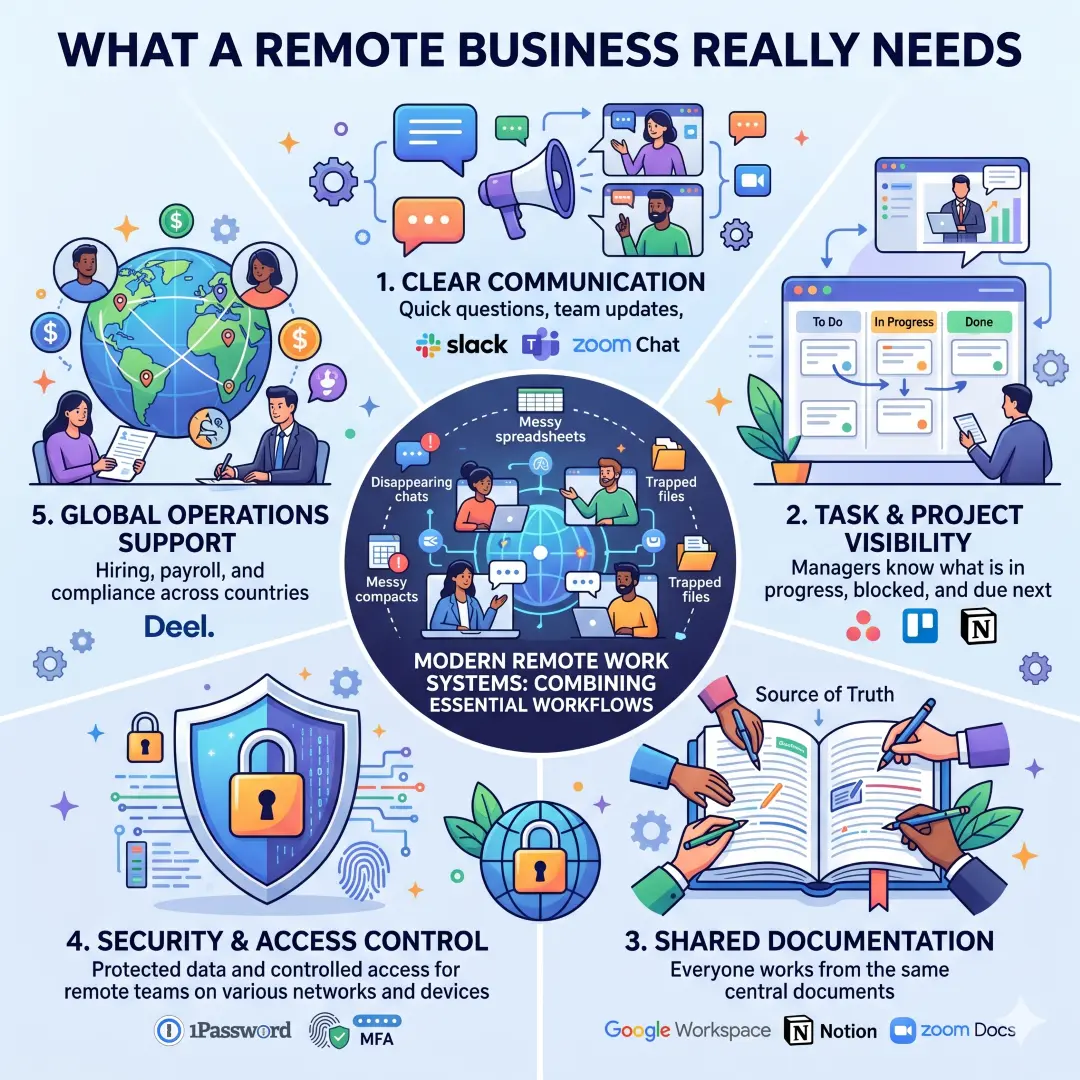
A remote company works best when every important job has a digital home. Messages should not disappear in random chats. Tasks should not live only in someone’s memory. Files should not be trapped on one laptop. Access should not be shared with weak passwords or messy spreadsheets. That is exactly why modern remote work systems combine collaboration, task tracking, storage, and access control in one larger workflow.
Here are the core capabilities every remote business should look for:
- Clear communication for quick questions, team updates, and decisions. Tools like Slack, Microsoft Teams, and Zoom Chat support this kind of daily collaboration.
- Task and project visibility so managers know what is in progress, what is blocked, and what is due next. Platforms like Asana, Trello, and Notion are built for that.
- Shared documentation so everyone works from the same source of truth. Google Workspace, Notion, and Zoom Docs are strong examples.
- Security and access control because remote teams often work from different networks and devices. 1Password is designed for passwords, passkeys, secrets, and controlled access.
- Global operations support for hiring, payroll, and compliance across countries. Deel is built for this kind of international work.
Best tools for managing a business remotely
1. Google Workspace for email, documents, storage, and real-time collaboration
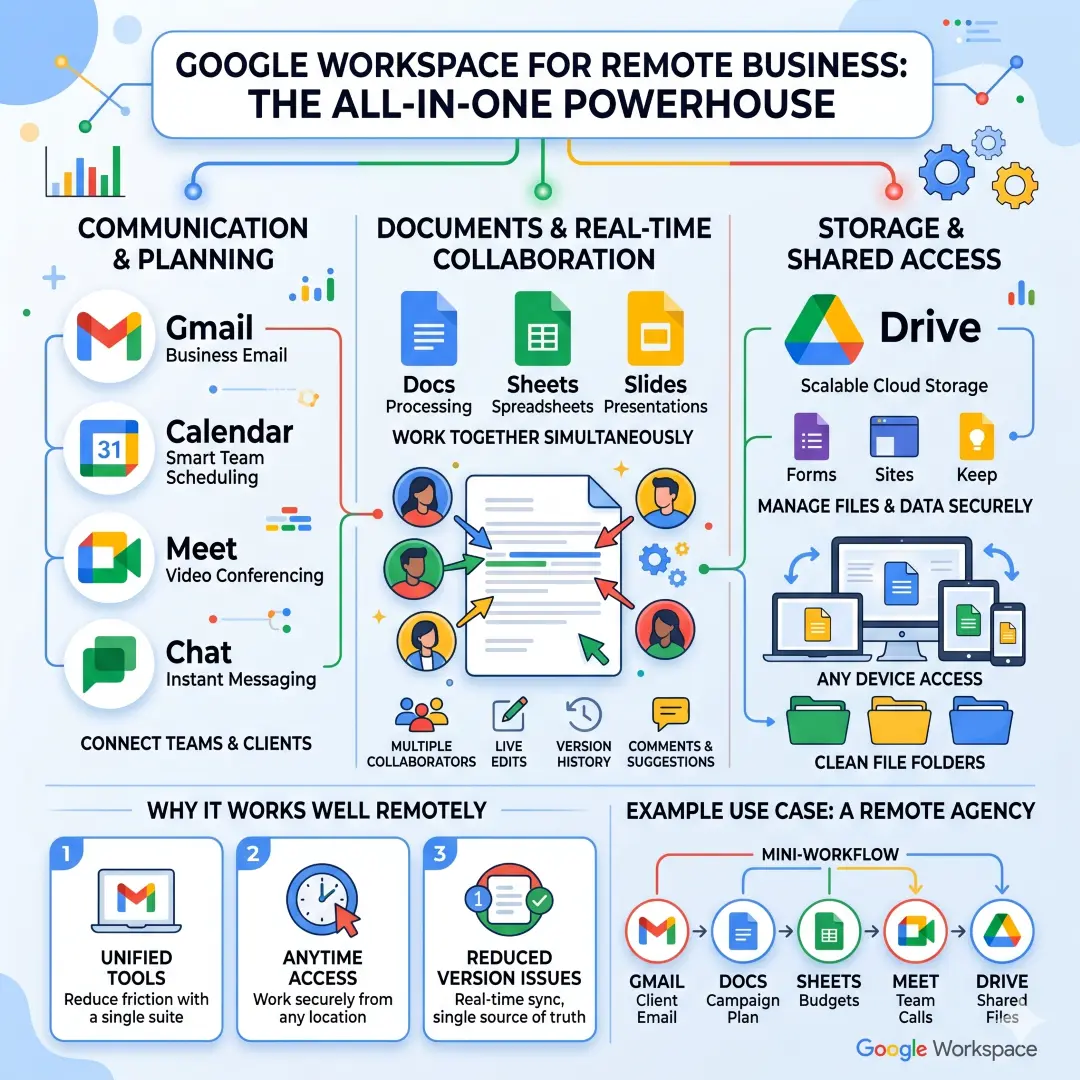
Google Workspace is one of the strongest all-in-one choices for remote businesses because it combines Gmail, Calendar, Meet, Chat, Drive, Docs, Sheets, Slides, Forms, and more in a single business suite. Google also positions Drive as simple, scalable cloud storage for teams of all sizes, with upload, sharing, and editing from any device.
This matters for remote teams because documents can be edited together in real time, changes appear instantly, and version control problems are reduced. Google explains that multiple collaborators can work on the same cloud file at the same time and see version history, comments, and suggestions.
Why it works well remotely
- Everyone uses the same tools for email, meetings, and documents.
- Teams can share and edit files from any device.
- Real-time editing reduces confusion and duplicate work.
Example use case: A small agency can keep client emails in Gmail, campaign plans in Docs, budgets in Sheets, calls in Meet, and shared files in Drive, all inside one connected workspace.
2. Microsoft Teams for chat, meetings, file sharing, and task flow
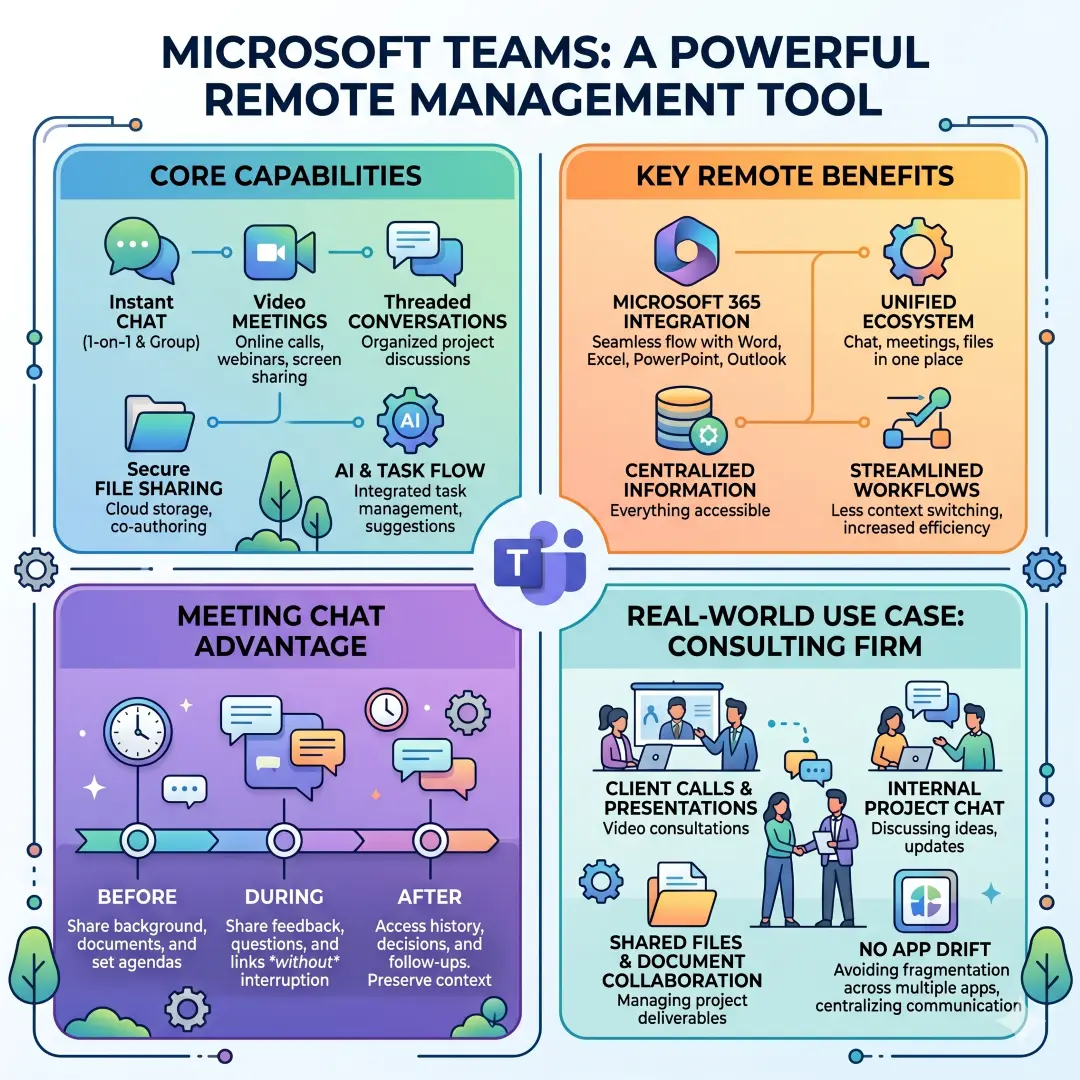
Microsoft Teams is a strong remote management tool for businesses that want chat, meetings, and file sharing inside one ecosystem. Microsoft says Teams supports chat, online video meetings, threaded conversations, and file sharing for group projects, while also promoting AI-enhanced messaging and task flow.
One useful part of Teams is meeting chat. Microsoft notes that most Teams meetings include chat, and participants can share information before, during, and after the meeting without interrupting the flow. That helps remote teams capture decisions and follow-up questions in one place.
Why it works well remotely
- Strong fit for businesses already using Microsoft 365.
- Keeps chat, meetings, and files connected.
- Meeting chat helps preserve context and action items.
Example use case
A consulting firm can use Teams for client calls, internal chat, project threads, and shared files, so the project does not drift across too many apps.
3. Slack for fast communication and flexible automation
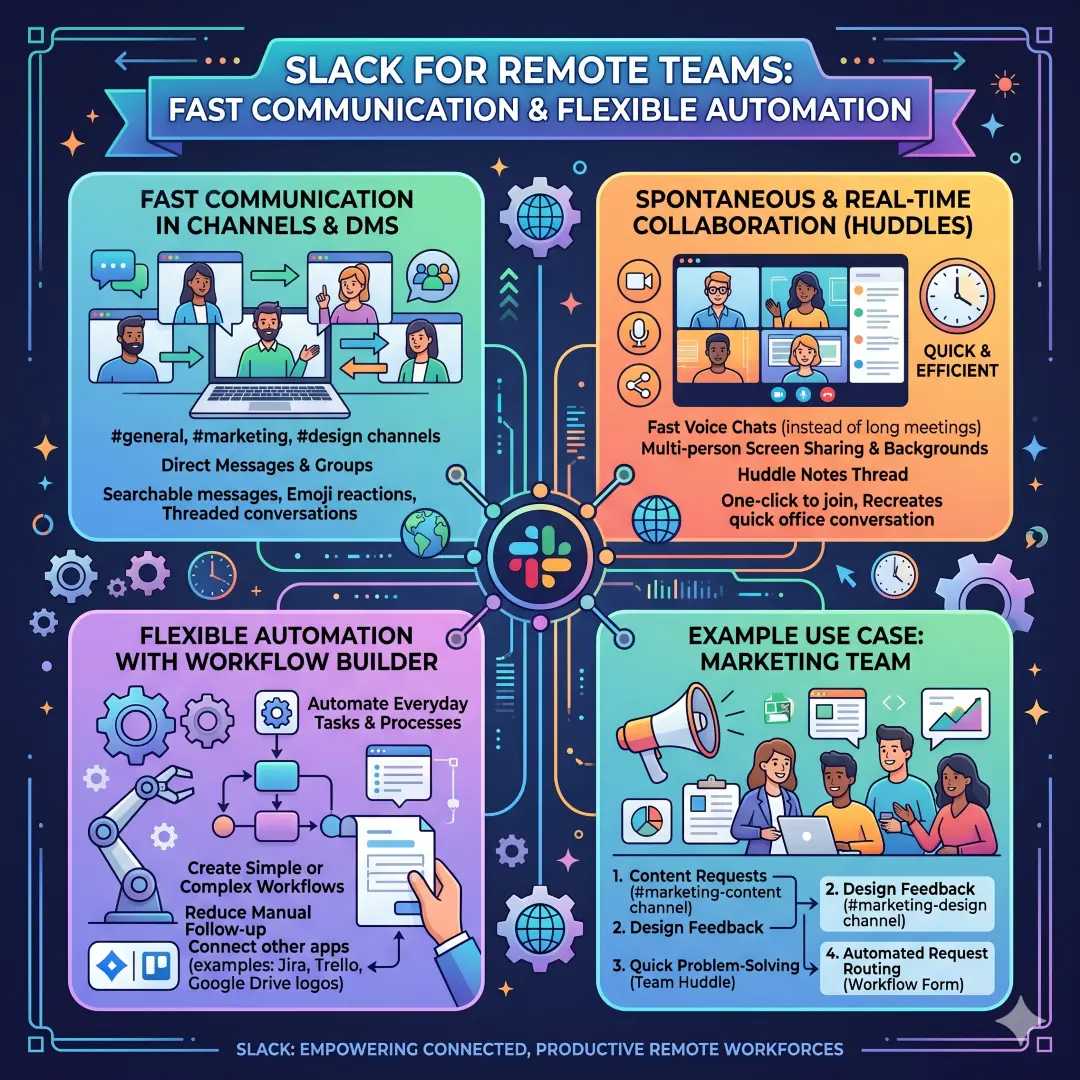
Slack is one of the best tools for team communication because it supports quick, informal collaboration in channels and direct messages. Slack’s huddles allow real-time discussions with video, multi-person screen sharing, and a notes thread, which is useful when a remote team needs a fast voice conversation instead of a long meeting.
Slack also has Workflow Builder, which helps automate everyday tasks and processes. Slack says workflows can be simple or complex and can connect to other apps your team already uses. That makes it useful for remote onboarding, request routing, internal approvals, and repetitive admin work.
Why it works well remotely
- Channels keep topics organized.
- Huddles recreate quick office conversations.
- Workflow automation reduces manual follow-up.
Example use case
A marketing team can use one Slack channel for content requests, another for design feedback, and a huddle when the team needs to solve a problem quickly. A Workflow Builder form can route request details to the right person automatically.
4. Zoom for meetings, chat, whiteboards, and action items
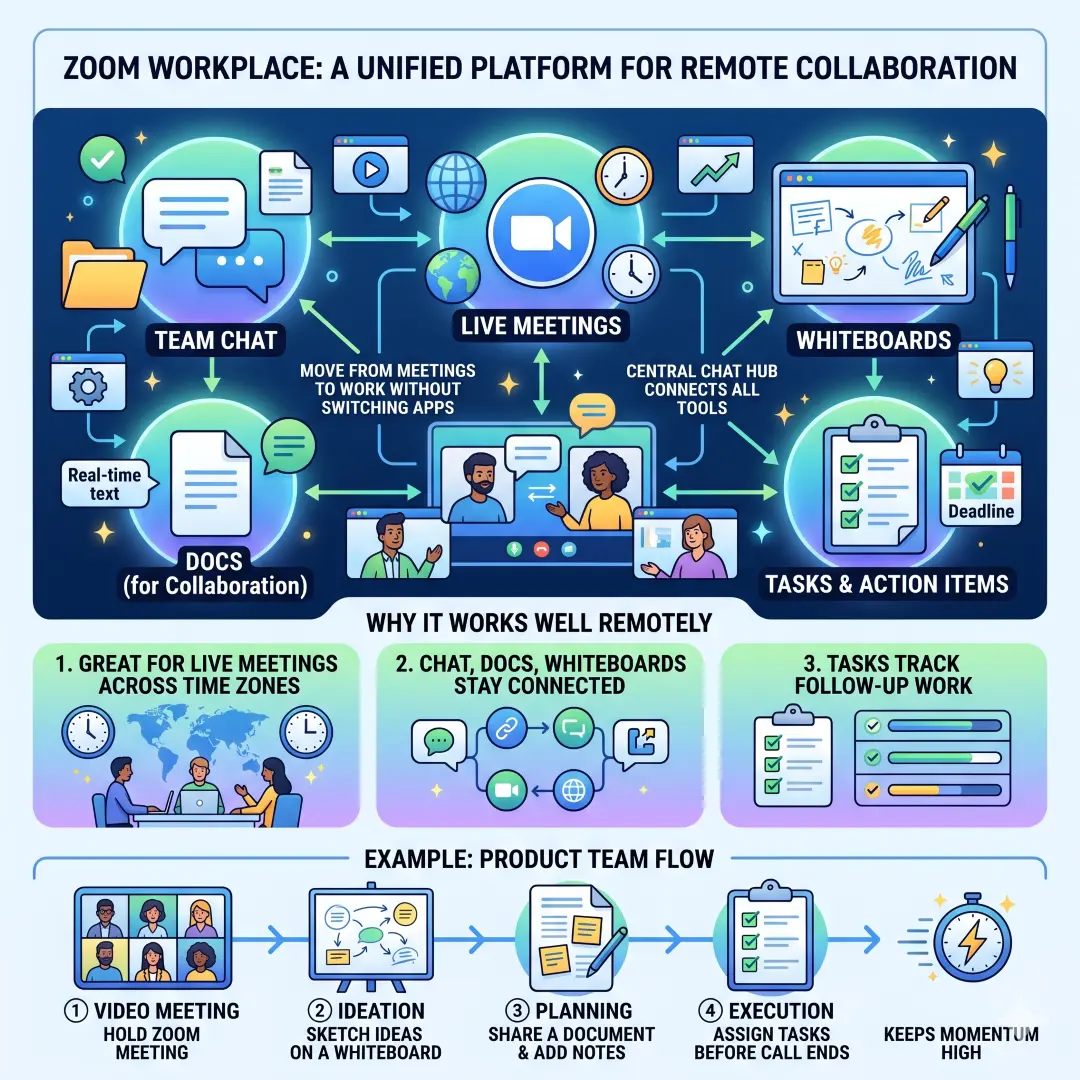
Zoom Workplace has expanded far beyond video meetings. Zoom says its collaboration tools include Docs, Whiteboard, Clips, Hub, Video Management, and Tasks, which makes it useful for teams that want to move from meetings into working materials without switching apps. Zoom Chat also acts as a central hub that connects chat, meetings, documents, and whiteboards.
That can be very helpful for distributed teams because meetings often produce ideas, next steps, and action items that need to be captured immediately. Zoom’s own product pages show that the platform is designed to bridge conversation and execution.
Why it works well remotely
- Great for live meetings across time zones.
- Chat, docs, and whiteboards stay connected.
- Tasks help teams track follow-up work.
Example use case
A product team can hold a Zoom meeting, sketch ideas on a whiteboard, share a document, and assign tasks before the call ends. That keeps the momentum high when people are not in the same office.
Best tools for project management and work tracking
5. Asana for structured project management and reporting
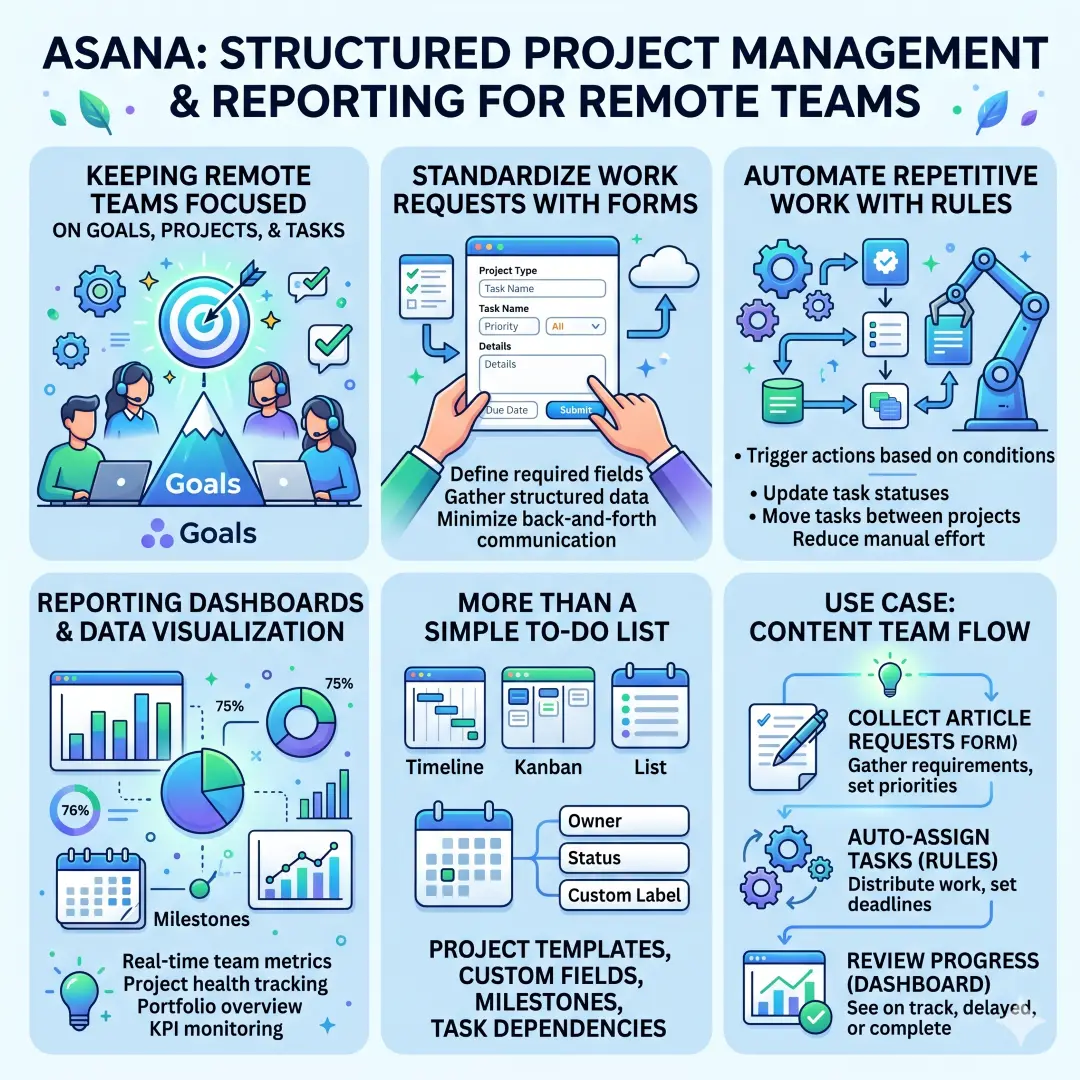
Asana is built for keeping remote teams focused on goals, projects, and tasks. Its official materials highlight project management, workflow automation, forms, templates, and reporting dashboards that visualize team and organizational data in real time.
That makes Asana valuable when a business needs more than a simple to-do list. It helps standardize work requests, automate routine tasks, and show progress across projects and portfolios.
Why it works well remotely
- Forms standardize incoming requests.
- Rules automate repetitive work.
- Dashboards make progress easier to see.
Example use case
A content team can collect article requests through an Asana form, assign tasks with rules, and review a dashboard to see what is on track, delayed, or complete.
6. Trello for visual boards, automation, and simple team workflows
Trello is a strong choice for teams that want a visual way to manage work. Trello’s product pages highlight Inbox, Planner, Automation, Power-Ups, Templates, and Integrations, and note that no-code automation is built into every board. Trello also says it supports remote teams and helps keep them connected around the world.
Trello is especially useful for teams that prefer a simple board structure over a more complex project system. It is easy to understand, easy to share, and easy to adapt as the business grows.
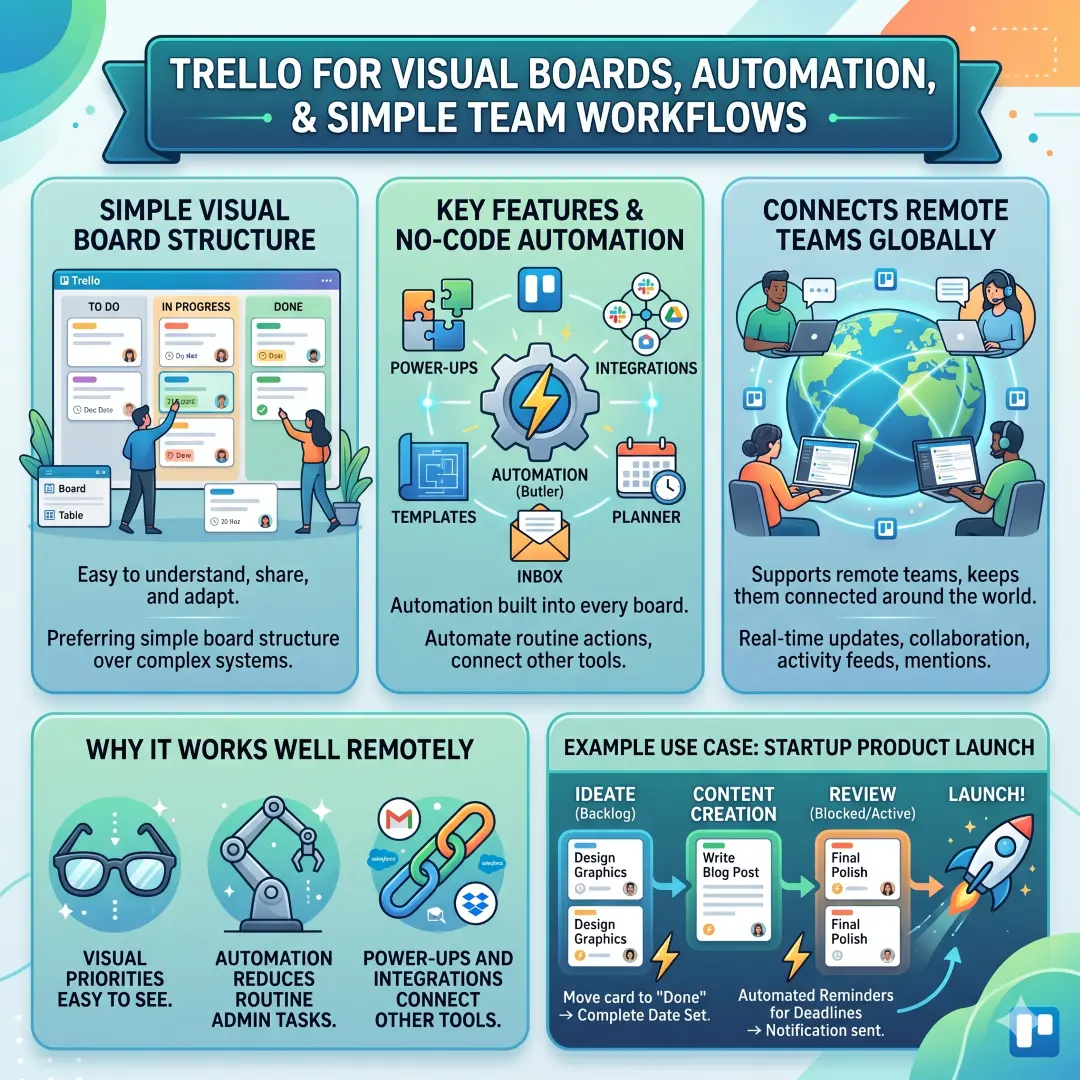
Why it works well remotely
- Visual boards make priorities easy to see.
- Automation reduces routine admin tasks.
- Power-Ups and integrations connect other tools.
Example use case
A startup can use Trello for product launches, move cards through stages, and automate reminders so deadlines do not get buried in messages.
7. Notion for company knowledge, docs, databases, and project systems
Notion works well for businesses that want a flexible shared workspace. Notion says it can transform scattered company information into an organized knowledge hub, with databases for meeting notes, docs, tasks, and projects. It also highlights workflow automation, filtering, sorting, and project management workflows that cut down repetitive admin work.
This makes Notion especially valuable when a remote team wants one place for policies, onboarding docs, roadmaps, meeting notes, and task tracking. It is both a documentation system and a lightweight operations hub.
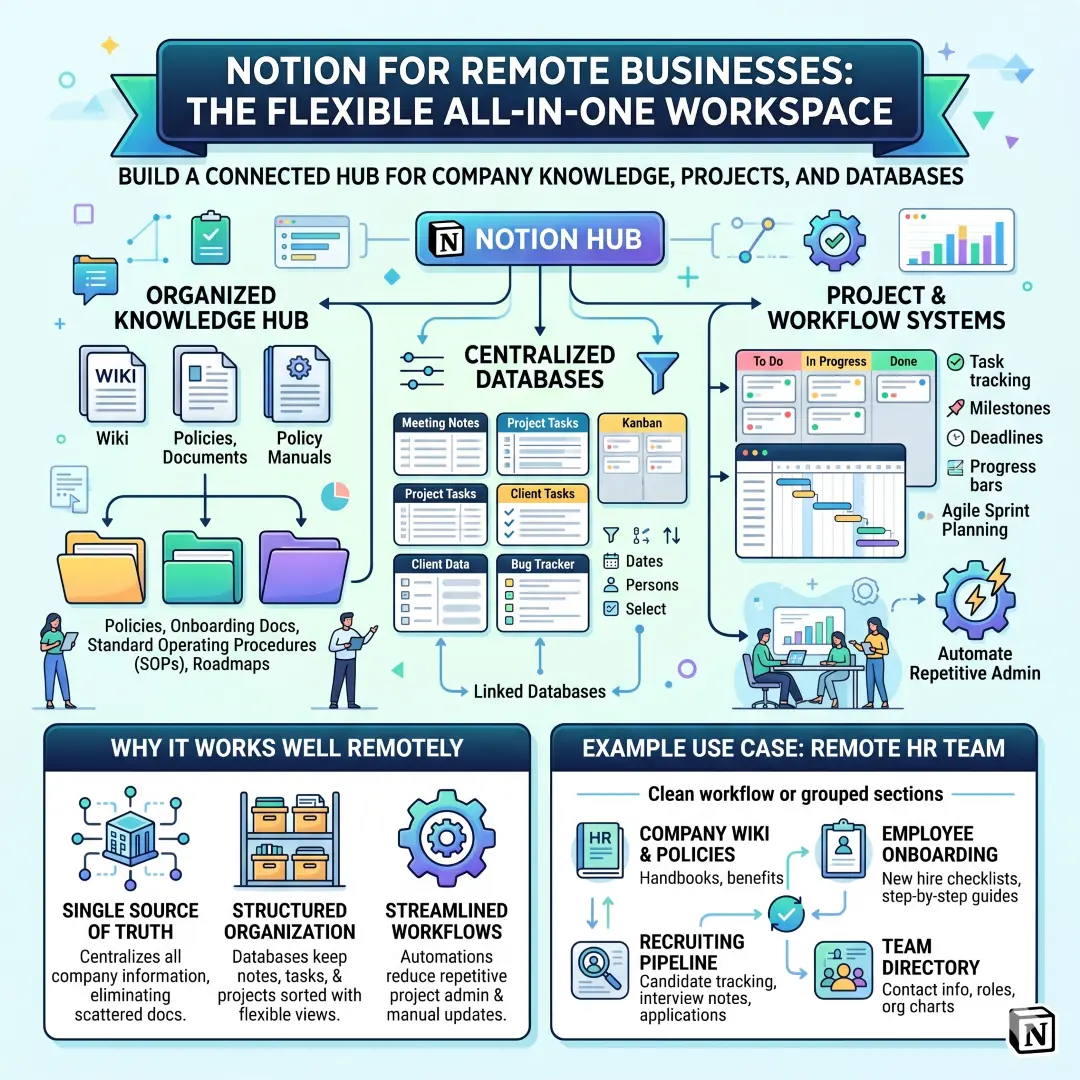
Why it works well remotely
- Centralizes company knowledge in a single place.
- Databases keep notes, tasks, and projects organized.
- Automations reduce repetitive project admin.
Example use case
A remote HR team can store policies, onboarding steps, interview notes, and team directories in Notion, then use databases and automations to keep information current.
Best tools for security and access control
8. 1Password for passwords, secrets, and controlled access
Remote businesses often struggle with one very common problem. People need access to tools, but they should not all have access to the same sensitive information. 1Password addresses that with password management, passkeys, secrets management, user groups, vaults, and controlled access. Its business pages explain that administrators can grant and revoke access, keep information on a need-to-know basis, and securely share passwords and secrets.
1Password also helps teams manage API keys, tokens, and other infrastructure secrets without exposing them in source code or chat threads. That matters a lot for remote companies because sensitive access often moves across more devices and more networks.
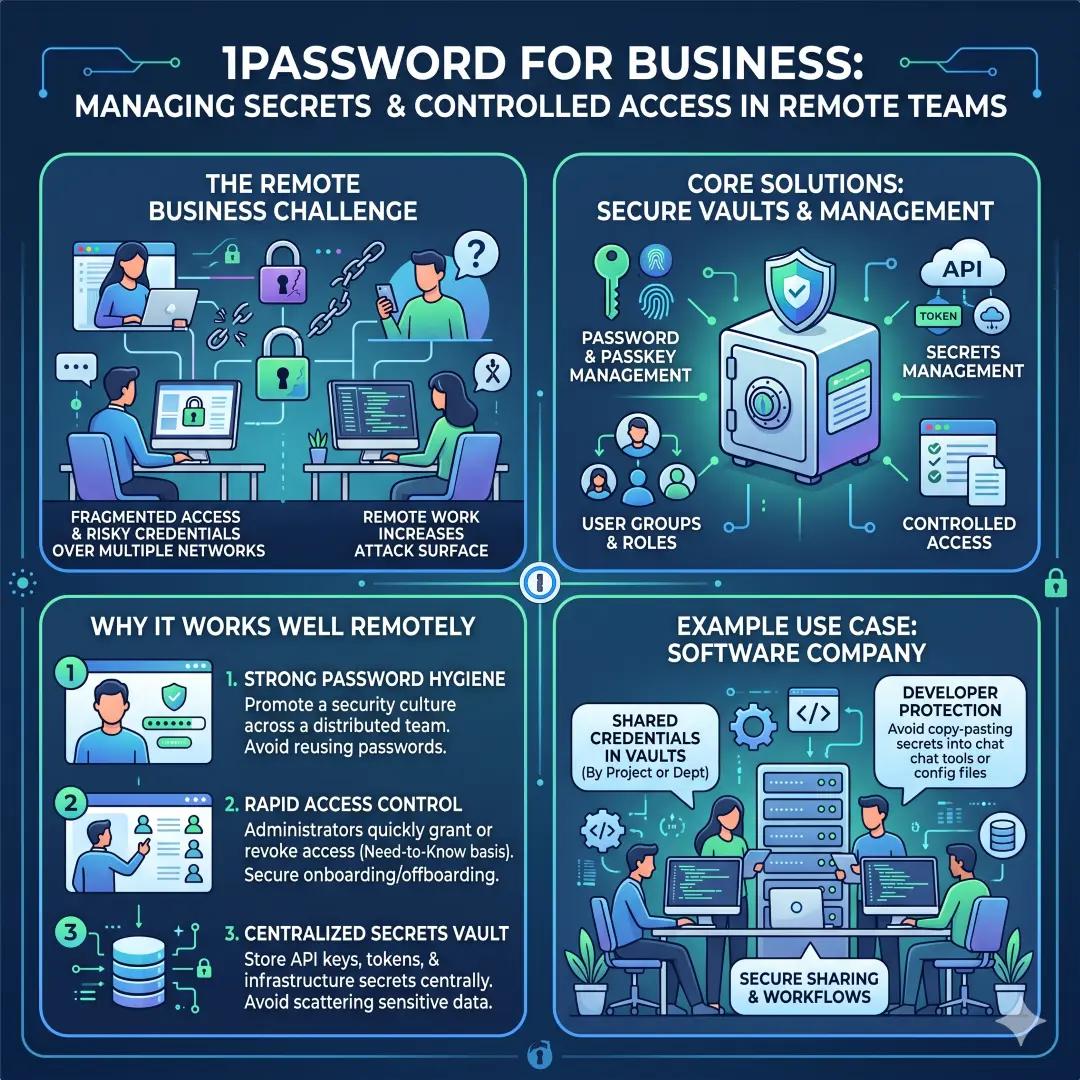
Why it works well remotely
- Strong password hygiene across the team.
- Access can be granted or revoked quickly.
- Secrets can be stored centrally instead of being scattered everywhere.
Example use case
A software company can keep shared credentials in vaults, control access by department, and protect developers from copying secrets into chat tools or config files.
Best tools for sales, customers, and revenue tracking
9. HubSpot CRM for remote sales and customer management
HubSpot CRM is a practical remote management tool for sales teams, service teams, and founders who need a clear view of customers and opportunities. HubSpot says its CRM lets teams store, track, manage, and report on deals, keep track of tasks and activities, and visualize the entire sales cycle with pipeline management.
For remote businesses, that kind of centralization matters because customer data can easily get fragmented across email threads, chat messages, and spreadsheets. A CRM keeps the pipeline visible and helps managers see what is actually happening in revenue conversations.
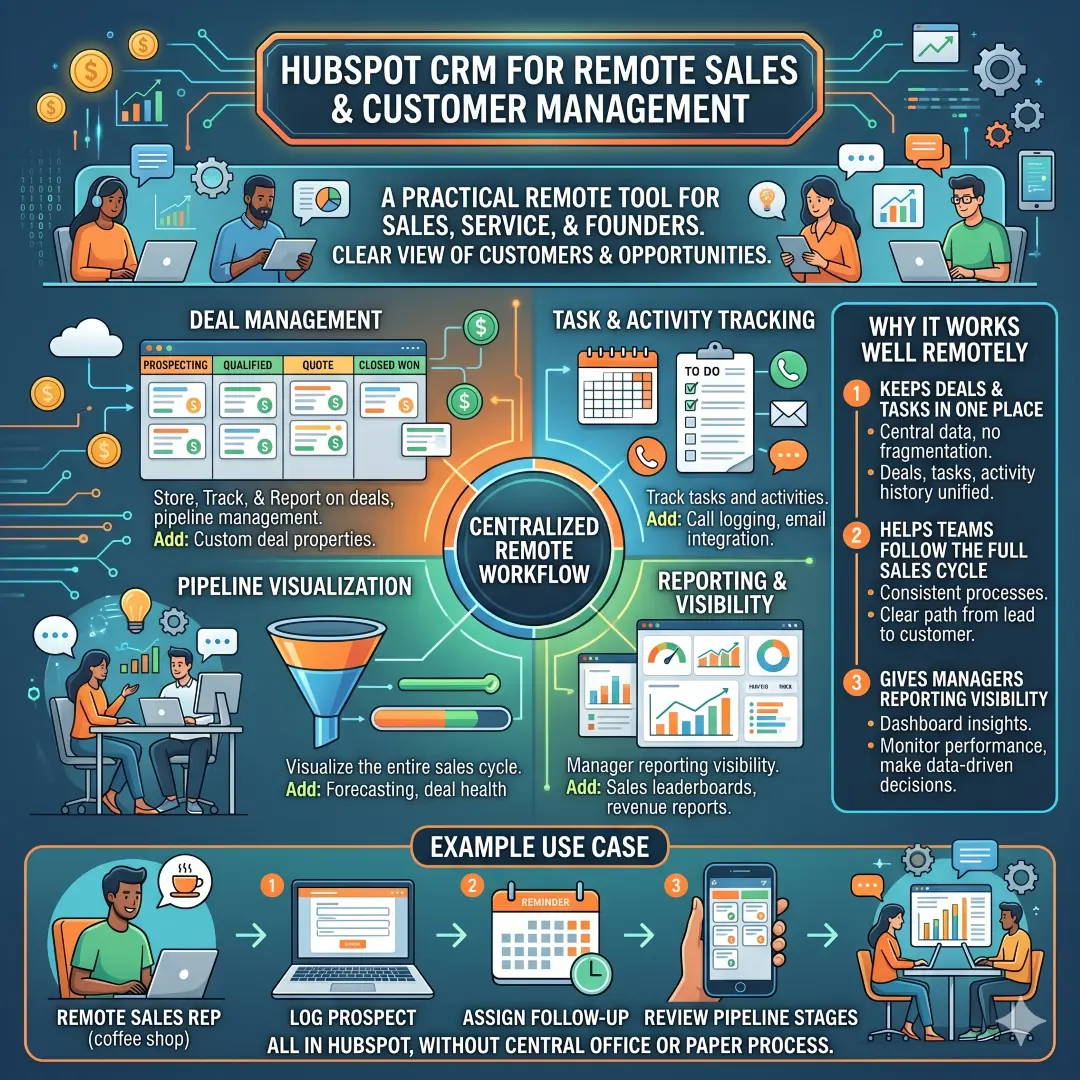
Why it works well remotely
- Keeps deals and tasks in one place.
- Helps teams follow the full sales cycle.
- Gives managers reporting visibility.
Example use case
A remote sales team can log every prospect, assign follow-ups, and review pipeline stages in HubSpot without needing a central office or paper-based process.
Best tools for global hiring, payroll, and compliance
10. Deel for international teams and borderless operations
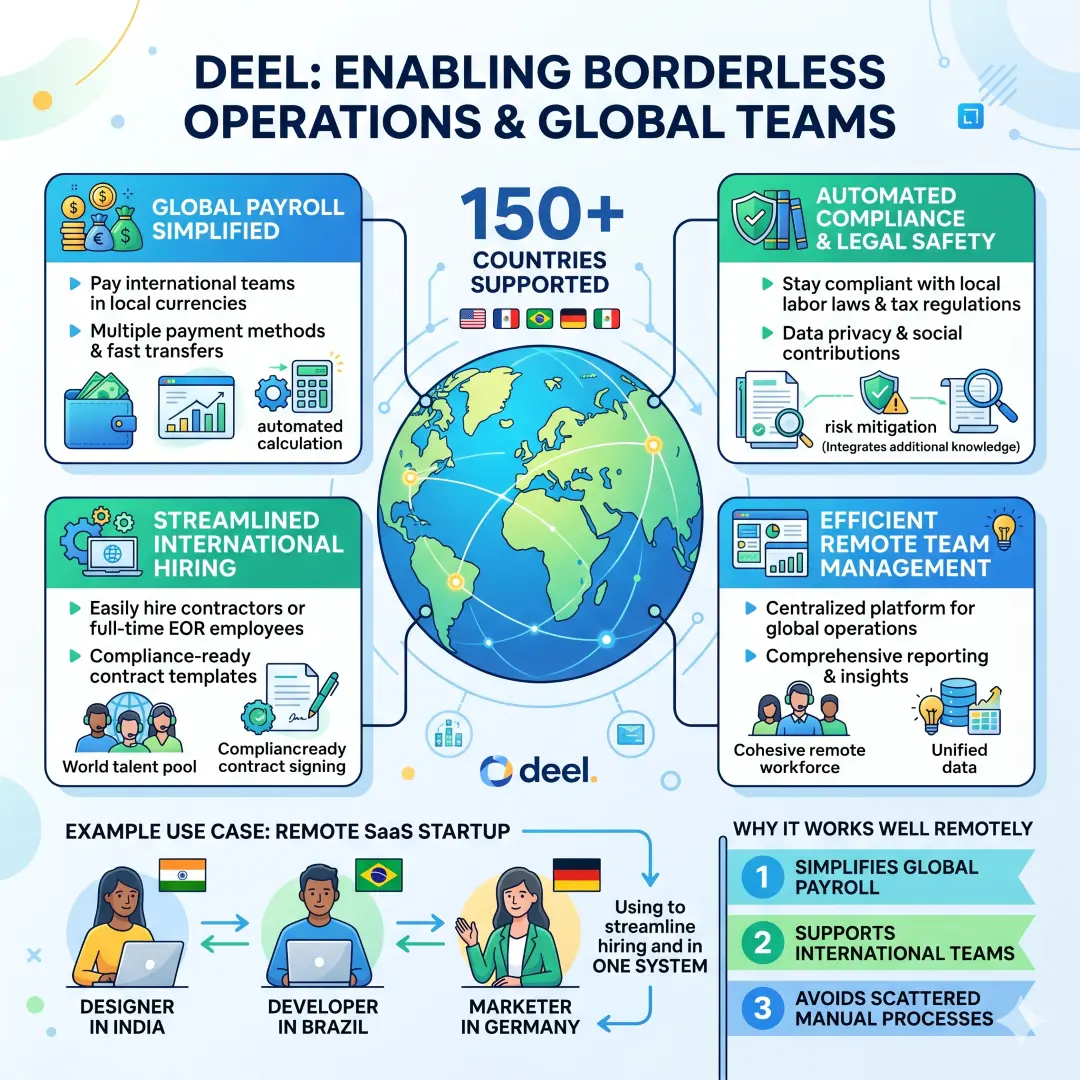
Deel is built for businesses that hire, pay, and manage people in multiple countries. Deel says it helps companies handle teams in 150+ countries, and its own site highlights global payroll, compliance, hiring, and support for remote and international teams.
For a worldwide blog audience, this is one of the most important tools to mention because remote business is often international business. If a company hires contractors, employees, or service providers across borders, payroll and compliance become much more than an HR task. They become part of daily operations.
Why it works well remotely
- Simplifies global payroll and compliance.
- Supports remote and international teams.
- Helps businesses avoid scattered manual processes.
Example use case
A SaaS startup with a designer in India, a developer in Brazil, and a marketer in Germany can use Deel to manage hiring and payments without stitching together separate country-by-country systems.
Large comparison table: the strongest remote tools by category
| Category | Best tools | Main strength | Best for | Key official feature or benefit |
|---|---|---|---|---|
| Communication | Slack | Fast team discussion and informal collaboration | Dynamic teams that talk all day | Huddles support real-time conversation, video, screen sharing, and notes. |
| Communication | Microsoft Teams | Chat, meetings, file sharing, and task flow | Microsoft 365 users and larger organizations | Teams supports chat, online meetings, threaded conversations, and file sharing. |
| Meetings and content | Zoom | Meetings plus docs, whiteboard, tasks, and chat | Teams that live in video calls | Zoom Workplace includes Docs, Whiteboard, Clips, Hub, Video Management, and Tasks. |
| Productivity suite | Google Workspace | Email, storage, docs, and collaboration in one suite | Businesses needing simple, all-in-one tools | Includes Gmail, Calendar, Meet, Chat, Drive, Docs, Sheets, Slides, Forms, and Sites. |
| Project management | Asana | Structured task tracking and reporting | Teams that need visibility and accountability | Forms, rules, templates, and dashboards support workflow automation and reporting. |
| Project management | Trello | Visual board-based planning | Small teams and startups | No-code automation is built into every board, with Power-Ups and integrations. |
| Knowledge management | Notion | Docs, databases, and internal wikis | Teams that want one flexible workspace | Databases, automations, and page verification keep knowledge organized and reliable. |
| Security | 1Password | Passwords, secrets, and access control | Any remote company handling sensitive data | Admins can grant and revoke access, manage vaults, and secure passwords and secrets. |
| Sales and CRM | HubSpot CRM | Deals, tasks, pipeline, and reporting | Remote sales and customer teams | Tracks deals, tasks, pipeline, and reporting in one CRM. |
| Global operations | Deel | Payroll, hiring, and compliance across countries | Distributed teams with international staff | Deel supports remote and international teams in 150+ countries. |
Recommended tool stacks by business type
| Business type | Suggested stack | Why this stack works |
|---|---|---|
| Small startup | Slack + Trello + Google Workspace + 1Password | Lightweight, easy to adopt, and strong enough to keep communication, tasks, files, and access under control. |
| Agency or creative team | Slack + Asana + Google Workspace + Zoom | Great for client communication, campaign tracking, file collaboration, and review calls. |
| Sales-driven business | Microsoft Teams or Slack + HubSpot CRM + Zoom + 1Password | Keeps internal communication, customer pipeline, meetings, and security in sync. |
| Global remote company | Google Workspace + Notion + Deel + 1Password | Strong for docs, knowledge management, payroll, compliance, and secure access across borders. |
| Product or engineering team | Notion + Asana + Slack + 1Password | Useful for product roadmaps, task tracking, fast communication, and secret management. |
How to choose the right remote management tools
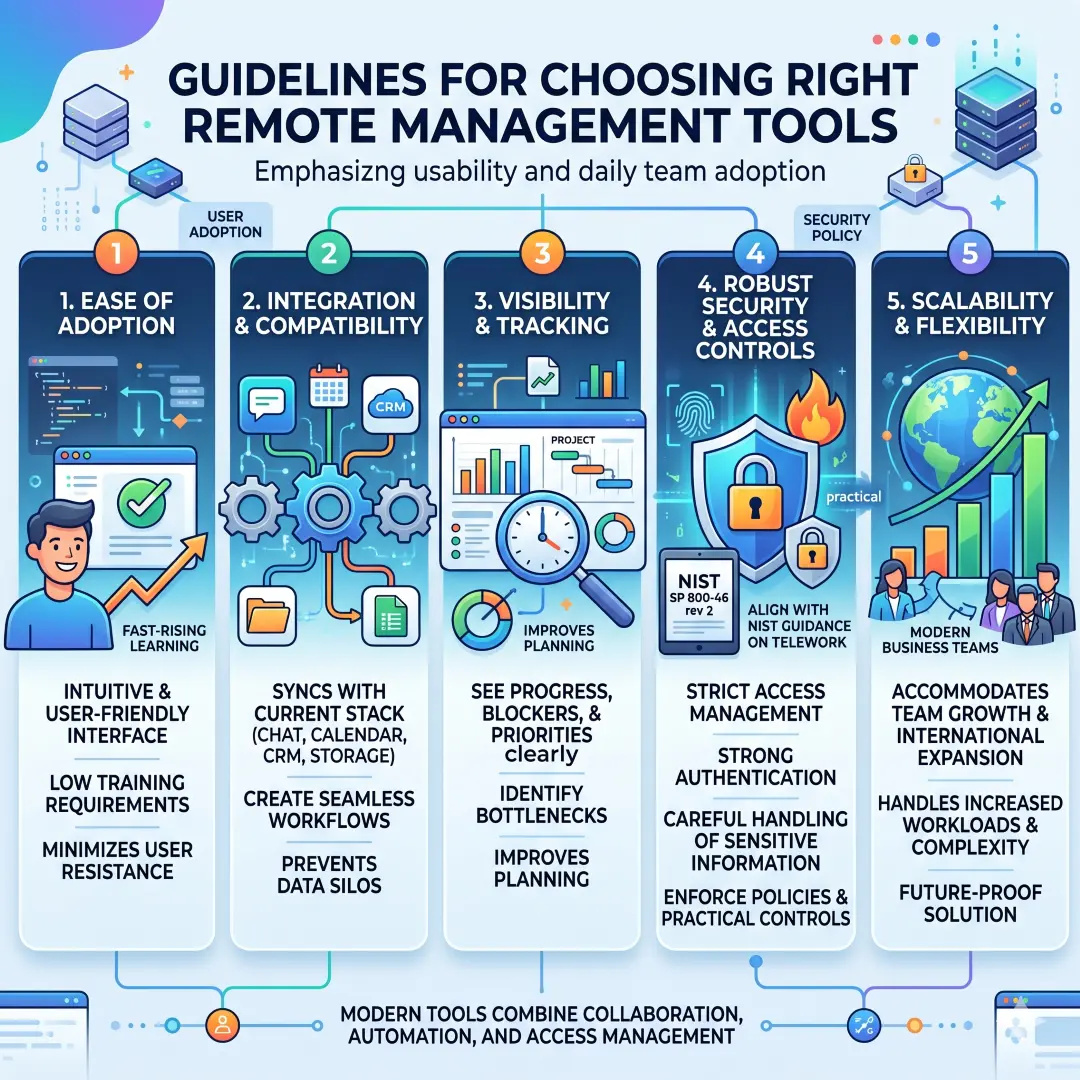
The best remote tools are not always the ones with the most features. They are the ones your team will actually use every day. A simple stack that people understand is usually better than a complicated stack that nobody follows. NIST guidance on telework and remote access reinforces the need for security policies and practical controls, while the product pages above show that modern tools can combine collaboration, automation, and access management in useful ways.
When choosing tools, think about these points:
- Ease of adoption. A tool should be easy enough that the team uses it without constant training.
- Integration. The best tools connect with your current stack, such as chat, calendar, storage, or CRM.
- Visibility. Managers should be able to see progress, blockers, and priorities clearly.
- Security. Remote work needs controlled access, strong passwords, and careful handling of sensitive information.
- Scalability. The tool should still work when the business grows or goes international.
Practical examples of remote management in action
A marketing team might use Slack for daily communication, Asana for campaign planning, Google Workspace for shared documents, and Zoom for content reviews. Slack huddles make it easy to solve urgent questions, while Asana forms and rules help standardize campaign requests.
A customer success team might use Microsoft Teams for chat and meetings, HubSpot CRM for customer records and pipeline management, and 1Password for access control. That way, the team can coordinate quickly while keeping customer data and internal credentials protected.
A global startup might use Google Workspace for email and files, Notion for internal documentation, and Deel for payroll and compliance. This gives the company one place for communication, one place for knowledge, and one system for managing international workers.
Common mistakes remote businesses should avoid
Even the best tools will not fix a broken workflow by themselves. Teams often make the same mistakes when working remotely. They buy too many apps, keep important decisions only in chat, skip documentation, or allow weak account security to spread quietly across the company. NIST and CISA both stress that remote access and telework need clear policies and practical security discipline.
Here are the most common mistakes:
- Using too many tools for the same job, which creates confusion.
- Keeping important updates only in private messages.
- Failing to document processes, policies, and decisions.
- Ignoring password management and access control.
- Choosing a tool just because it is popular instead of matching it to the team’s workflow.
The best fix is usually to keep the stack lean, define ownership, and make one system the main source of truth for each kind of work.
Final thoughts
Managing a business remotely becomes much easier when every part of the workflow has the right tool. Google Workspace keeps communication and documents connected. Slack, Teams, and Zoom keep conversations moving. Asana, Trello, and Notion keep work organized. 1Password protects access. HubSpot keeps revenue visible. Deel helps international teams operate across borders. Together, these tools create a remote business system that is cleaner, safer, and easier to scale.
The strongest remote businesses are not built on constant meetings. They are built on clear communication, shared visibility, simple processes, secure access, and tools that fit the way the team truly works. That is the real foundation of remote management success.
Also, Read these Articles in Detail
- Best Business Tools for Small Businesses in 2026
- Top Business Tools Every Startup Needs
- Best Productivity Tools for Modern Teams
- Essential Business Tools for Remote Teams
- Best AI Business Tools to Save Time and Money
- Top 10 Project Management Tools for Growing Businesses
- 8 Best CRM Tools for Sales and Customer Growth
- Top 7 Accounting Tools for Small Business Owners
- Best Collaboration Tools for Business Teams
- Must-Have Business Tools for Entrepreneurs
- 10 Best Business Automation Tools for Faster Workflows
- Top Tools to Organize Your Business Like a Pro
- Best Online Business Tools for Daily Operations
- Top Digital Tools for Small Business Success
- Top 11 Tools to Improve Team Productivity
Article’s References and Sources
- NIST Telework and Remote Access Security Guidelines
- CISA Remote Work Security Resources
- Google Workspace Official Website
- Google Drive Features and Cloud Storage
- Google Real-Time Editing Overview
- Microsoft Teams Official Page
- Microsoft Teams Group Chat Features
- Microsoft Teams Meeting Chat Guide
- Slack Official Website
- Slack Huddles Feature Guide
- Slack Workflow Builder Guide
- Zoom Workplace Collaboration Tools
- Zoom Team Chat Overview
- Asana Official Website
- Asana Workflow Automation Features
- Asana Reporting and Goals
- Trello Official Website
- Trello Features and Tour
- Notion Documentation Guides
- Notion Project Management Guides
- 1Password Business Security Overview
- 1Password User Management Features
- 1Password Secrets Management
- HubSpot CRM Official Page
- Deel Official Website
Frequently Asked Questions
FAQ 1: What are the best tools for managing a business remotely?
The best tools for managing a business remotely are the ones that help a team communicate clearly, stay organized, share files safely, and complete work without confusion. A remote business usually needs more than one tool because different parts of the business have different needs. For example, one tool may be great for team chat, another for task tracking, another for storing files, and another for managing customers or payroll.
A strong remote business setup usually includes communication tools, project management tools, cloud storage tools, security tools, and business operations tools. These tools work together to create a smooth workflow. Without them, remote teams often face missed messages, duplicate work, file confusion, and weak accountability.
Some of the most useful tool categories include team chat, video meetings, shared documents, task boards, internal knowledge bases, password managers, CRM systems, and global payroll platforms. Each one solves a different problem. For example, a chat tool helps people talk quickly, while a project management tool helps them see deadlines and responsibilities. A cloud document tool helps teams edit the same file at the same time, and a password manager helps protect sensitive access details.
The best approach is not to use every tool available. The best approach is to choose a simple set of tools that fit the size of the business, the number of team members, and the way the team works. A small startup may only need a few tools at first, while a larger company may need a more complete system with stronger security and automation.
A good remote tool stack should make work easier, not harder. It should help the team stay connected, reduce repeated manual work, and make important information easy to find. That is what makes remote business management efficient and sustainable.
FAQ 2: Why is communication so important in remote business management?
Communication is one of the most important parts of remote business management because remote teams do not have the benefit of quick face-to-face conversations in an office. In a physical workplace, people can ask questions easily, clarify mistakes fast, and solve problems on the spot. In a remote workplace, that same clarity must be created through digital communication tools and good habits.
Without strong communication, a remote business can become messy very quickly. People may work on the wrong version of a task, miss updates, overlook deadlines, or repeat work someone else already completed. Clear communication helps avoid these problems by keeping everyone informed and aligned.
This is why tools like Slack, Microsoft Teams, and Zoom are so valuable. They allow teams to talk through chat, hold meetings, share updates, and solve problems in real time. Some tools also support huddles, threaded conversations, screen sharing, and file sharing, which make communication even more practical.
But communication is not only about having the right tool. It is also about having the right habits. Remote teams should define where certain conversations happen. For example, quick questions can go in chat, project discussions can go in task comments, and important decisions can go in shared documents. This keeps communication organized and easy to follow later.
Another benefit of good communication is trust. When people feel informed, they feel more connected to the company and less isolated. That improves teamwork, reduces stress, and creates a healthier remote culture. In many ways, communication is the glue that holds a remote business together.
FAQ 3: How do project management tools help remote teams stay productive?
Project management tools help remote teams stay productive by turning vague work into clear, trackable tasks. In a remote environment, it is easy for work to become invisible. People may be busy, but managers may not always know what is being done, what is delayed, or what needs attention. A project management tool solves this by creating a visible system for tasks, deadlines, owners, and progress.
Tools like Asana, Trello, and Notion help teams organize work in a structured way. They make it possible to create task lists, assign responsibilities, set deadlines, add notes, and track progress from start to finish. This reduces confusion and makes it easier for everyone to know what comes next.
For example, a marketing team can use a project board to track blog articles, social posts, email campaigns, and design tasks. A product team can use the same kind of tool to track feature requests, development stages, testing, and release planning. A remote sales team can use task systems to follow up with leads and monitor the progress of deals.
One of the biggest benefits of project management tools is accountability. When everyone can see who owns a task and when it is due, there is less room for misunderstanding. These tools also make meetings shorter and more effective because the team can review progress visually instead of trying to remember everything from memory.
Another major benefit is prioritization. Remote teams often work across time zones, so it is important to know which tasks matter most. A project management tool helps managers and team members focus on urgent work first and avoid getting lost in low-priority tasks.
In simple terms, project management tools help remote teams work with more structure, less stress, and better results.
FAQ 4: What is the role of cloud storage and shared documents in a remote business?
Cloud storage and shared documents are essential in remote business management because they keep important files accessible to everyone who needs them. In a traditional office, a file might sit on one computer or in one folder. In a remote business, that would create major problems. Team members need to access documents from different places, different devices, and sometimes different countries.
A cloud storage system allows files to be stored online instead of on a single local machine. That means team members can open documents, edit files, upload materials, and share information from anywhere with an internet connection. Shared document tools also make real-time collaboration possible. Several people can work on the same file at the same time, leave comments, and track changes.
This is especially helpful for things like proposals, reports, meeting notes, budgets, contracts, plans, and training documents. Instead of emailing versions back and forth, the whole team can work from one central file. That saves time and lowers the chance of mistakes.
Cloud storage also improves consistency. When documents are stored in one place, teams are less likely to use old versions or wrong files. This is important for remote businesses because inconsistency can lead to poor decisions and wasted effort.
Shared documents also support better collaboration across departments. For example, a manager can write a plan in a document, a teammate can add feedback, and another colleague can update the numbers or schedule. This kind of shared workflow makes work more transparent and efficient.
In a remote business, cloud storage is not just a convenience. It is the foundation of organized and reliable file management.
FAQ 5: Why should remote businesses use a password manager and other security tools?
Remote businesses should use a password manager and other security tools because remote work increases the risk of weak access control, shared credentials, and accidental data exposure. In an office, security can sometimes be managed through physical systems and controlled networks. In a remote setting, employees connect from different locations, devices, and internet connections, which makes secure access much more important.
A password manager helps teams store passwords safely, generate strong passwords, and share access without exposing sensitive information. It also reduces the temptation to reuse weak passwords or send credentials through chat messages or email. That alone can make a big difference in a company’s security posture.
Security tools are also useful for managing secrets, access permissions, and account recovery. A remote business may need to protect email logins, CRM access, website admin panels, financial tools, and internal systems. If these accounts are not managed properly, one weak password can put the whole business at risk.
Another important point is access control. Not every employee needs access to every tool. A remote business should give people access only to what they need for their role. This is often called least privilege. It lowers risk and makes security easier to manage.
Security is not only about preventing hackers. It is also about preventing mistakes. Someone may accidentally share the wrong file, store a password in an unsafe place, or leave a device unlocked. Good security tools reduce those risks.
A remote business that takes security seriously protects its customers, its employees, and its reputation. That is why tools for password management, authentication, and access control are just as important as chat apps and project boards.
FAQ 6: How can a CRM help when managing a business remotely?
A CRM, or customer relationship management system, helps a remote business keep track of customers, leads, deals, and follow-ups in one organized place. This is especially useful when the sales team, support team, and leadership team are not sitting in the same room. Without a CRM, customer information often gets spread across email inboxes, spreadsheets, chat apps, and memory. That creates delays and confusion.
A CRM gives the team one central place to see the full customer journey. It can show where each lead is in the pipeline, who is responsible for follow-up, what actions have already been taken, and what comes next. This helps remote teams avoid missed opportunities and keeps everyone on the same page.
For sales teams, a CRM improves visibility. Managers can see how many deals are open, which prospects are active, and where bottlenecks are happening. For service teams, it helps track customer issues, response history, and support progress. For founders, it gives a clearer picture of revenue activity and customer engagement.
A CRM also helps remote teams stay consistent. Every customer gets tracked in the same system, so the process does not depend on individual habits. That makes the business more predictable and easier to scale.
Another benefit is reporting. Many CRM systems allow teams to generate charts, dashboards, and summaries. This is useful when a remote company needs to understand performance without meeting in person every day.
In simple terms, a CRM helps a remote business manage customers with more structure, more visibility, and fewer missed steps.
FAQ 7: What is the best way to manage a global remote team across different countries?
Managing a global remote team across different countries works best when the business combines communication, documentation, scheduling, payroll, and compliance into one clear system. The biggest challenge in a global team is not only distance. It is also time zones, local labor rules, payment differences, language preferences, and cultural work styles.
The first step is to use tools that support asynchronous work. Not every decision needs a live meeting. Shared documents, task boards, and recorded updates can help people contribute on their own schedule. This is important when one person is starting the day while another is ending it.
The second step is to define clear processes. A global team should know where to post updates, where to store files, how to report blockers, and how to ask for help. When the process is clear, the team does not need to guess.
The third step is to use a payroll or hiring system that understands international work. A global remote company may work with employees and contractors in many countries. That creates challenges around payments, contracts, and legal compliance. A system built for global operations can simplify that work and reduce administrative stress.
The fourth step is to make communication respectful of time zones. A global team should avoid unnecessary meetings and use recorded updates, written summaries, and structured planning where possible. That helps people work without always needing to be online at the same time.
The fifth step is to support team culture. Remote global teams need trust, clarity, and regular connection. Even a simple weekly check-in or monthly team meeting can improve morale and coordination.
A global remote team can be very successful, but it needs systems that match its complexity. With the right tools and processes, distance becomes manageable.
FAQ 8: How do remote businesses choose the right tools without creating tool overload?
Remote businesses choose the right tools by focusing on real needs instead of buying software just because it looks impressive. Tool overload happens when a team uses too many platforms for the same kind of work. This creates confusion, slows people down, and makes it harder to know where information lives.
The best way to avoid tool overload is to ask a few simple questions. What problem does this tool solve? Is there already another tool doing something similar? Will the team actually use it every day? Does it connect well with the rest of the stack? These questions help businesses make smarter choices.
A good rule is to keep each tool focused on one core purpose. For example, one tool can handle chat, another can handle tasks, another can handle documents, and another can handle security. When roles are clearly separated, the system is easier to understand.
It also helps to choose tools that integrate with each other. For example, task updates can connect to chat, documents can connect to meetings, and CRM data can connect to sales workflows. Integration reduces duplication and makes the whole system feel smoother.
Training is another important factor. Even the best tool will fail if the team does not know how to use it. Remote businesses should make sure people understand the purpose of each tool and the workflow around it. Clear onboarding and simple documentation help a lot.
The smartest remote businesses are not the ones with the biggest tool stack. They are the ones with the cleanest and most useful stack.
FAQ 9: What are the most common mistakes businesses make when managing remotely?
One of the most common mistakes businesses make when managing remotely is relying too much on chat messages and not enough on documented systems. Chat is useful for quick communication, but important decisions should not live only in fast-moving messages. If the information is not documented, it can be lost or misunderstood.
Another common mistake is failing to define ownership. In a remote team, every task should have a clear owner. If everyone thinks someone else will handle it, work gets delayed or forgotten.
A third mistake is using too many tools without a clear structure. This leads to scattered files, repeated conversations, and poor visibility. A remote business needs a simple and intentional system, not a random collection of apps.
A fourth mistake is ignoring security. Remote businesses often underestimate the importance of strong passwords, secure access, and controlled permissions. That can create real risk, especially when employees are handling customer data, financial systems, or sensitive internal information.
A fifth mistake is holding too many meetings. Remote teams need communication, but they also need time to focus. Good remote management uses meetings carefully and supports async work where possible.
A sixth mistake is not documenting processes. Remote teams should have written guides for onboarding, approvals, internal policies, and regular workflows. This makes the business easier to run and easier to grow.
A remote business works best when it is organized, documented, secure, and clear about responsibilities. Without those habits, even the best tools will not fully solve the problem.
FAQ 10: Can a small business also use remote management tools effectively?
Yes, a small business can absolutely use remote management tools effectively, and in many cases, it benefits from them even more than a large company does. Small businesses often have fewer people, fewer layers of management, and fewer resources to waste. That means every tool needs to pull its weight.
The good news is that small businesses do not need a huge, expensive stack.
They can start with a few essential tools. A chat tool can handle communication. A task board can handle project tracking. A document platform can handle files and policies. A password manager can protect access. A simple CRM can help manage customers. That is often enough to create a strong remote foundation.
For a small team, simplicity is especially valuable. A small business usually needs tools that are easy to learn, easy to maintain, and easy to scale. The goal is to reduce stress, not add more complexity. That is why lightweight and flexible tools are often the best choice at the beginning.
Small businesses also benefit from remote tools because they help create a professional structure early. Instead of relying on memory or informal habits, the business can build good workflows from day one. That makes it easier to grow later.
Even if the team is tiny, remote tools can still improve communication, save time, and make the business more resilient. A small company that builds good systems early often grows more smoothly than one that waits too long to organize its workflow.
Remote management is not only for large organizations. It can be a major advantage for small businesses too, especially when the tools are chosen carefully and used consistently.
Article Disclaimer
The information provided in this article, “Best Tools for Managing a Business Remotely,” is intended for general informational and educational purposes only. While every effort has been made to present accurate, up-to-date, and reliable information, the content should not be considered as professional advice related to business management, legal compliance, financial planning, or information security. Readers are encouraged to evaluate their own business needs and consult with qualified professionals before making any significant decisions.
This article discusses various software tools, platforms, and digital solutions that are commonly used for remote business management. However, the effectiveness of these tools may vary depending on factors such as business size, industry, team structure, and operational requirements. The inclusion of any tool or platform does not imply endorsement, guarantee of performance, or suitability for every business scenario.
All references to features, functionalities, and benefits of tools mentioned in this article are based on publicly available information and may change over time. Software providers frequently update their products, pricing, and services. Therefore, readers should verify details directly from official sources before relying on them for business use.
Additionally, this article may contain general insights related to remote work practices, productivity strategies, and security considerations. These insights are not exhaustive and should not replace comprehensive internal policies or expert guidance. Businesses are responsible for implementing appropriate security measures, data protection practices, and compliance procedures relevant to their specific region and industry.
The author and publisher are not liable for any losses, damages, or disruptions that may arise from the use or misuse of the information provided in this article. Any actions taken based on this content are strictly at the reader’s own risk.
By reading this article, you acknowledge and agree that the content is provided “as is” without any warranties of completeness, accuracy, or reliability, and that you are solely responsible for how you interpret and apply the information in your business operations.
