Business automation is no longer a luxury. It has become one of the easiest ways for teams to save time, reduce repetitive work, and keep operations moving without constant manual effort. Modern automation platforms can connect apps, trigger actions from events, manage approvals, route work, send notifications, sync data, and even support AI-powered workflows. Zapier describes its platform as a no-code way to move data between apps. Make focuses on visual no-code automation, Microsoft Power Automate centers on low-code process automation, and Salesforce Flow, Asana, Airtable, Notion, monday.com, and HubSpot all offer their own workflow automation systems for teams and business processes.
For businesses that want to work faster, the real value of automation is not just speed. It is consistency, fewer errors, better visibility, and more time for high-value work. McKinsey reports that AI and automation technologies have major productivity potential, while OECD research has long shown that automation can shift labor away from repetitive tasks and toward higher-skill work. In practical terms, that means teams can spend less time copying data, chasing reminders, and updating statuses, and more time serving customers, solving problems, and growing the business.
Table of Contents
What Business Automation Tools Actually Do
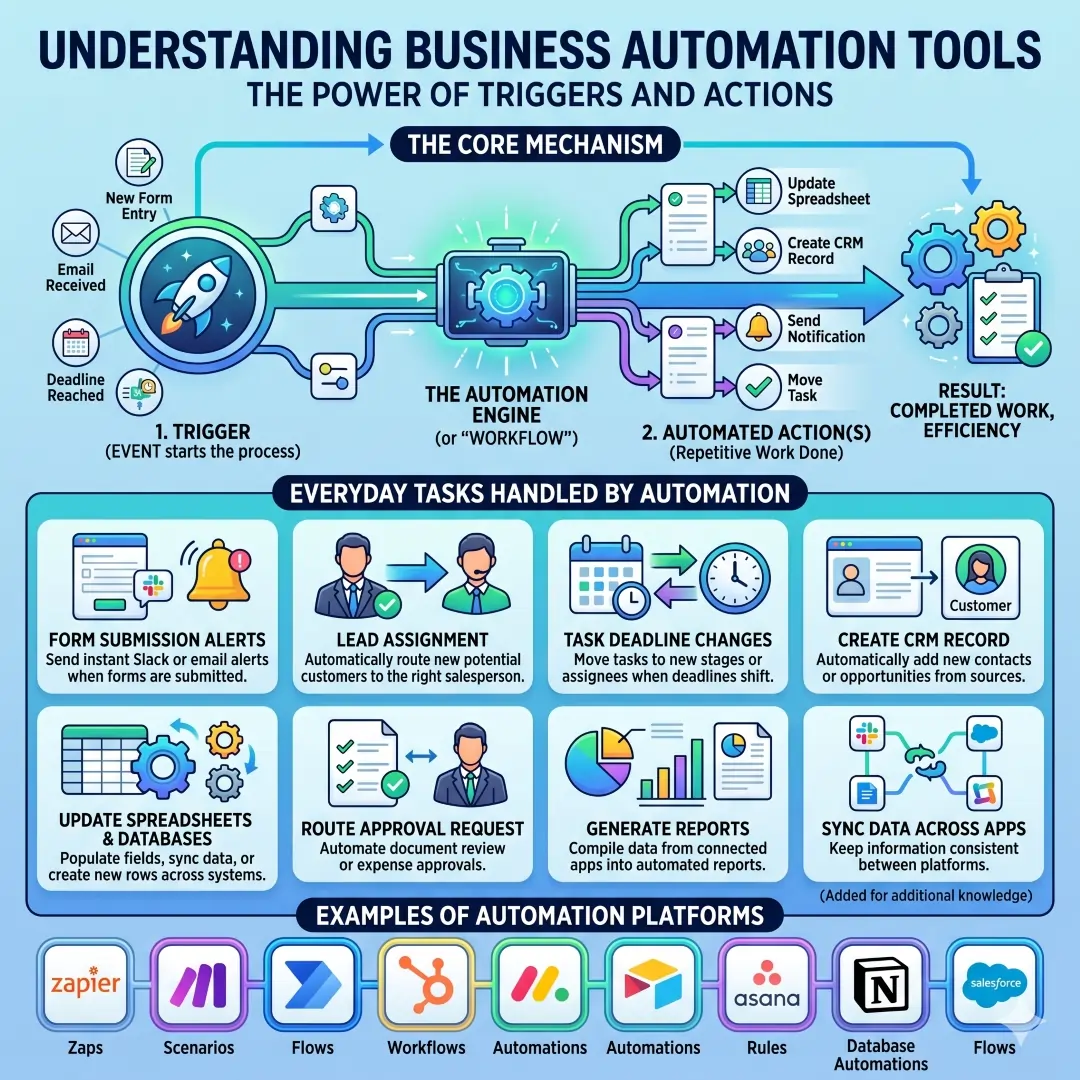
At the simplest level, a business automation tool watches for a trigger and then performs one or more actions. Zapier defines a workflow as a Zap, where a trigger starts the process and actions happen automatically afterward. Asana uses rules built from triggers and actions, Airtable automations use triggers to automate teamwork, and Notion database automations also work through triggers and actions. This is why so many tools feel similar on the surface. They all help software do repetitive work that people used to do by hand.
In business terms, automation can handle many everyday tasks, such as:
- sending a Slack or email alert when a form is submitted
- assigning a lead to the right salesperson
- moving a task when a deadline changes
- creating a record in a CRM
- updating a spreadsheet or database
- routing an approval request
- generating reports from connected systems
These are the kinds of actions covered by the automation features of Zapier, Make, Microsoft Power Automate, HubSpot, monday.com, Airtable, Asana, Notion, and Salesforce Flow.
Why Faster Workflows Matter So Much
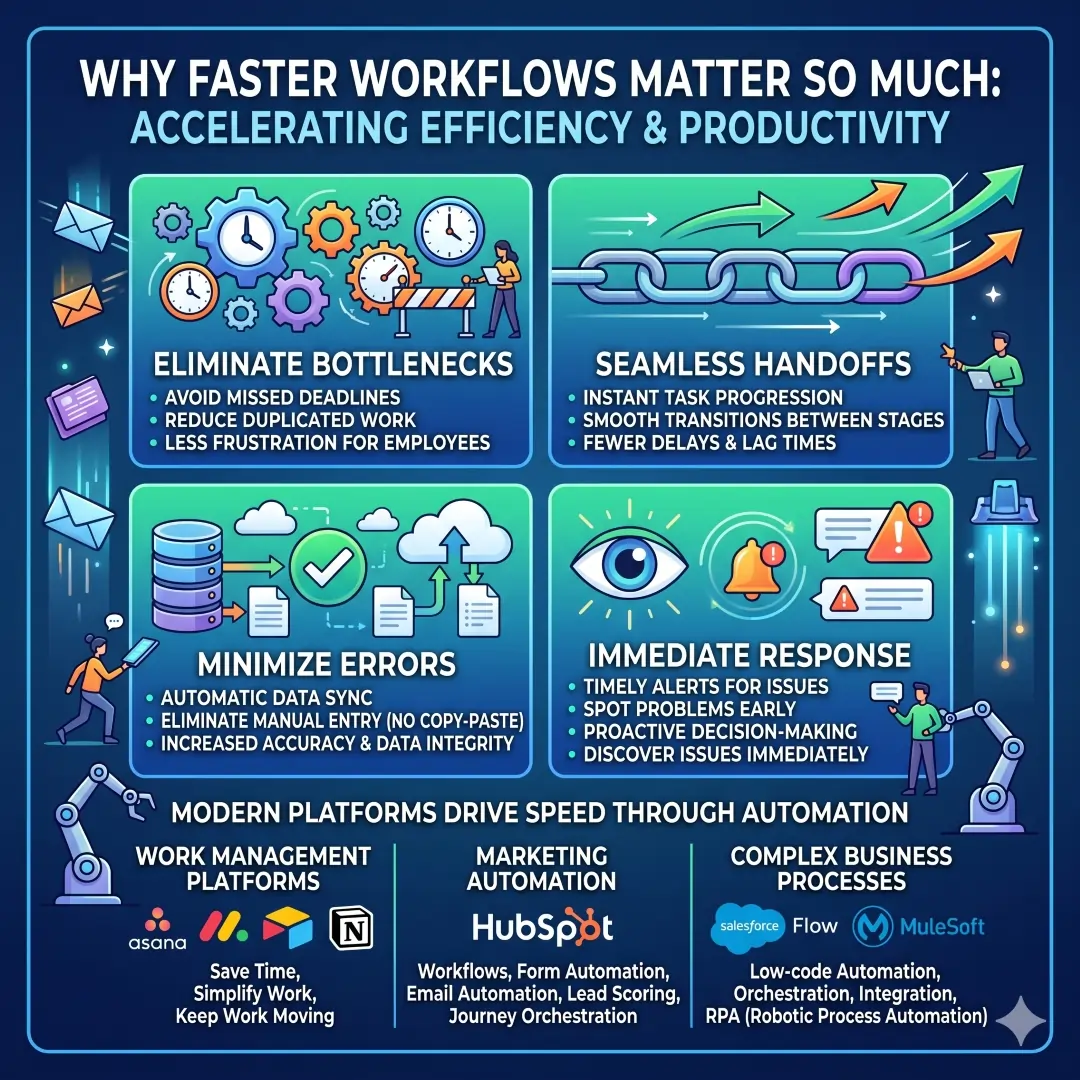
A fast workflow is not only about working quickly. It is about removing bottlenecks before they turn into missed deadlines, duplicated work, and frustrated employees. When automations move a task forward instantly, teams get a cleaner handoff and fewer delays. When data syncs automatically, there is less chance of mistakes caused by copy-paste work. When alerts fire at the right time, people can respond immediately instead of discovering issues too late. Those are the everyday operational wins that most teams feel first.
This is also why automation has become a core part of modern work management platforms. Asana, monday.com, Airtable, and Notion all describe automation as a way to save time, simplify work, and keep work moving. HubSpot highlights workflows, form automation, email automation, lead scoring, and journey orchestration for marketing teams. Salesforce Flow and MuleSoft add low-code automation, orchestration, integration, and RPA for more complex business processes.
Comparison Table: Best Business Automation Tools for Faster Workflows
| Tool | Best for | Main strengths | Typical use cases | Pricing signal or plan note |
|---|---|---|---|---|
| Zapier | Teams that need to connect many apps fast | No-code automation, AI Workflows, AI Agents, AI Chatbots, 9,000+ apps on the homepage and 8,000+ apps in pricing FAQs | Lead capture, notifications, file routing, CRM updates, content workflows | Professional plan starts from $19.99/mo billed annually on the pricing page |
| Make | Visual builders and SMB teams | Visual no-code builder, routers, filters, HTTP/webhooks, analytics, AI workflows, 3,000+ apps on the pricing page | Multi-step workflows, data transformation, advanced branching | Free plan at $0/mo, Make Plan at $9/mo for 5k credits |
| Microsoft Power Automate | Microsoft-centric businesses and process teams | Low-code automation, free trial, premium, process, and hosted process plans | Approvals, desktop flows, cloud flows, Microsoft 365 and Power Platform processes | Premium at $15/user/month, Process at $150/bot/month |
| Asana | Project teams that want workflow automation inside task management | Rules, triggers and actions, rule recommendations, integrations with Slack, Gmail, Calendar, Jira, Dropbox, OneDrive, Zendesk | Task routing, deadline reminders, handoffs, project status changes | Free trial for Starter and Advanced, AI Teammates on paid plans |
| Monday.com | Operations, marketing, and cross-functional teams | Board automations, notifications, item updates, task movement, security and collaboration features | Recurring task management, status updates, campaign workflow coordination | Free plan available, pricing starts from $24/month for 3 users |
| Airtable | Teams that want automation plus structured data | Trigger-based automations, collaboration, app connections, AI-powered workflows, data-centric workspace | Ops tracking, inventory, project data, content pipelines, internal tools | Plans charged per seat, self-serve business plans available |
| Notion | Knowledge work, internal wikis, project systems | Database automations, buttons, pages, blocks, integrations, AI workspace | Internal docs, editorial systems, content calendars, lightweight workflow automation | Free plan available, pricing page for business and enterprise tiers |
| HubSpot | Marketing, sales, and customer service teams | Marketing automation, CRM-powered workflows, email automation, lead scoring, journey orchestration | Lead nurturing, email sequences, forms, customer lifecycle automation | Marketing automation includes a 14-day free trial |
| Salesforce Flow | Enterprise teams with complex CRM and process needs | Flow Builder, Flow Orchestration, integrations, document automation, RPA | Multi-step approvals, lead and case routing, record updates, cross-system processes | Flow is positioned as low-code business automation inside Salesforce |
| n8n | Technical teams that want control and flexibility | Visual building, deep code support, self-hosting, traceable agent reasoning | Developer-led automation, internal tools, AI workflows, custom integrations | Pricing page includes plans based on executions, with unlimited users and workflows highlighted |
Best Business Automation Tools by Use Case
| Business need | Best tools | Why they fit |
|---|---|---|
| Connect many SaaS apps quickly | Zapier, Make | Both are built for connecting apps with triggers and actions. Zapier emphasizes breadth of integrations, while Make emphasizes visual flow design and branching logic. |
| Automate project work | Asana, monday.com | These tools help teams move tasks, notify people, and keep work organized inside project boards and task systems. |
| Automate CRM and customer journeys | HubSpot, Salesforce Flow | HubSpot centers automation on marketing, sales, and service. Salesforce Flow supports low-code processes, orchestration, and record-level automation. |
| Automate data-driven internal tools | Airtable, Notion | Airtable is great when workflows depend on records and structured data. Notion is useful when automation sits close to docs, databases, and planning pages. |
| Work inside Microsoft ecosystems | Power Automate | It is built for low-code process automation, including cloud and desktop flows. |
| Need developer control or self-hosting | n8n | n8n lets teams build visually, add code, and deploy on their own infrastructure or use hosted options. |
Deep Dive Into the Top Tools
1. Zapier
Zapier is one of the easiest places to start when a business wants quick automation without hiring developers. Its official site says it offers AI Workflows, AI Agents, AI Chatbots, and 9,000+ apps, while its pricing FAQ says it supports 8,000+ apps and explains that a Zap is an automated workflow made of a trigger and one or more actions. Zapier also highlights built-in tools like Tables, Forms, Filter, Formatter, Path, and Delay, which help create smarter workflows without code.
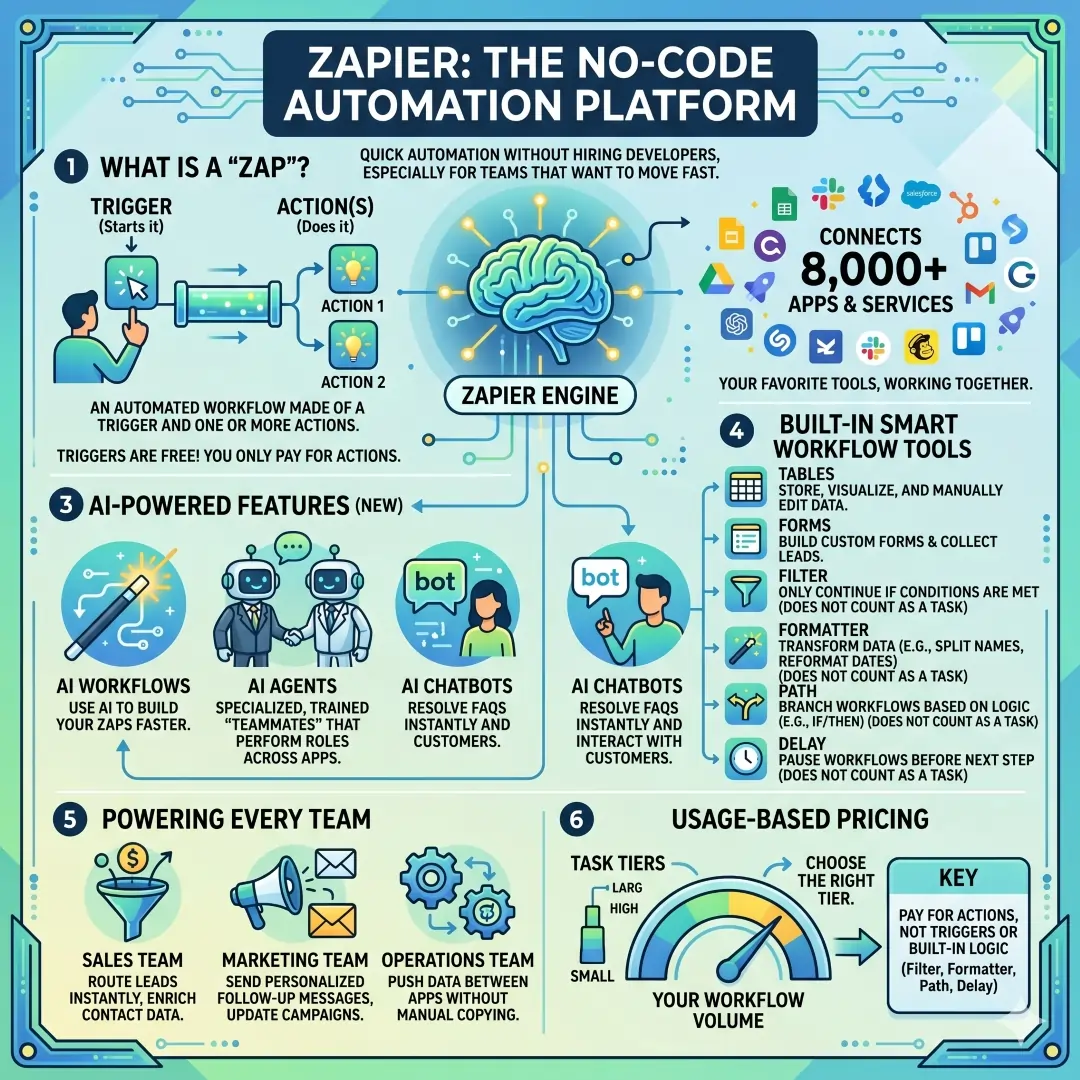
Zapier is especially strong for teams that want to move fast. A sales team can use it to route leads, a marketing team can use it to send follow-up messages, and an operations team can use it to push data between apps without manual copying. Its pricing structure is usage-based, so it is important to match your workflow volume to the right task tier.
2. Make
Make is a visual-first automation platform that shines when workflows get a little more complex. Its pricing page highlights a no-code visual workflow builder, routers, filters, and 3,000+ apps on the free tier, while the paid plan adds unlimited active scenarios, custom variables, and more operational control. Make is a strong choice when you want to see the logic of the process on screen rather than hiding it inside a simple linear flow.
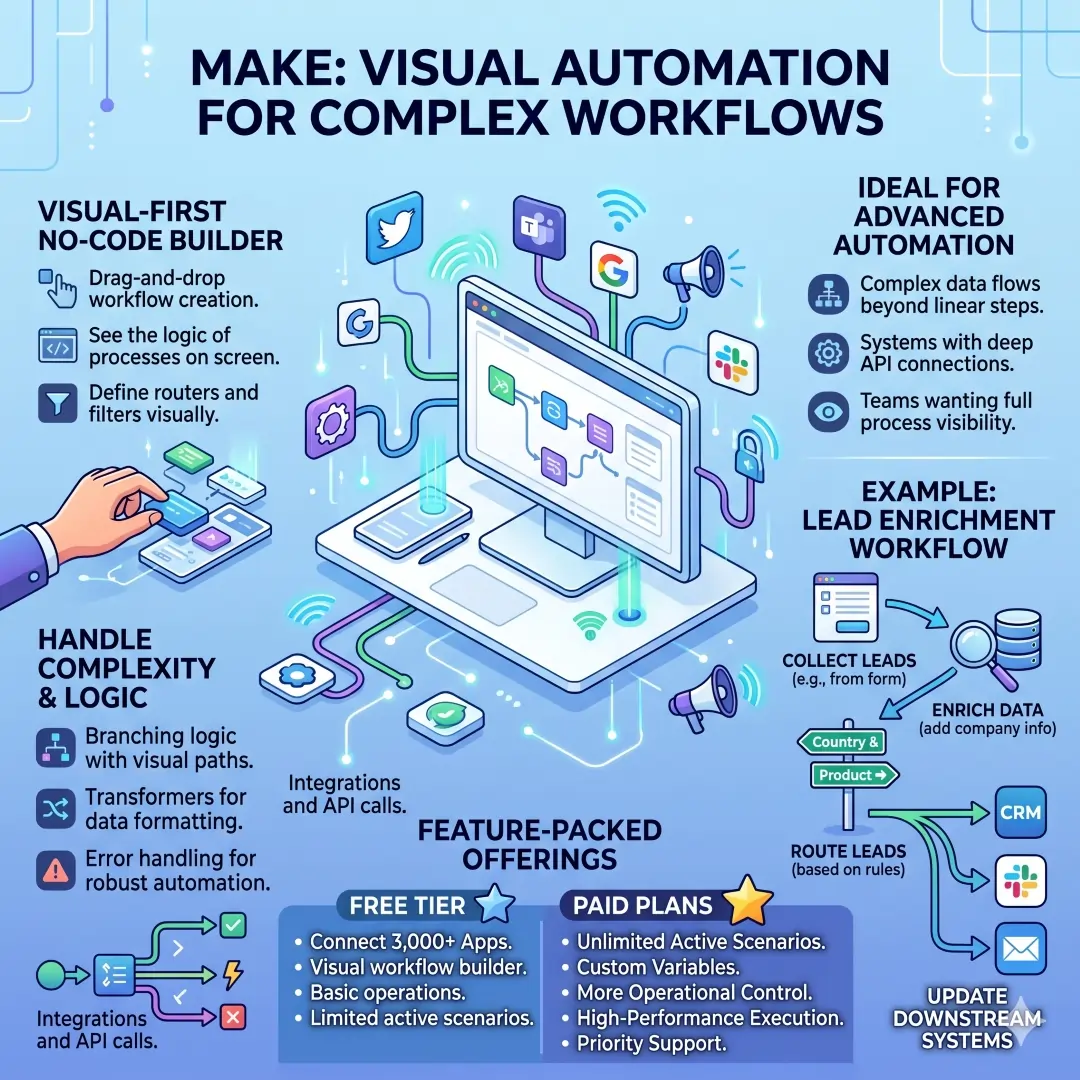
This is a great fit for workflows that need branching logic, transformation, and API calls. For example, a company could collect leads from a form, enrich them with data, route them based on country or product interest, and then update several downstream systems. Make is often appealing to teams that want more visual control than a basic point-and-click connector.
3. Microsoft Power Automate
Microsoft Power Automate is a powerful choice for organizations that already live in the Microsoft ecosystem. Microsoft’s pricing page lists a free trial, Power Automate Premium, Power Automate Process, and Power Automate Hosted Process. Microsoft also describes Power Automate as a process automation platform, and its licensing documentation notes that basic capabilities can be included at no cost for work or school accounts in Microsoft Entra tenants.
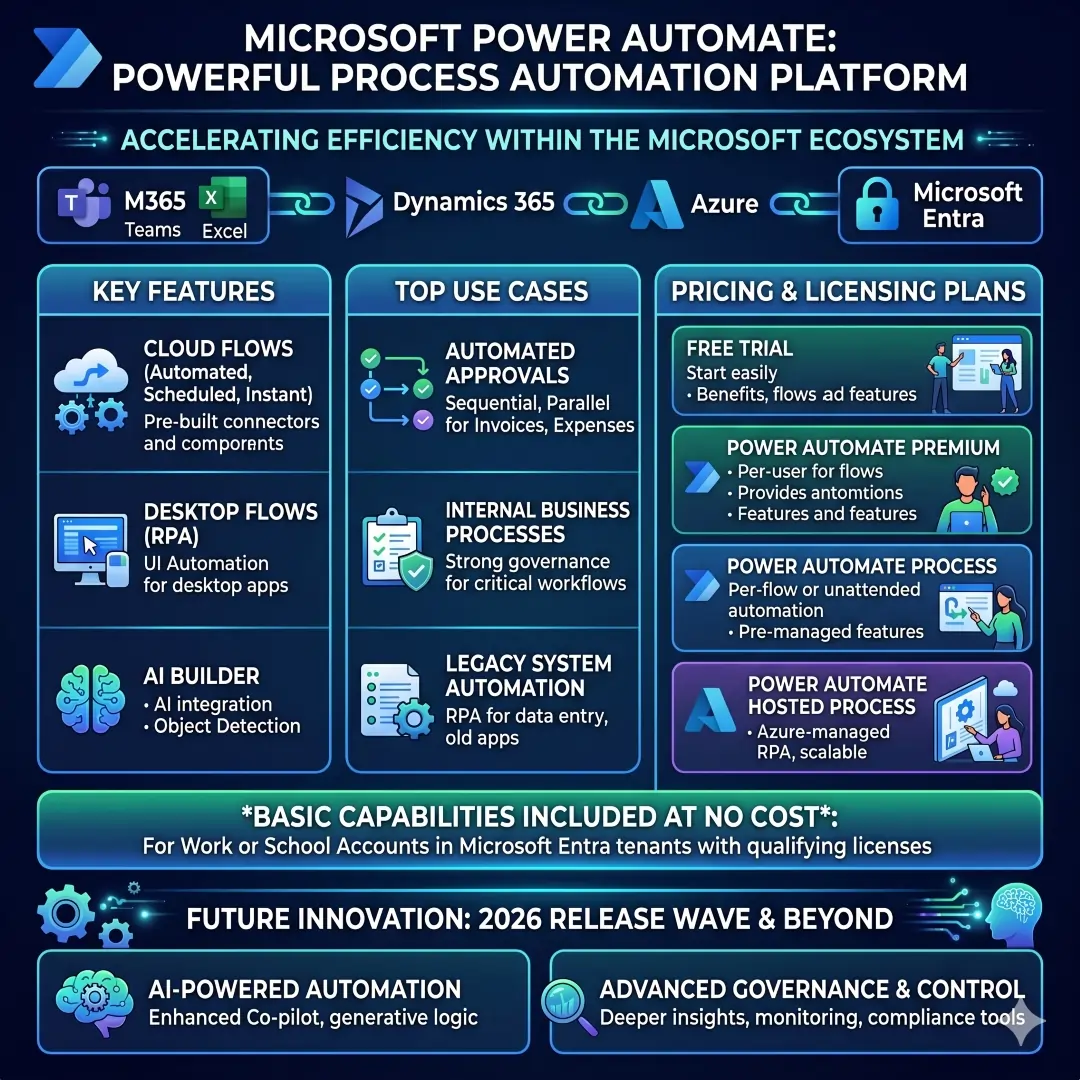
Power Automate is especially useful for approvals, desktop automation, cloud flows, and internal business processes that need strong governance. Microsoft’s 2026 release wave material also points to continued investment in AI-powered automation and governance capabilities, which matters for companies that need both speed and control.
4. Asana
Asana is a strong workflow automation option for teams that already manage work in projects and tasks. Asana’s rules feature lets users build automations from triggers and actions, such as moving a task when a due date approaches. Asana also provides a rules library with suggested automations and supports integrations with tools like Slack, Gmail, Google Calendar, Jira, Dropbox, OneDrive, and Zendesk.
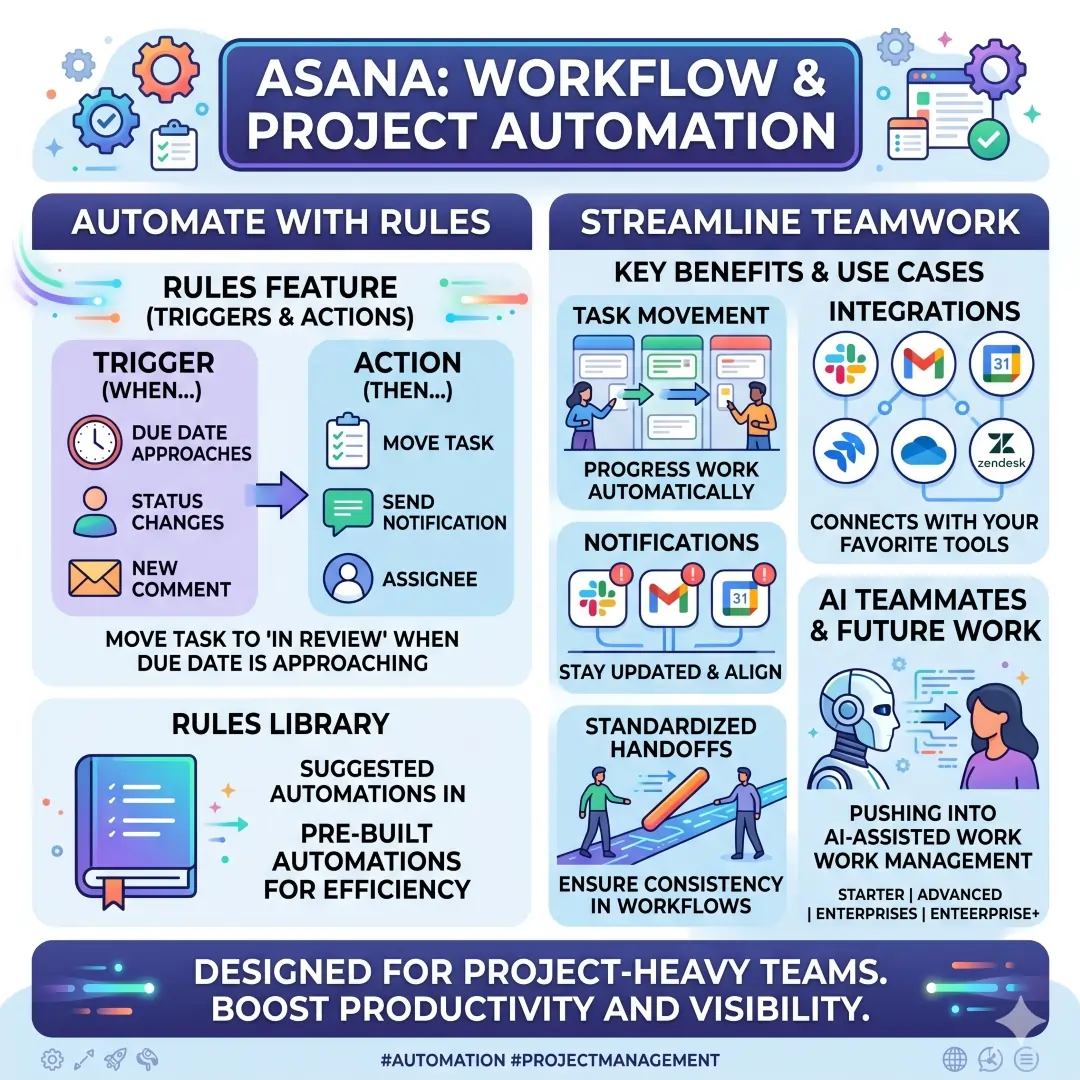
This makes Asana useful for project-heavy teams that need task movement, notifications, and standardized handoffs. Its pricing page also shows that AI Teammates are available on Starter, Advanced, Enterprise, and Enterprise+ plans, which signals that Asana is pushing further into AI-assisted work management.
5. Monday.com
Monday.com is especially good for teams that want their boards to run repetitive tasks automatically. Its support documentation says automations can update items, send notifications, and move tasks. Monday.com pricing also notes a free plan and a starting price of $24 per month for three users.
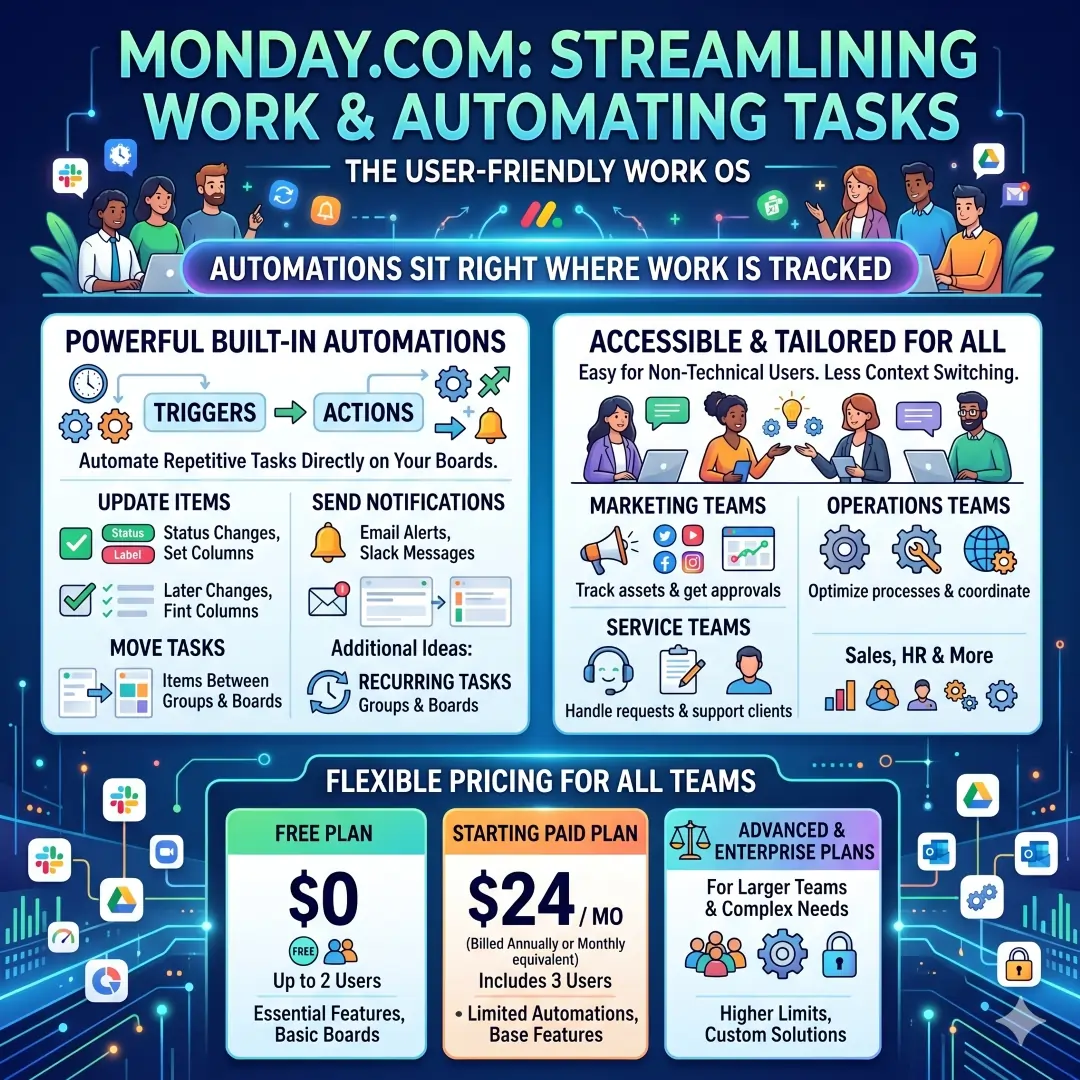
This platform is easy to understand for non-technical users, which is a major advantage in fast-moving companies. Marketing teams, operations teams, and service teams often like monday.com because the automation sits right where work is already being tracked. That means fewer extra tools and less context switching.
6. Airtable
Airtable is a strong option when your workflow depends on structured data. Airtable says its automations use triggers to automate redundant tasks, communications, and connections with other tools. It also describes itself as a platform for building AI-powered workflows that unify data and improve collaboration. Airtable pricing confirms that plans are charged per seat, with additional rules for collaborators and read-only users.
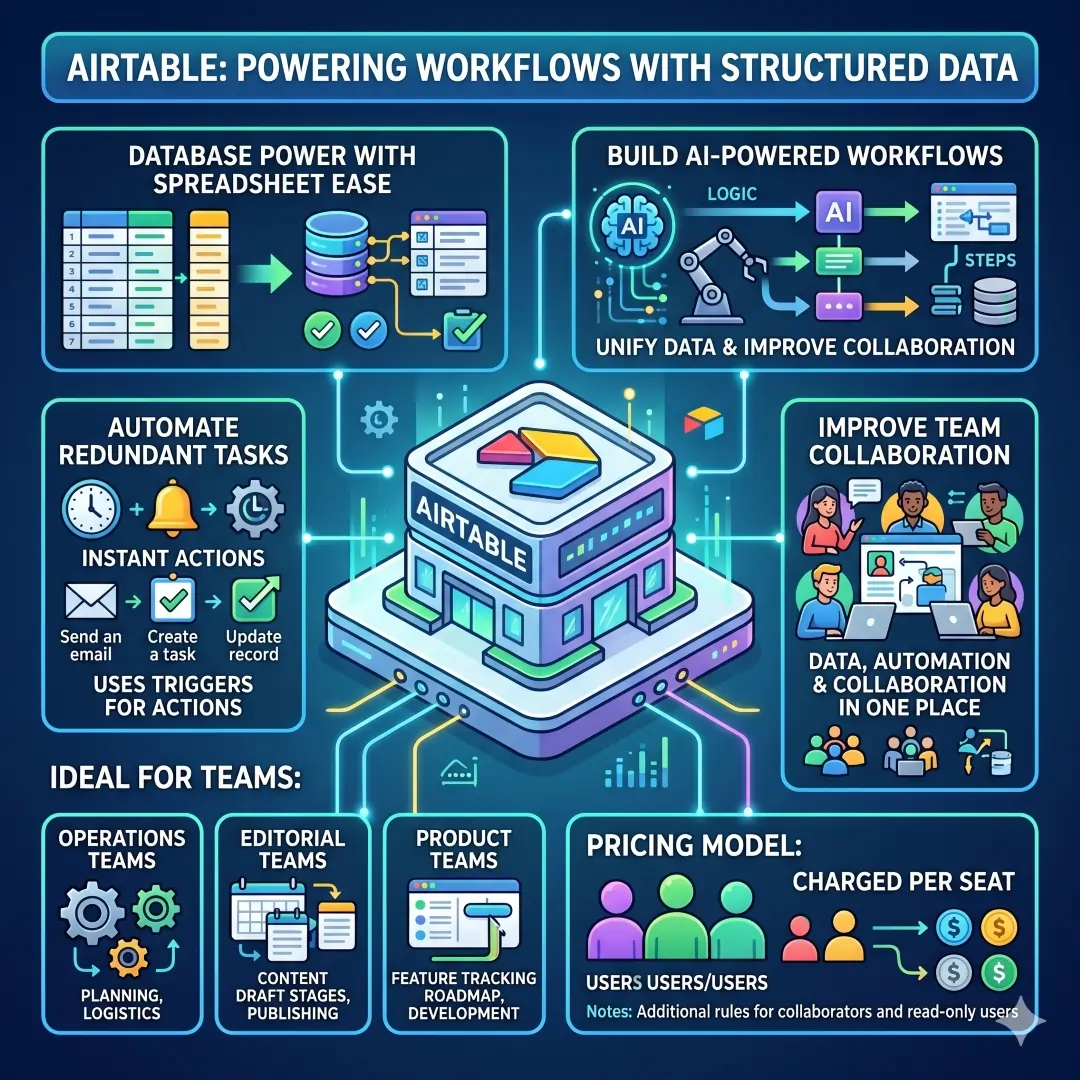
Airtable works well for operations teams, editorial teams, and product teams that need a database-like system with workflow logic around it. It is often a better fit than a plain spreadsheet because the data, automation, and collaboration live together in one place.
7. Notion
Notion is widely used for documentation, planning, knowledge management, and lightweight workflow automation. Its help center says database automations are sequences of actions triggered by database changes, and they are designed to save time and simplify work. Notion’s product and release pages also show that the company is investing in AI workspace features, custom agents, and automation across docs, projects, and connected apps.
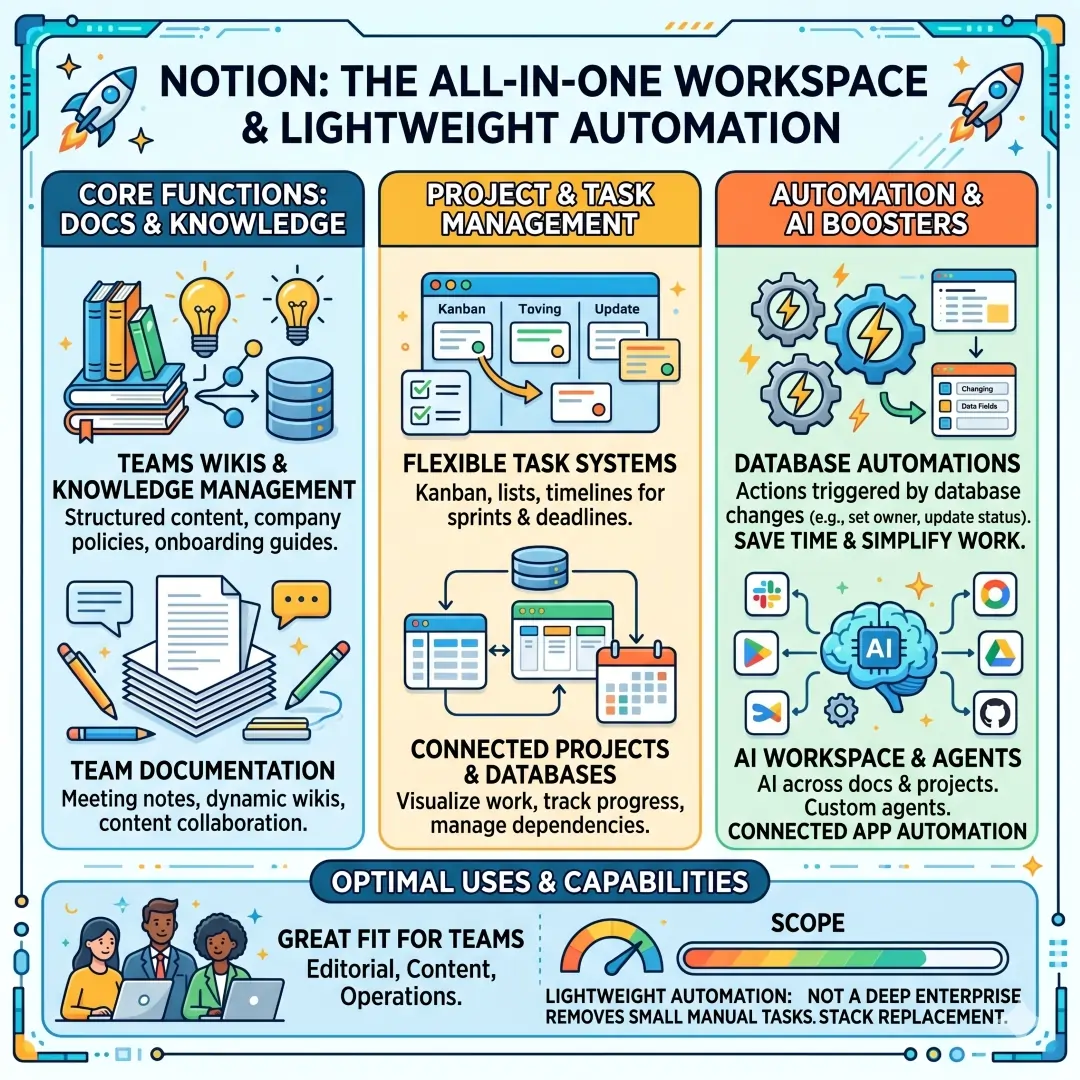
Notion is a great fit when a team wants one place for docs, task systems, and internal knowledge. It may not replace a deep enterprise automation stack, but it can remove a lot of small manual tasks from editorial, content, and operations workflows.
8. HubSpot
HubSpot is one of the best choices for marketing, sales, and customer service automation. HubSpot says its marketing automation software can save time with custom workflows, form and email automation, automated scoring, and journey orchestration. HubSpot’s broader platform page says it combines marketing, sales, service, data management, and content management on one customer platform.
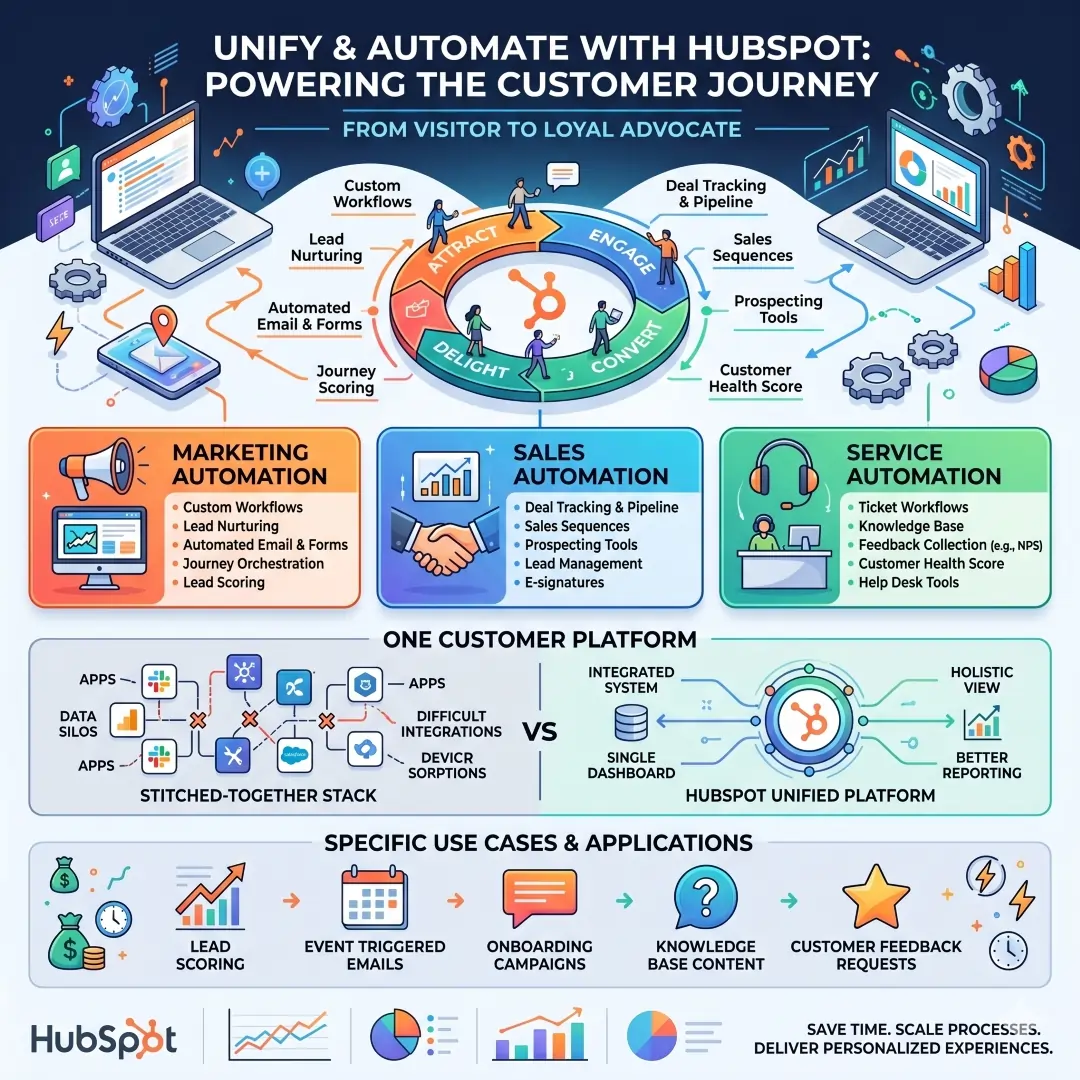
This makes HubSpot especially valuable for lead nurturing, onboarding emails, lifecycle automation, and customer communication. If your automation needs are closely tied to the customer journey, HubSpot is often more practical than stitching together several separate tools.
9. Salesforce Flow
Salesforce Flow is built for teams that need enterprise-grade process automation inside Salesforce. Salesforce says Flow Builder can design, connect, test, and deploy single-user and triggered automations with low code. It also supports Flow Orchestration for end-to-end, multi-user, multi-system business processes, plus integration, document processing, and RPA through the MuleSoft ecosystem.
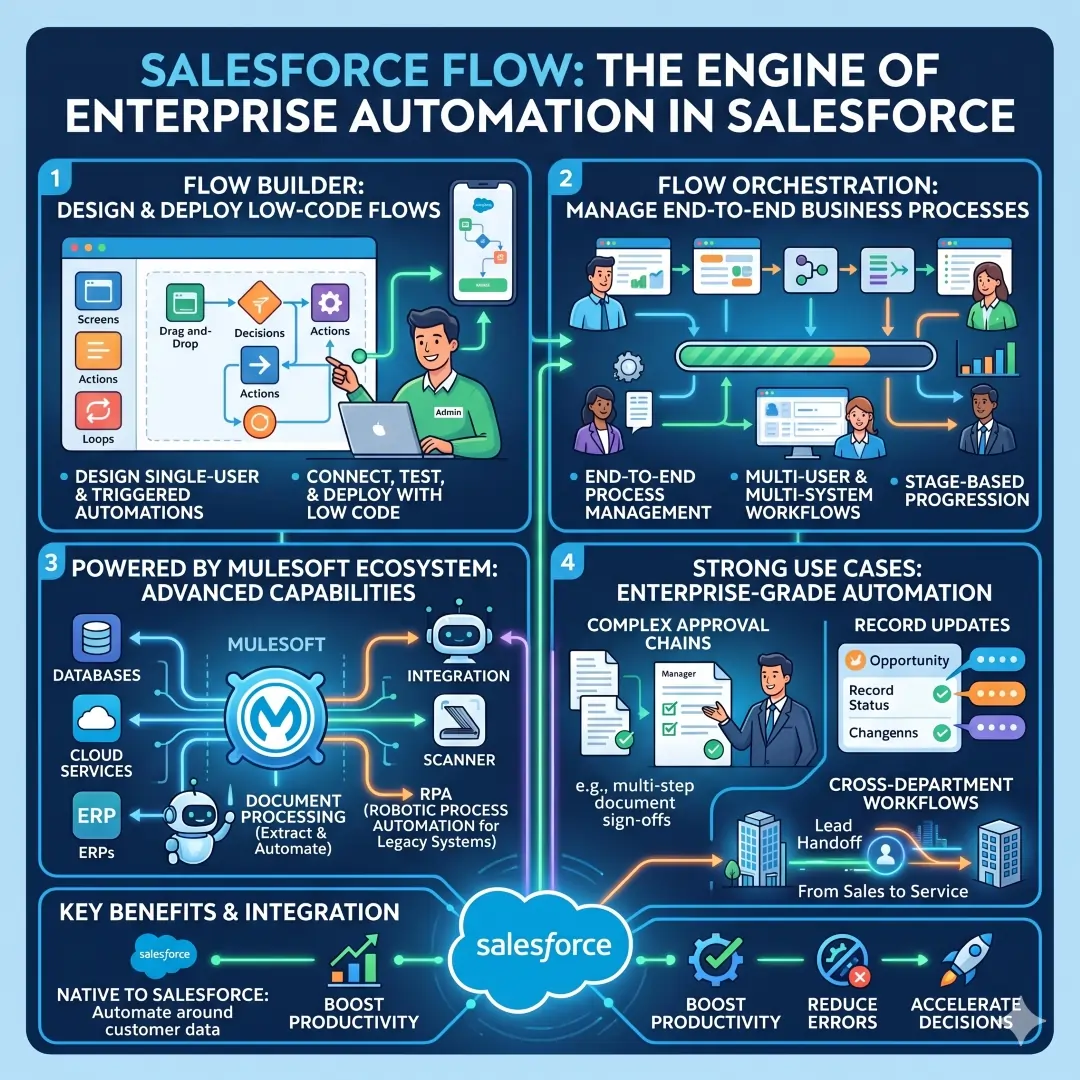
This is a strong option for complex approval chains, record updates, and cross-department workflows. If your company already depends on Salesforce for customer data, Flow is one of the most natural ways to automate around that system.
10. n8n
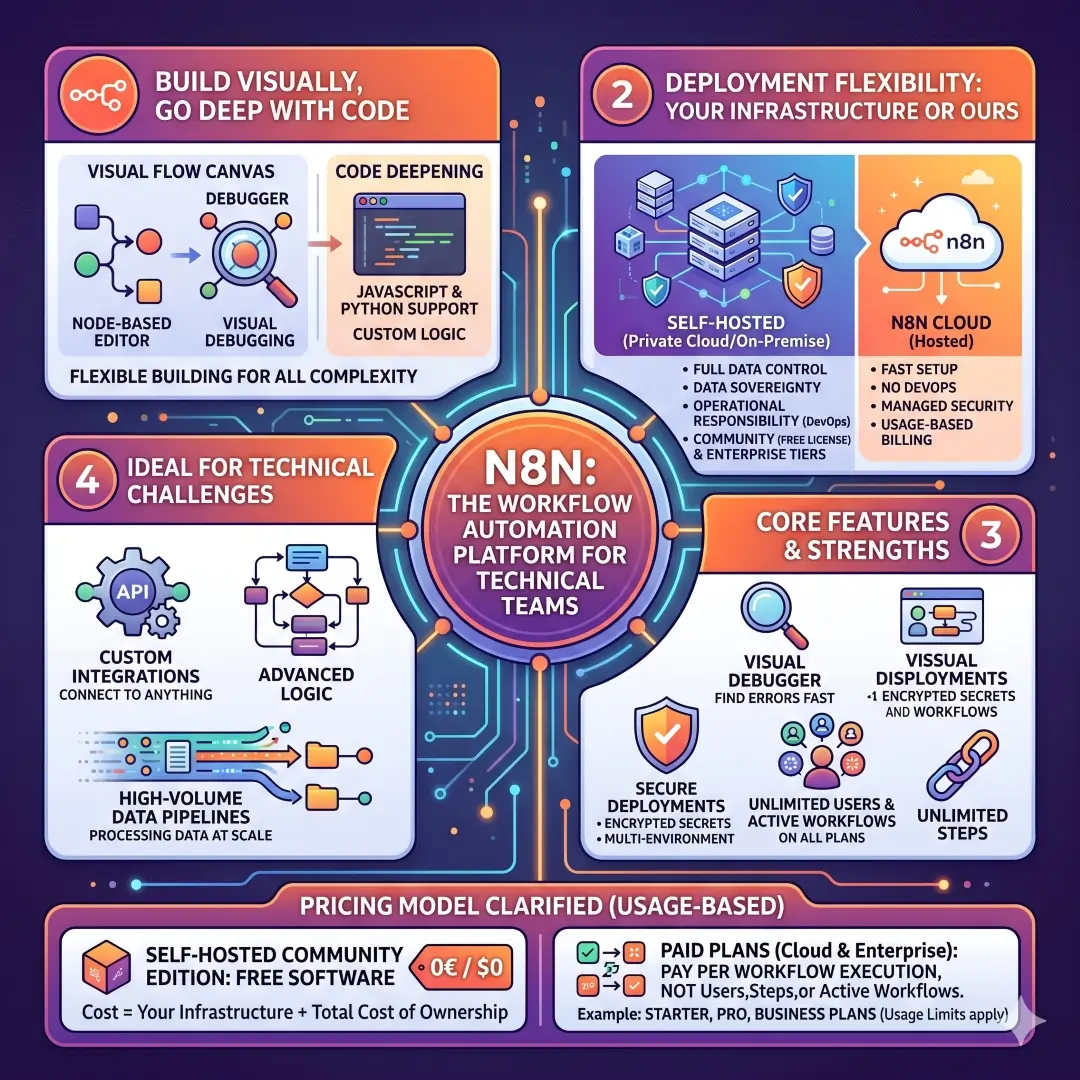
n8n is ideal for technical teams that want more control. Its site says users can build visually, go deep with code, connect to anything, and deploy on their own infrastructure or n8n’s hosted environment. Its features page emphasizes visual building, debugging, and secure deployments. n8n’s pricing page also highlights unlimited users and workflows in its current pricing model.
n8n is especially attractive when a business needs custom integrations, self-hosting, or advanced logic that no-code tools cannot handle comfortably. It is not always the fastest beginner option, but it can be one of the most flexible options for teams with technical confidence.
Practical Examples of Business Automation in Real Workflows
A marketing team can use HubSpot to capture a lead, score that lead, start an email sequence, and notify sales when the lead becomes sales-ready. HubSpot explicitly supports workflows, email automation, and lead scoring for this kind of journey.
A project team can use Asana or Monday.com to move work through stages automatically, assign the right owner, and send reminders when deadlines are near. Both platforms document rule-based or board-based automations for tasks and notifications.
An operations team can use Airtable to collect requests, update status fields, and connect with other tools through triggers. Airtable’s automation docs clearly position it around redundant tasks, communications, and tool connections.
A sales team can use Salesforce Flow to create follow-up tasks, route approvals, update records, and orchestrate larger processes across users and systems. Salesforce’s official materials describe exactly those kinds of low-code business automations.
A technical team can use n8n or Make to build multi-step workflows with logic, API calls, filters, and transformations. Make emphasizes routers, filters, and HTTP/webhooks, while n8n emphasizes visual building with code support and deployment flexibility.
How to Choose the Right Automation Tool
Before you pick a platform, ask a few simple questions:
- What are you automating most often? If the answer is apps and handoffs, start with Zapier or Make. If the answer is internal task flow, look at Asana or monday.com.
- Do you need CRM-first automation? If yes, HubSpot or Salesforce Flow is likely a better fit.
- Do you need a data-centered system? Airtable is usually the stronger choice.
- Do you need documentation plus lightweight automation? Notion can work beautifully.
- Do you want technical control or self-hosting? n8n is worth serious attention.
- Are you already in Microsoft 365? Power Automate is often the most natural fit.
A smart approach is to start small. Automate one repetitive workflow first, measure the time saved, and then expand. That strategy is usually safer than trying to automate everything at once. The official product pages across these platforms all show that automation is meant to start from triggers, rules, and workflows that can be expanded over time.
Common Mistakes to Avoid
One common mistake is choosing a tool only because it is popular. A popular tool is not always the best fit for your process. For example, Zapier is fantastic for broad app connectivity, but a Salesforce-heavy company may get more value from Flow, and a Microsoft-first company may move faster with Power Automate.
Another mistake is automating messy processes before fixing the process itself. Automation should make a workflow cleaner, not lock in confusion. If a process has unclear ownership, frequent exceptions, or no standard steps, it usually needs redesign before automation. That is one reason platforms like Asana, monday.com, Airtable, and Notion are helpful. They let teams define the workflow clearly before scaling it.
A third mistake is ignoring governance. Enterprise tools like Salesforce Flow, Power Automate, and Zapier Enterprise emphasize admin control, security, and monitoring because automation can touch sensitive data. If your workflow moves customer records, approvals, or finance data, governance matters as much as speed.
A Simple Workflow Automation Starter Plan
Here is a simple way to begin:
- Identify one repetitive task
- Map the trigger
- Define the action
- Choose the tool that already connects to the systems you use
- Test with a small group
- Measure the time saved
- Expand only after the workflow is stable
This approach fits the design of the platforms covered here because all of them use workflow logic built around triggers, actions, and connected systems.
Final Thoughts
The best business automation tool is the one that fits your team’s actual workflow, not just the one with the flashiest feature list. Zapier is excellent for broad app connectivity. Make is strong for visual, branching workflows. Power Automate is powerful for Microsoft users. Asana and monday.com are great for task and project automation. Airtable works well for data-driven teams. Notion is useful for docs and lightweight automation. HubSpot is excellent for customer journey automation. Salesforce Flow handles enterprise processes, and n8n gives technical teams maximum flexibility.
If the goal is faster workflows, the winning strategy is simple. Start with one clear process, automate the most repetitive part, and let the time savings prove the value. Once that works, expansion becomes much easier and much more confident.
Also, Read these Articles in Detail
- Best Business Tools for Small Businesses in 2026
- Top Business Tools Every Startup Needs
- Best Productivity Tools for Modern Teams
- Essential Business Tools for Remote Teams
- Best AI Business Tools to Save Time and Money
- Top 10 Project Management Tools for Growing Businesses
- 8 Best CRM Tools for Sales and Customer Growth
- Top 7 Accounting Tools for Small Business Owners
- Best Collaboration Tools for Business Teams
- Must-Have Business Tools for Entrepreneurs
Article’s References and Sources
- Zapier Official Website & Pricing
- Make Pricing and Features Page
- Power Automate Pricing and Plans
- Asana Workflow Automation (Rules Feature)
- Asana Pricing Page
- Monday.com Automation Guide
- Airtable Automations Documentation
- Notion Database Automations Guide
- HubSpot Marketing Automation Software
- Salesforce Automation and Flow Overview
- n8n Official Website
- McKinsey & Company: Superagency in the Workplace
- OECD: Automation, Skills, and Productivity Insights
Frequently Asked Questions
FAQ 1. What are business automation tools, and why are they important?
Business automation tools are software platforms that help companies handle repetitive tasks automatically instead of doing everything by hand. They work by using a trigger and an action. A trigger starts the workflow, and the action is what happens next. For example, when someone submits a form, the tool can send an email, create a task, update a record, or notify a team member without anyone needing to do it manually.
These tools are important because they save time, reduce human error, and help teams work in a more organized way. In many businesses, employees spend a lot of time copying data, sending reminders, moving tasks, or checking status updates. When those tasks are automated, people can focus on work that needs thinking, creativity, planning, and customer care.
Another major reason automation matters is consistency. Manual work often changes depending on who is doing it and how busy they are. Automation helps make the process the same every time. That creates fewer mistakes and better results. It also improves speed, because workflows can happen instantly instead of waiting for someone to remember the next step.
For modern businesses, automation is no longer only about convenience. It is a practical way to improve efficiency, support growth, and keep teams from getting overloaded with repetitive work. Whether a company is small or large, automation can make daily operations smoother and more reliable.
FAQ 2. Which business automation tool is best for beginners?
For beginners, the best tool is usually the one that feels easiest to understand and use. Many people start with Zapier because it is built around a simple idea. You choose one event that starts the workflow, then you choose what should happen next. This makes it easy for non-technical users to build useful automations without writing code.
Monday.com and Asana are also beginner-friendly, especially for people who already manage projects and tasks. Their automation features are built right into the workspace, so users do not have to learn a completely separate system. If someone already uses boards, task lists, or project timelines, it is easier to add automation there than to move everything to a new platform.
Notion is another good starting point for teams that already use it for notes, docs, or internal planning. Its database automations are straightforward and helpful for simple task flows. Airtable can also work well for beginners, especially if their work is centered around structured data, lists, or records.
The best beginner tool is not always the most powerful one. It is the one that helps the team automate a real task quickly, with minimal confusion. A simple first win builds confidence and makes it easier to automate more later.
FAQ 3. How do automation tools help businesses save time?
Automation tools save time by removing repetitive steps from everyday work. Instead of asking employees to manually copy information, send reminders, update spreadsheets, or move tasks from one stage to another, the tool does these things automatically. That means tasks are completed faster and with fewer interruptions.
For example, a sales team can automate lead follow-up. When a form is filled out, the lead can be sent to the right person, added to a CRM, and followed up with an email sequence. Without automation, this might take several manual steps and cause delays. With automation, it can happen in seconds.
Time savings also come from reducing back-and-forth communication. A workflow can send the right notification to the right person at the right time. A task can be reassigned automatically when it reaches a new stage. A report can be updated without someone opening multiple systems and collecting data by hand.
Over time, these small savings become very important. A few minutes saved on one task may not seem like much, but when a team repeats that task every day, the total time saved becomes significant. This is one of the biggest reasons companies adopt business automation. It helps them do more work with fewer delays and less manual effort.
FAQ 4. What is the difference between workflow automation and business process automation?
Workflow automation usually refers to automating a specific sequence of steps inside a task or team process. For example, when a new request comes in, the system assigns it, sends a message, and updates the status. This is often focused on one workflow, such as content approval, lead management, or task assignment.
Business process automation is broader. It covers larger business operations that may involve several teams, systems, or departments. For example, onboarding a new employee may involve HR, IT, payroll, and management. Automating that whole process is a form of business process automation.
The two ideas are connected, but they are not exactly the same. Workflow automation is often the starting point because it is easier to set up and easier to understand. Business process automation can be more advanced and may require tools that support approvals, integrations, data routing, and cross-team coordination.
In simple terms, workflow automation handles the steps of a task, while business process automation handles a larger business system. Many tools today support both, but some are better for lighter workflows, and others are stronger for complex company-wide processes.
FAQ 5. Which automation tools are best for marketing teams?
Marketing teams usually need tools that can handle lead capture, follow-up messages, campaign coordination, and audience tracking. HubSpot is one of the strongest choices for this because it was built around customer journeys, lead nurturing, email automation, and scoring. It is especially useful when marketing and sales need to work closely together.
Zapier is also very helpful for marketing teams because it can connect many apps. For example, when a new lead comes from a form, Zapier can send that lead into a CRM, notify the sales team, and store the information in a database. This is useful for campaign tracking and simple cross-tool automation.
Monday.com can support marketing operations by automating task updates, notifications, and campaign workflows. It is useful when a team needs to manage content production, approvals, or campaign calendars. Asana is also a strong option for marketing teams that want structured project management with automation built into the task system.
The best marketing automation tool depends on the team’s main need. If the goal is customer journeys and lead nurturing, HubSpot is often the strongest fit. If the goal is connecting many tools and automating small actions, Zapier can be ideal. If the goal is campaign management, Asana or monday.com may be a better match.
FAQ 6. Which automation tools work best for sales and CRM workflows?
For sales and CRM workflows, the most useful tools are usually the ones that can manage leads, follow-ups, task assignments, and customer records in a structured way. HubSpot is a strong choice because it combines CRM features with automation for lead scoring, email sequences, and customer journeys. This makes it easier for sales teams to follow up at the right moment.
Salesforce Flow is another powerful option, especially for larger businesses. It supports low-code automation, record updates, multi-step approvals, and orchestration across teams. If a company already uses Salesforce, Flow can help automate many CRM-related processes without needing separate systems.
Zapier is also useful for sales teams that need to connect forms, calendars, email tools, and CRMs. For example, when a new lead comes in, Zapier can create a record, notify a rep, and send a welcome message. That keeps response times fast and improves lead handling.
A good sales automation setup usually focuses on speed and accuracy. Leads should move quickly to the right person, follow-ups should happen on time, and data should stay organized. The best tool is the one that fits the size of the team and the complexity of the CRM process.
FAQ 7. How do I choose between Zapier, Make, and n8n?
These three tools are all useful, but they fit different needs.
Zapier is often the best choice for people who want something simple, fast, and beginner-friendly. It is great for connecting apps and setting up direct automations without much technical work. If the workflow is straightforward, Zapier is usually the easiest place to begin.
Make is better when the workflow needs more visual control and more complex logic. It is useful for branching workflows, filters, routers, and multi-step processes. Many users like it because they can see how the automation flows from one step to another. It is a strong fit when a business wants more flexibility than simple trigger-and-action automation.
n8n is best for teams that want maximum control, technical flexibility, and possible self-hosting. It is a great option when workflows need deeper customization, code support, or more advanced internal automation. Developers often appreciate how adaptable it is.
The choice depends on the team’s skill level and goals. If the need is simple and fast, Zapier is often easiest. If the need is visual and flexible, Make stands out. If the need is technical and highly customizable, n8n is a strong option. There is no single best tool for everyone.
FAQ 8. Are automation tools useful for small businesses too?
Yes, automation tools are extremely useful for small businesses. In fact, small teams often benefit the most because they usually have limited time, limited staff, and many tasks that need to be done every day. Automation helps small businesses do more with fewer resources.
A small business can automate many common tasks, such as new lead alerts, invoice reminders, appointment confirmations, file organization, social media updates, or customer follow-up emails. These tasks may seem small, but they take up a lot of time when done manually. Automation reduces that burden and keeps the business running more smoothly.
Small businesses also gain a competitive advantage from speed. When a customer inquiry is answered quickly or a lead is followed up on immediately, the business looks more professional and reliable. Automation makes that kind of fast response much easier.
Another benefit is that small businesses can start with simple automations and grow gradually. They do not need to build a huge system on day one. They can begin with one workflow, test it, and expand as the business grows. That makes automation practical, affordable, and manageable for smaller teams.
FAQ 9. What are the most common mistakes businesses make when using automation tools?
One common mistake is automating a process before making it clear. If a workflow is messy, inconsistent, or poorly defined, automation will not fix the problem by itself. It may even make the confusion worse. Before building automations, businesses should understand the exact steps they want to improve.
Another mistake is trying to automate too much at once. It is better to start with one simple process and build from there. That makes it easier to test, correct, and improve the workflow. When teams try to automate everything immediately, they often create systems that are hard to manage.
A third mistake is ignoring data quality. If the information entering the automation is wrong or incomplete, the output will also be unreliable. For example, if lead data is missing or task fields are inconsistent, the automation may send the wrong message or assign the wrong owner.
Businesses also sometimes forget about permissions and governance. Some workflows involve sensitive records, customer data, or approval chains. Those automations need careful control. The best results come from combining speed with security, clarity, and oversight.
FAQ 10. How can a business start using automation without making it complicated?
The easiest way to start is by choosing one repetitive task that happens often and causes frustration. This could be lead capture, reminder emails, task assignment, approval routing, or file updates. A good first workflow should be simple, important, and easy to measure.
Next, the business should define the trigger and the action. For example, if a form is submitted, the trigger is the submission. The action might be adding the response to a database, creating a task, or sending a message. Keeping the first automation simple makes it easier to test and understand.
It also helps to choose a tool that matches the way the team already works. If the business already uses a project tool, it may make sense to start there. If the team depends on CRM data, a customer platform may be a better fit. If the business uses many different apps, a connector tool may be ideal.
The final step is to monitor the automation and improve it gradually. A good automation is not just set once and forgotten. It should be checked, refined, and expanded when needed. Starting small and building slowly is the safest and smartest way to create a strong automation system.
Article Disclaimer
The information provided in this article, “Best Business Automation Tools for Faster Workflows,” is intended for general informational and educational purposes only. While every effort has been made to ensure the accuracy, relevance, and completeness of the content, the tools, features, pricing, and capabilities mentioned may change over time. Readers are encouraged to verify details directly from official sources before making any business or purchasing decisions.
This article does not constitute professional advice, including but not limited to business, financial, technical, or legal advice. The tools and strategies discussed are based on widely available information and general industry practices. Every business operates differently, and what works effectively for one organization may not be suitable for another. Readers should assess their own needs, workflows, and resources or consult with a qualified professional before implementing any automation solutions.
All product names, trademarks, and brands mentioned in this article are the property of their respective owners. Their inclusion is for informational and comparative purposes only and does not imply any form of endorsement, partnership, or affiliation. The opinions expressed in this article are neutral and intended to help readers understand available options in the market.
The use of business automation tools may involve handling sensitive data, integrating multiple systems, and relying on third-party platforms. Readers are solely responsible for ensuring proper data security, compliance, privacy policies, and regulatory requirements when implementing any automation solution. The author and publisher are not responsible for any loss, damage, or disruption arising from the use or misuse of the tools or strategies discussed.
Additionally, while automation can significantly improve efficiency, productivity, and workflow speed, results may vary depending on implementation, team adoption, and operational complexity. There is no guarantee of specific outcomes, performance improvements, or business success from using any of the tools mentioned.
By reading this article, you acknowledge that you are using the information at your own discretion and risk.
