Running a business today is not only about selling a product or service. It is also about keeping everyday work smooth, organized, and predictable. That is where the best online business tools for daily operations make a real difference. The right tools help teams communicate faster, manage projects clearly, share files safely, send invoices on time, schedule meetings without endless back and forth, and keep customer data in one place. In other words, they reduce confusion and give people more time to do meaningful work. Microsoft 365, Google Workspace, Slack, Asana, Zoom Workplace, Dropbox, QuickBooks, Calendly, and HubSpot CRM are all built around those everyday needs in different ways.
What makes a tool valuable in daily operations is not just its features. It is whether it solves a recurring problem cleanly. A strong daily operations stack should support communication, documentation, task management, file storage, financial control, meeting scheduling, and customer tracking without creating extra confusion. The tools below are popular because they each address one or more of those daily pain points in a practical way.
Table of Contents
Why Online Business Tools Matter in Daily Operations
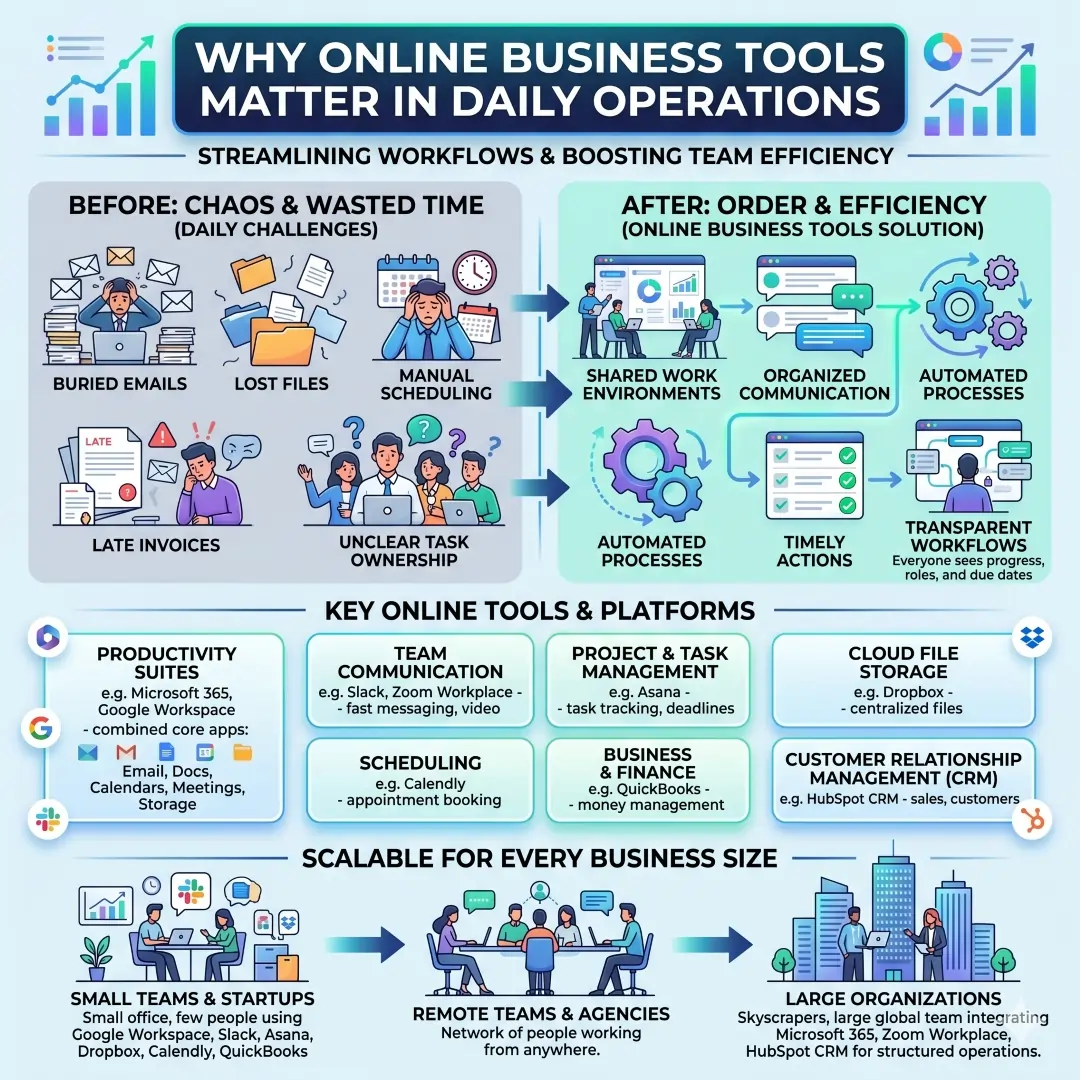
A business can lose a surprising amount of time to small things. Emails get buried, files disappear in folders, invoices are sent late, meetings are scheduled manually, and task ownership becomes unclear. Online business tools solve this by giving your team a shared system. Instead of relying on memory or scattered chats, everyone can see what needs to happen, who owns it, and when it is due. Microsoft 365 and Google Workspace are especially useful here because they combine core productivity apps like email, documents, calendars, meetings, and cloud storage into connected work environments.
The best part is that these platforms are not just for big companies. Small businesses, startups, agencies, freelancers, and remote teams can all use them to build a consistent daily workflow. A small team might use Google Workspace for email and shared docs, Slack for fast team communication, Asana for task tracking, Dropbox for file storage, Calendly for scheduling, and QuickBooks for finances. Larger organizations may add Microsoft 365, Zoom Workplace, or HubSpot CRM to support more structured operations.
Quick Comparison Table of the Best Daily Operations Tools
| Tool | Best for | Core strengths | Best fit |
|---|---|---|---|
| Microsoft 365 | Productivity and document work | Word, Excel, PowerPoint, Outlook, Teams, OneDrive, and business security options | Teams that live in documents, spreadsheets, and email |
| Google Workspace | Cloud collaboration | Gmail, Drive, Docs, Sheets, Slides, Meet, Chat, and custom business email | Teams that want simple real-time collaboration |
| Slack | Team communication | Channels, huddles, Canvas, Lists, Workflow Builder, and integrations | Fast-moving teams that need organized messaging |
| Asana | Task and project management | Projects, goals, reporting, workflows, automation, resource management | Teams that need clear ownership and deadlines |
| Zoom Workplace | Meetings and collaboration | Meetings, chat, docs, and AI-assisted collaboration | Teams that meet often and need one platform |
| Dropbox | File storage and sharing | Secure cloud storage, file sharing, collaboration, Paper, and backup tools | Teams handling many files and approvals |
| QuickBooks | Accounting and invoicing | Invoicing, expense tracking, payroll, financial reporting, cash flow tools | Businesses that need day-to-day finance control |
| Calendly | Scheduling automation | Availability sharing, booking links, reminders, follow-ups, team scheduling | Sales teams, consultants, recruiters, and service businesses |
| HubSpot CRM | Customer tracking | Contact management, email tracking, meeting scheduling, pipeline management, live chat | Teams that need one customer hub |
1. Communication Tools That Keep Daily Work Moving
Communication is the heartbeat of daily operations. If messages are unclear, slow, or scattered, the rest of the work slows down too. That is why tools like Slack, Microsoft Teams, Google Chat, and Zoom Chat matter so much. They do more than send messages. They help teams organize conversations into channels, connect apps, and keep important information closer to the work itself. Slack’s current platform emphasizes channels, huddles, Canvas, Lists, file sharing, and workflow automation, which makes it useful for both conversation and coordination. Zoom Workplace also brings chat together with meetings and documents, while Google Workspace includes Chat as part of its business suite.
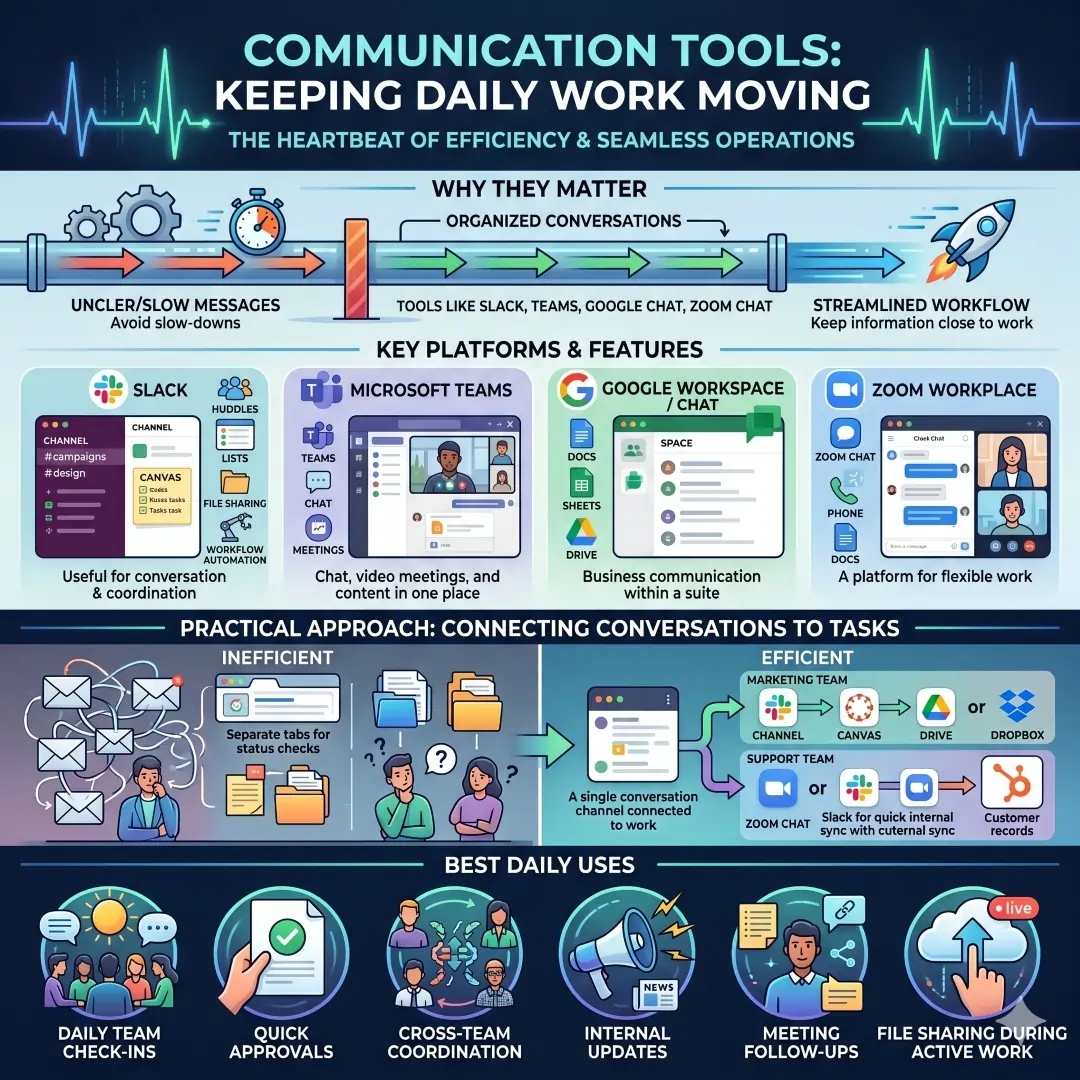
A practical way to think about communication tools is this. Use them to replace repeated status checks and long message chains. For example, a marketing team can keep campaign questions in one Slack channel, use a Canvas page for shared notes, and store the final assets in Dropbox or Drive. A support team can use Zoom Chat or Slack for quick internal responses while keeping customer records in HubSpot. This creates a cleaner flow of work because the conversation stays attached to the task.
Best uses for communication tools include:
- Daily team check-ins
- Quick approvals
- Cross-team coordination
- Internal updates
- Meeting follow-ups
- File sharing during active work
2. Productivity Suites for Email, Docs, Calendar, and Storage
For many businesses, the foundation of daily operations is a productivity suite. The two most widely used options are Microsoft 365 and Google Workspace. Microsoft 365 for business includes apps such as Word, Excel, PowerPoint, Outlook, Teams, and OneDrive, which make it strong for document-heavy work, spreadsheet reporting, and email-based workflows. Google Workspace includes Gmail, Drive, Docs, Sheets, Slides, Forms, Calendar, Meet, and Chat, which makes it especially strong for real-time collaboration across browsers and devices.
If your business spends a lot of time creating proposals, reports, spreadsheets, contracts, or presentations, a productivity suite becomes a daily necessity. Microsoft 365 is often attractive for businesses that rely on Excel and Outlook workflows. Google Workspace is often attractive for teams that want easy sharing, live editing, and browser-first collaboration. Both platforms support mobile and desktop use, which is useful for teams that work from different locations.
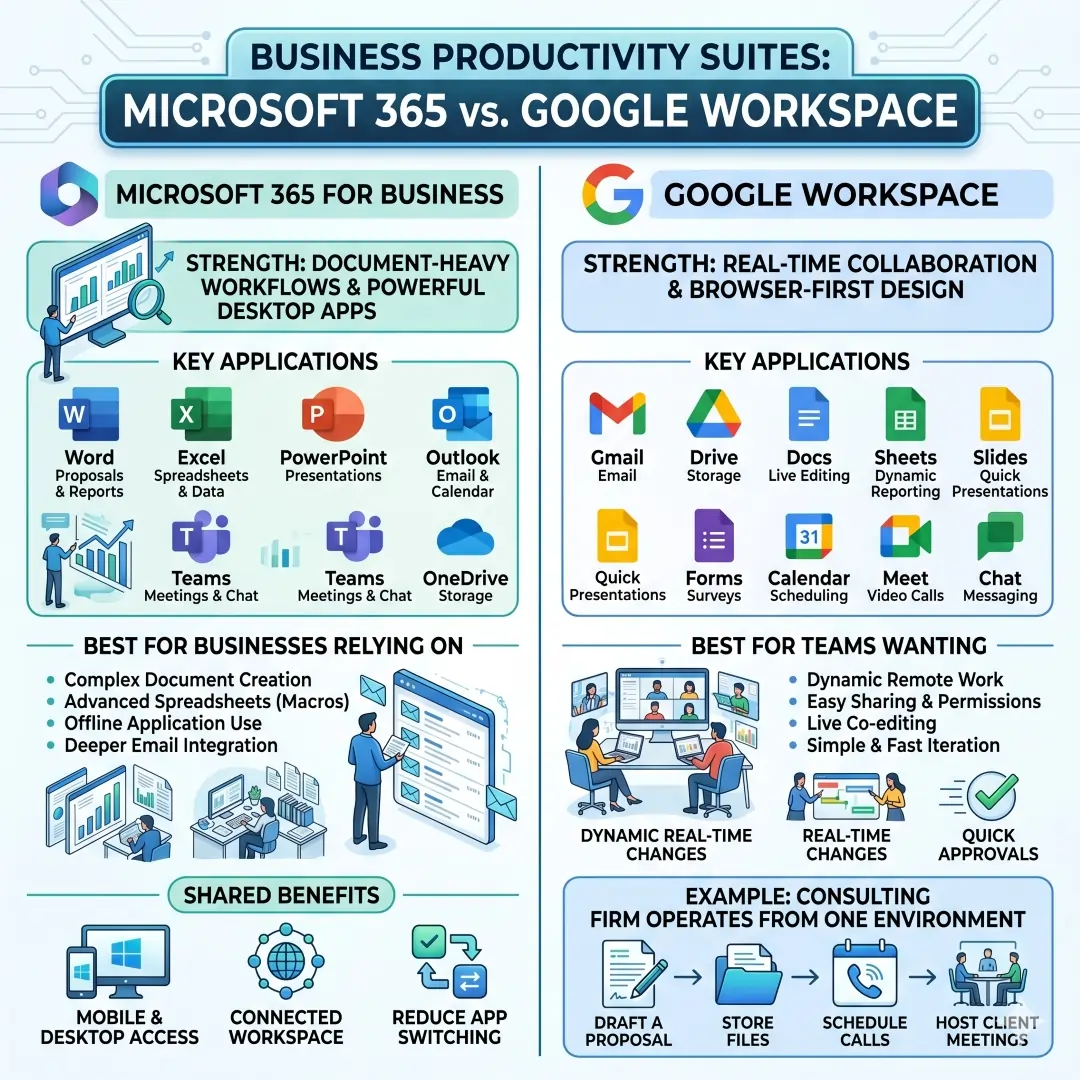
A simple example makes the value clear. A consulting firm can draft proposals in Word or Google Docs, store final files in OneDrive or Drive, schedule follow-up calls in Outlook Calendar or Google Calendar, and host client meetings through Teams or Meet. The tools reduce switching and help the firm operate from one connected workspace instead of many disconnected apps.
3. Project Management Tools for Better Task Control
Daily operations become much easier when everyone knows what to do next. That is the main job of project management software. Asana is one of the clearest examples. Its official feature set includes project management, goals and reporting, workflows and automation, resource management, and admin and security. Asana also emphasizes forms, rules, and templates for standardizing work requests and routine actions.
This matters because many daily work problems are not really talent problems. They are coordination problems. One person thinks another person is handling a task, or the task exists in chat but not in the official plan. With tools like Asana, tasks can be assigned, due dates can be set, progress can be tracked, and recurring work can be standardized. That makes it easier to keep operations predictable.
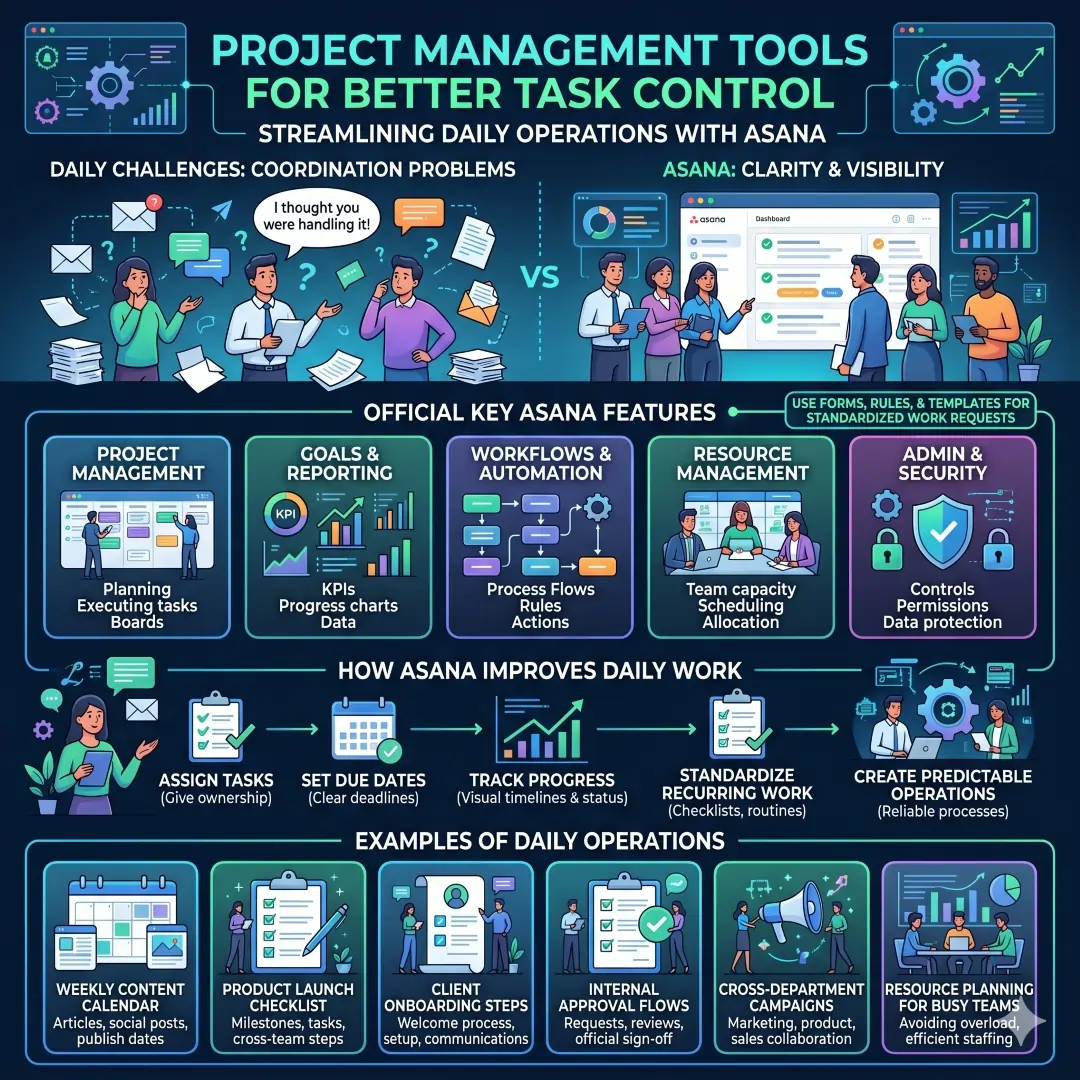
Examples of daily operations that Asana can support:
- Weekly content calendars
- Product launch checklists
- Client onboarding steps
- Internal approval flows
- Cross-department campaigns
- Resource planning for busy teams
Why this tool stands out: it is not only about tasks, but also about goals, reporting, and automation, which helps management see whether daily work is moving toward larger business outcomes.
4. Meeting and Collaboration Platforms for Remote and Hybrid Teams
A business can lose time every day to poorly managed meetings. That is why Zoom Workplace deserves a place in a daily operations stack. Zoom describes Zoom Workplace as a platform that unites meetings, docs, chat, and more, with an AI Companion built in to help teams focus and work together. Its chat product and docs features show that Zoom is no longer just a video calling app. It is becoming a broader collaboration environment.
This is especially useful for companies with many remote check-ins, customer calls, interviews, or training sessions. Instead of using one app for meetings, another for notes, and another for chat, the work can happen in a more unified flow. Zoom Chat is included with Zoom Workplace plans, and Zoom Docs is designed to help users draft, organize, and share working materials.
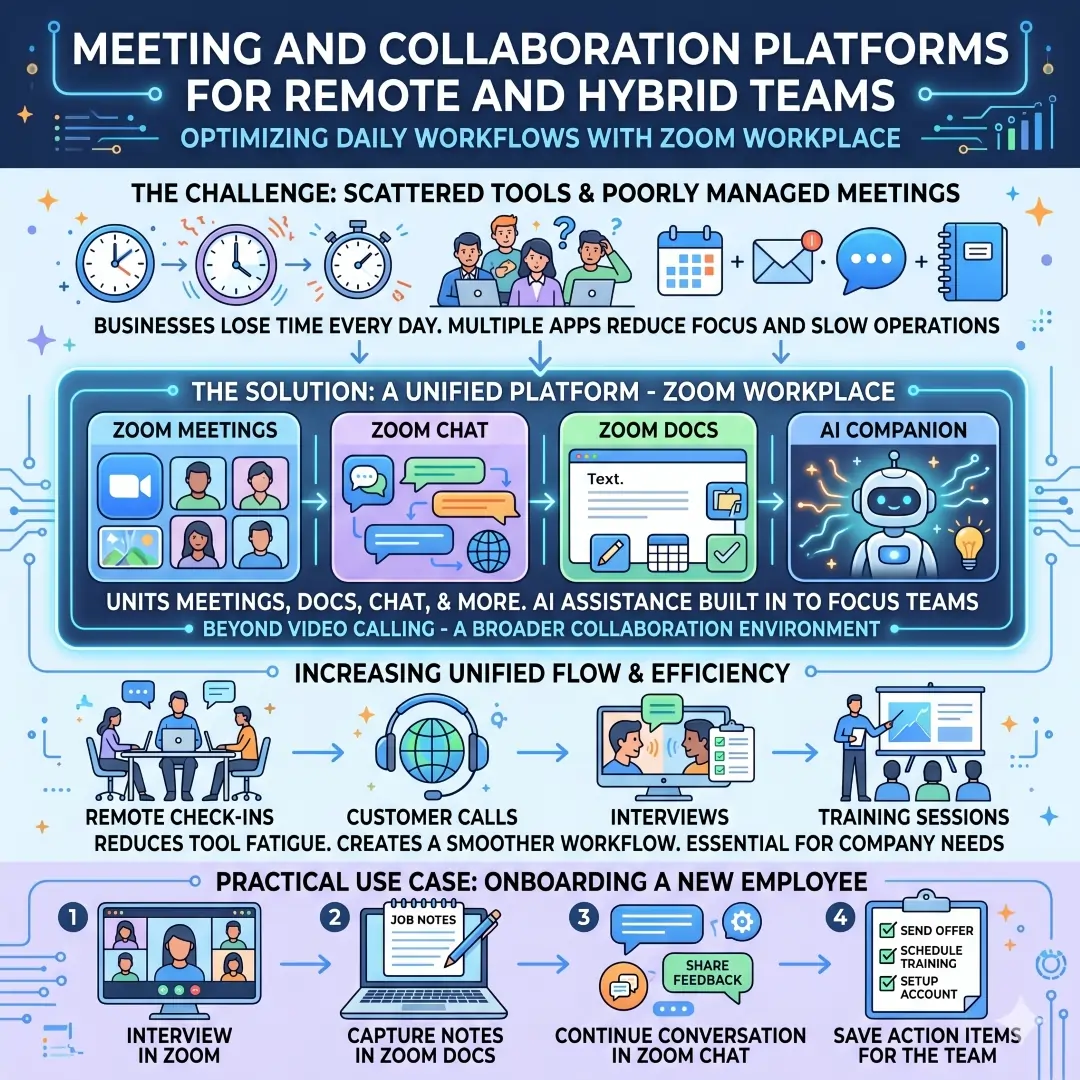
A practical use case is onboarding. A hiring manager can run the interview in Zoom, capture notes in Zoom Docs, continue the conversation in Zoom Chat, and save action items for the team. This reduces the number of tools people need to manage during a busy workday.
5. Cloud Storage and File Sharing Tools for Safe Daily Access
Every business depends on files, and file chaos can be costly. Dropbox is a strong choice for secure file storage and collaboration. Its official pages highlight cloud storage, file sharing, collaboration, and security features such as 256-bit AES encryption, SSL/TLS, file recovery, password protection, watermarking, and viewer history. Dropbox also highlights Paper as a collaborative doc for organizing projects with timelines, to-dos, and tables.
Why does this matter in daily operations? Because teams constantly move documents, images, videos, contracts, and approvals. Without a structured file system, people waste time searching, recreating lost versions, or sending outdated attachments. Dropbox makes it easier to keep work in one place and share it with controlled permissions.
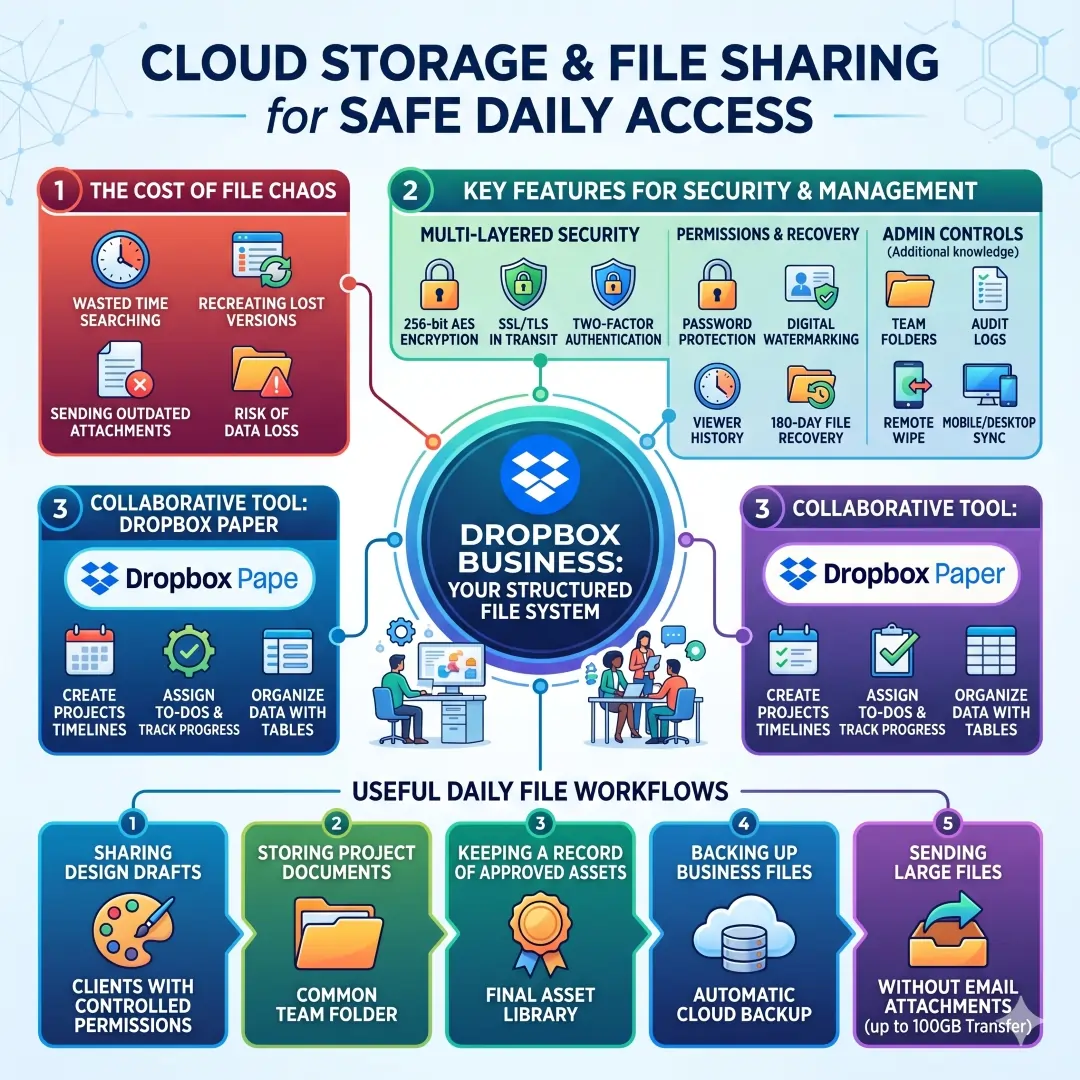
Useful daily file workflows include:
- Sharing design drafts with clients
- Storing project documents in a common folder
- Keeping a record of approved assets
- Backing up important business files
- Sending large files without endless email attachments
6. Accounting and Invoicing Tools That Keep Money Moving
Business operations are not truly organized unless the money side is organized too. That is why QuickBooks is one of the most important tools in this list. QuickBooks says its software supports invoicing, expense tracking, payroll, and financial reporting, and its invoicing product allows users to create, send, and track invoices, record payments, and monitor outstanding balances.
For daily operations, this matters because cash flow depends on routine financial habits. Invoices should go out on time. Expenses should be captured regularly. Payroll should be processed accurately. Reports should be available when owners or managers need them. QuickBooks is built to support those recurring tasks in one place.
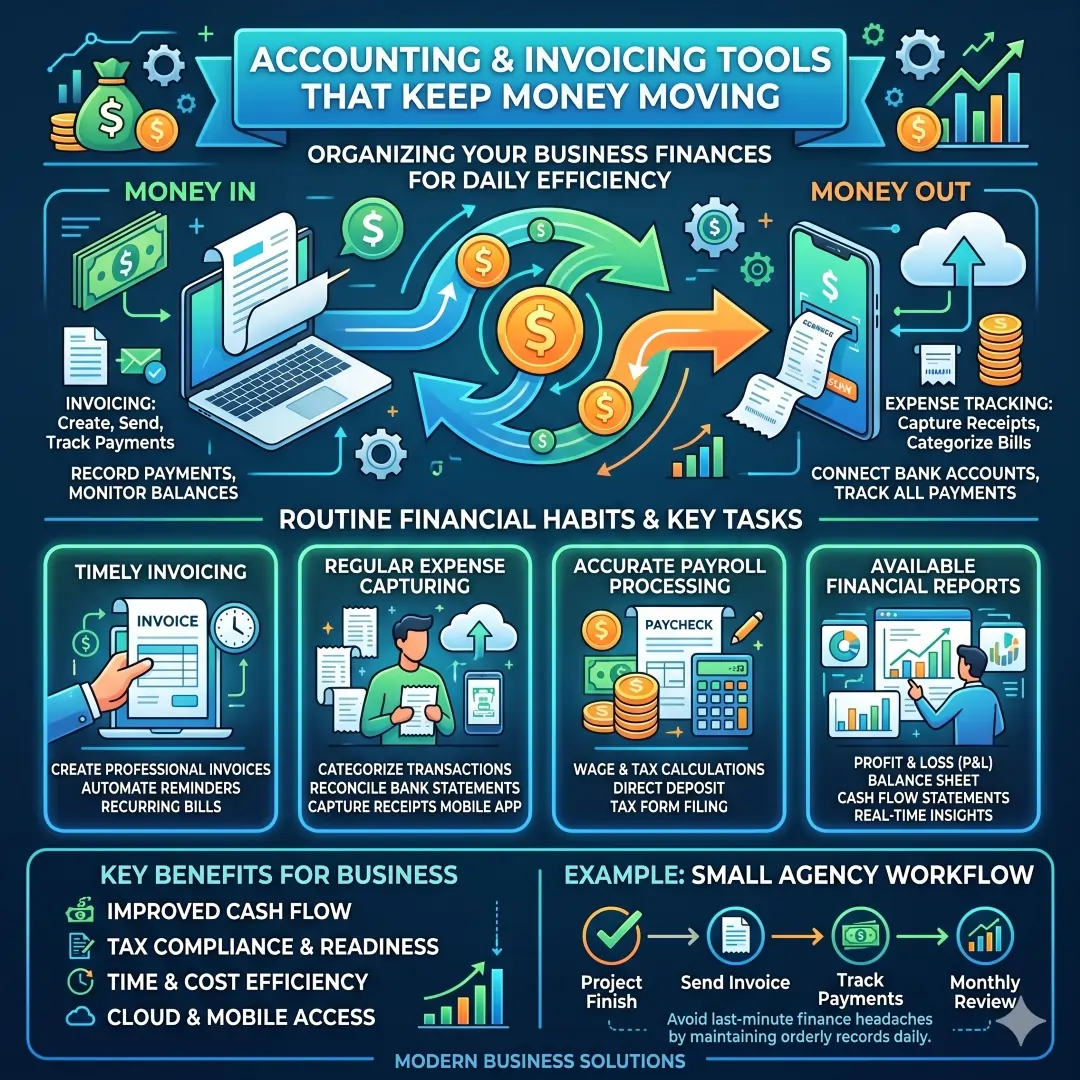
A small agency, for example, may use QuickBooks to send invoices at the end of each project, track overdue payments, record vendor bills, and review monthly reports. That keeps the business from turning finance into a last-minute headache.
7. Scheduling Tools That Remove Calendar Friction
Scheduling may look simple, but it absorbs a lot of time in real business life. Calendly is built to reduce that friction. Calendly describes itself as a modern scheduling platform that makes finding time easier, and its scheduling pages emphasize sharing availability, booking links, reminders, follow-ups, group scheduling, and team coordination.
This is extremely useful for sales teams, recruiters, consultants, coaches, and service businesses. Instead of swapping several emails to find one available time, you share a link and let the other person book directly from your open slots. Calendly’s team scheduling features are especially helpful when more than one teammate needs to attend the same meeting.
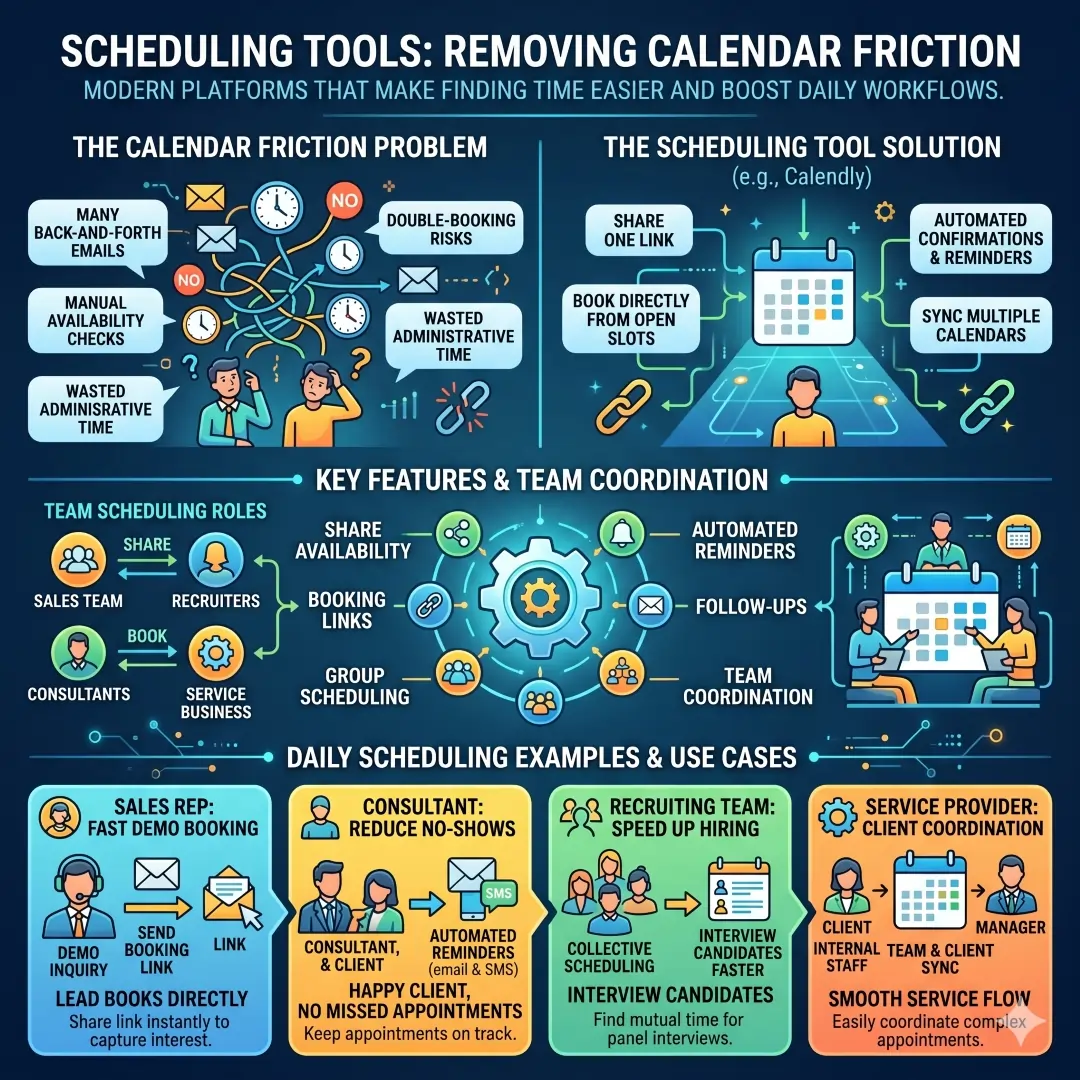
Daily scheduling examples:
- A sales rep sends a booking link after a demo inquiry
- A consultant uses reminders to reduce no-shows
- A recruiting team schedules interviews faster
- A service provider coordinates clients and internal staff more easily
8. CRM Tools for Customer Operations and Follow-Up
Daily operations are not only internal. They also include the way you handle leads, customers, and follow-up tasks. HubSpot CRM is useful here because it centralizes customer data and includes contact management, email tracking, meeting scheduling, live chat, and pipeline management. HubSpot also describes its CRM as a unified platform for customer data with AI support and workflow automation across sales, service, and marketing.
This is important because many businesses lose opportunities after the first conversation. A lead gets forgotten, a follow-up never happens, or a customer complaint sits in one inbox too long. A CRM helps keep those interactions visible. It also makes it easier to move people through a pipeline, assign tasks, and understand the status of each relationship.
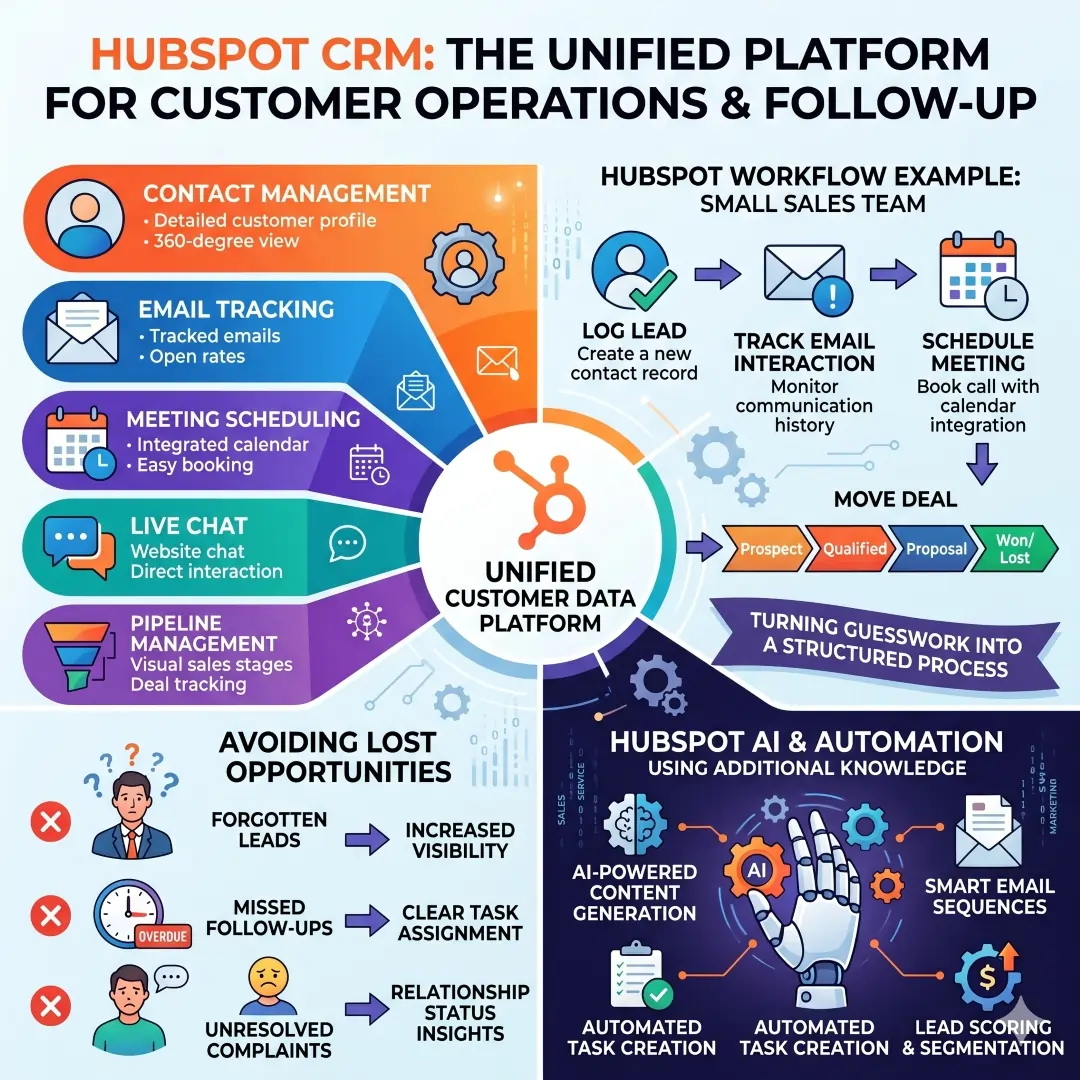
A good example is a small sales team using HubSpot to manage incoming leads. The team can log a contact, track the email interaction, schedule a meeting, and move the deal through stages in the pipeline. That turns customer work from guesswork into a structured process.
How to Build a Smart Daily Operations Stack
A smart stack does not need to be huge. It needs to be balanced. The best approach is usually to choose one tool for each major job and avoid overlap. A simple stack might look like this:
| Business need | Recommended tool | Why it helps |
|---|---|---|
| Email, docs, spreadsheets | Microsoft 365 or Google Workspace | Gives your team a shared productivity base |
| Team chat | Slack | Keeps day-to-day communication organized by channel |
| Task management | Asana | Clarifies ownership, deadlines, and progress |
| Meetings | Zoom Workplace | Combines meetings, chat, and docs in one place |
| File storage | Dropbox | Supports secure storage, sharing, and collaboration |
| Finance | QuickBooks | Handles invoicing, expenses, payroll, and reports |
| Scheduling | Calendly | Removes email back and forth for booking meetings |
| Customer records | HubSpot CRM | Keeps leads and customer activity in one system |
The strongest stacks usually follow a simple principle. Keep the number of main tools low, but make sure each tool has a clear job. That way, your team knows where to communicate, where to store files, where to assign tasks, and where to track customers.
Best Tool Choices by Business Type
Different businesses need different setups. A freelancer, for example, may only need a productivity suite, a scheduling tool, and an accounting platform. A remote agency may need communication, project management, file storage, and finance tools. A sales-led company may need CRM and scheduling first, followed by collaboration software. (Google Workspace)
Here is a practical way to think about it:
| Business type | Best daily tools | Why |
|---|---|---|
| Freelancer | Google Workspace, Calendly, QuickBooks | Covers email, files, scheduling, and billing |
| Small agency | Microsoft 365, Slack, Asana, Dropbox, QuickBooks | Good for collaboration, task control, and finance tracking |
| Sales team | HubSpot CRM, Calendly, Slack, Zoom Workplace | Helps manage leads, meetings, and follow-up speed |
| Remote company | Google Workspace, Slack, Zoom Workplace, Asana | Supports communication, work tracking, and live collaboration |
| Finance-focused business | QuickBooks, Microsoft 365, Dropbox | Keeps accounting, reporting, and file management under control |
What to Look for Before Choosing Any Tool
The best online business tool is not always the one with the most features. It is the one your team will actually use every day. Before choosing a tool, check whether it is easy to learn, works well on mobile and desktop, integrates with your current software, and fits the way your team already works. Official product pages for these tools show that many of them now place a strong focus on collaboration, automation, and AI support, which can save time when used properly.
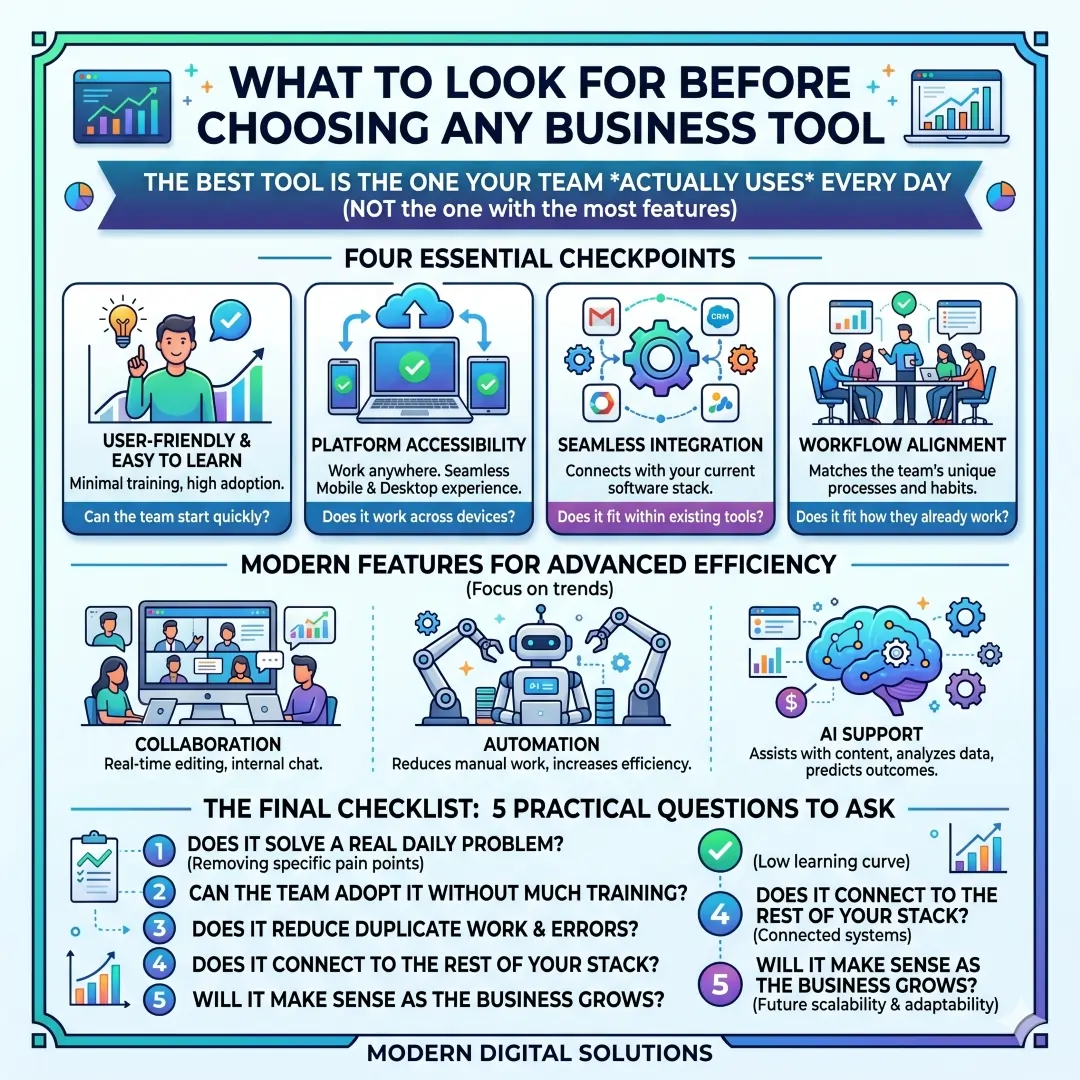
A few practical questions are worth asking:
- Does the tool solve a real daily problem?
- Can the team adopt it without too much training?
- Does it reduce duplicate work?
- Does it connect with the rest of your stack?
- Will it still make sense as the business grows?
A Simple Daily Workflow Using These Tools
Here is a realistic example of how a small online business might use these tools in one day:
The team starts the morning in Slack or Microsoft Teams to share updates. Tasks are checked in Asana. Files are pulled from Dropbox or Google Drive. Meetings are held on Zoom Workplace or Google Meet. Sales calls are booked through Calendly. New leads are tracked in HubSpot CRM. Invoices go out through QuickBooks. Drafts, reports, and planning documents are managed in Microsoft 365 or Google Workspace. That combination creates a workflow that is organized, repeatable, and easier to manage.
Final Thoughts
The best online business tools for daily operations are the ones that make work simpler, not heavier. Microsoft 365 and Google Workspace support the daily basics. Slack and Zoom Workplace keep people connected. Asana brings clarity to tasks. Dropbox protects files and makes sharing easy. QuickBooks keeps finances under control. Calendly saves time on scheduling. HubSpot CRM helps manage customer relationships with more structure. Together, these tools form a practical foundation for almost any modern business.
The most successful companies do not simply collect software. They build a system. When every tool has a clear role, daily operations become more organized, communication clearer, and growth easier to manage. That is the real value of choosing the right online business tools.
Also, Read these Articles in Detail
- Best Business Tools for Small Businesses in 2026
- Top Business Tools Every Startup Needs
- Best Productivity Tools for Modern Teams
- Essential Business Tools for Remote Teams
- Best AI Business Tools to Save Time and Money
- Top 10 Project Management Tools for Growing Businesses
- 8 Best CRM Tools for Sales and Customer Growth
- Top 7 Accounting Tools for Small Business Owners
- Best Collaboration Tools for Business Teams
- Must-Have Business Tools for Entrepreneurs
- 10 Best Business Automation Tools for Faster Workflows
- Top Tools to Organize Your Business Like a Pro
Article References And Citations
- Microsoft. Microsoft 365 for Business Overview.
- Microsoft. Microsoft 365 Business Solutions.
- Google. Google Workspace Official Site.
- Slack Technologies. Slack Features and Overview.
- Asana, Inc. Asana Product Features.
- Zoom Video Communications. Zoom Collaboration Tools.
- Zoom Video Communications. Zoom Team Chat.
- Dropbox, Inc. Dropbox Features Overview.
- Dropbox, Inc. Dropbox Security Features.
- Intuit. QuickBooks Global Overview.
- Calendly, LLC. Calendly Official Website.
- Calendly, LLC. Scheduling Features.
- HubSpot, Inc. HubSpot CRM Platform.
Frequently Asked Questions
FAQ 1: What are the best online business tools for daily operations?
The best online business tools for daily operations are the tools that help a business work smoothly every single day. These usually include a productivity suite, a team communication tool, a project management platform, a cloud storage system, an accounting tool, a meeting and scheduling solution, and a customer relationship management system. Together, these tools help teams communicate clearly, share files safely, track work, manage money, and stay organized.
A good daily operations setup is not about using the most tools. It is about using the right tools for the right jobs. For example, one tool can handle emails and documents, another can manage tasks, another can track invoices, and another can help schedule meetings. This reduces confusion and saves a lot of time. It also helps teams avoid repeating work or searching for information in many different places.
For most businesses, the best daily tools are the ones that are easy to use, work well on both computers and mobile devices, and connect with other tools. A business that chooses simple, reliable, and connected tools usually runs more efficiently than one that depends on scattered apps and manual processes. That is why the best online business tools are often the ones that make everyday work feel more organized, faster, and less stressful.
FAQ 2: Why do businesses need online tools for daily operations?
Businesses need online tools for daily operations because everyday work becomes much easier when it is organized in one system. Without the right tools, people spend too much time on small problems like searching for files, waiting for replies, checking task status, or rescheduling meetings. These little delays add up and can slow down the whole business.
Online tools help solve these problems by creating structure. A communication tool keeps messages in one place. A task management tool makes responsibilities clear. A cloud storage platform keeps files easy to find. A finance tool helps with invoices and expenses. A scheduling tool removes the back and forth of booking meetings. When all of these tools work together, daily operations become more predictable.
Another big reason businesses need online tools is teamwork. Many businesses now have remote staff, hybrid teams, freelancers, and outside partners. Online tools let everyone stay connected no matter where they are working from. That is very important in modern business because speed and clarity often decide how well a company performs.
FAQ 3: How do productivity suites help with daily business work?
A productivity suite helps with daily business work by bringing together the most common office tasks in one place. These tasks usually include email, word processing, spreadsheets, presentations, calendars, and cloud storage. When a business uses a strong productivity suite, its team does not need to jump between many separate tools for basic work.
This type of tool is useful because daily business work often depends on documents, reports, drafts, and schedules. A team may need to write a proposal, update a spreadsheet, share a presentation, or plan a meeting. A productivity suite makes all of that easier because the tools are connected and built to work together. It also makes collaboration smoother, especially when more than one person is editing the same file.
Another advantage is that productivity suites often support both office and remote work. A person can start a document on a laptop, check a calendar on a phone, and share files from the cloud without losing track of the work. That makes the whole business more flexible and efficient.
FAQ 4: What makes a communication tool important for business operations?
A communication tool is important for business operations because most work depends on people staying aligned. If messages are scattered across email, text, and random calls, it becomes harder to track decisions and follow up properly. A good communication tool keeps conversations organized and easy to search later.
These tools are especially valuable for teams that work on shared projects. They let people create channels or groups for different topics, such as sales, customer service, marketing, or internal updates. This keeps important conversations from getting lost. It also helps reduce long email chains that can be hard to follow.
Communication tools also support faster decision-making. Instead of waiting hours for an email reply, teams can ask quick questions, share files, and solve problems in real time. That makes daily operations smoother and helps businesses respond quickly to customers, deadlines, and changes in work.
FAQ 5: How do project management tools improve daily operations?
A project management tool improves daily operations by making work visible, structured, and easier to track. It helps businesses assign tasks, set deadlines, monitor progress, and see what still needs to be done. This is especially useful when several people are working on the same project.
Without a project management tool, tasks often get lost in chat messages, emails, or verbal instructions. That can lead to missed deadlines and confusion about who is responsible for what. A project management system solves this by showing tasks in a clear way. Everyone can see what has started, what is in progress, and what is finished.
These tools are also helpful for recurring work. Businesses often repeat the same processes every week or month, such as content planning, campaign launches, reporting, or client onboarding. A project management platform makes it easier to reuse checklists, workflows, and templates. That saves time and keeps work consistent.
FAQ 6: Why are cloud storage tools important for business file management?
Cloud storage tools are important for business file management because they keep important files safe, accessible, and easy to share. Businesses deal with many documents, images, contracts, spreadsheets, and presentations every day. If these files are stored in different places or only on local devices, it becomes hard to stay organized.
Cloud storage solves this problem by creating one central place for files. Team members can open documents from different devices, share them with the right people, and work together without sending endless email attachments. This is especially useful for businesses with remote teams, client work, or fast-moving projects.
Another advantage is file security and recovery. If a device is lost or damaged, cloud storage helps protect important work. It also reduces the risk of version confusion because teams can keep track of the latest file instead of working on old copies. For daily operations, that kind of reliability is extremely valuable.
FAQ 7: How do accounting and invoicing tools support daily business operations?
Accounting and invoicing tools support daily business operations by helping a company stay on top of money matters. This includes sending invoices, tracking payments, recording expenses, managing payroll, and reviewing reports. When these tasks are done regularly, the business has a much clearer view of its financial health.
Many businesses struggle not because they lack sales, but because they do not manage cash flow well. A strong accounting tool helps fix that by keeping financial records organized and up to date. It makes it easier to see who has paid, which bills are due, and how much money is coming in or going out.
These tools also save time. Instead of manually preparing invoices or calculating reports, the business can use software to handle repeated financial tasks. That reduces errors and gives owners and managers more confidence in the numbers they see. For daily operations, that kind of control is essential.
FAQ 8: Why should businesses use scheduling tools?
Businesses should use scheduling tools because meetings and appointments often waste a lot of time when they are arranged manually. A scheduling tool lets people share their availability, book a time automatically, and send reminders without back-and-forth messages. This makes the process much faster and more professional.
Scheduling tools are especially useful for sales teams, consultants, recruiters, service providers, and anyone who books meetings often. Instead of asking several times when someone is free, the business can simply send a booking link. The other person chooses a suitable time, and the meeting is confirmed automatically.
These tools also reduce no-shows and missed appointments because they often include reminders and notifications. That improves daily operations by making the calendar more dependable. It also helps staff spend less time on scheduling and more time on actual work.
FAQ 9: How does a customer relationship management system help daily operations?
A customer relationship management system, often called a CRM, helps daily operations by keeping customer and lead information in one organized place. It tracks contacts, conversations, meetings, follow-ups, and deal stages. This is important because businesses cannot afford to forget customer details or miss follow-up opportunities.
A CRM helps teams stay consistent. For example, a sales team can see which leads are new, which ones have been contacted, and which ones are close to closing. A service team can track customer issues and follow-up history. A marketing team can use the same data to better understand customer needs and behavior. This creates better coordination across the business.
The biggest benefit of a CRM is visibility. Instead of relying on memory or scattered notes, the team can see the full customer picture in one place. That makes daily operations more reliable and helps businesses build stronger relationships over time.
FAQ 10: How can a business choose the right online tools for daily operations?
A business can choose the right online tools for daily operations by starting with its biggest needs. The first step is to identify where time is being lost. Is it communication, task tracking, file sharing, scheduling, invoicing, or customer follow-up? Once the main pain points are clear, it becomes easier to choose the right tools.
The next step is to keep the system simple. Many businesses make the mistake of choosing too many tools at once. That often creates more confusion instead of solving problems. A better approach is to choose one strong tool for each major job and make sure the tools can work together. That way, the team has a clear workflow and does not need to learn too many systems.
It is also smart to think about ease of use, cost, security, and growth. A tool should be simple enough for the team to adopt quickly, but strong enough to support the business as it grows. The best daily operations tools are the ones that save time, reduce mistakes, and help everyone work with more confidence.
Article Disclaimer
The information provided in this article, “Best Online Business Tools for Daily Operations,” is intended for general informational and educational purposes only. While every effort has been made to ensure the accuracy, relevance, and usefulness of the content, the information should not be considered as professional, financial, legal, or business advice. Readers are encouraged to evaluate their own business needs carefully and consult with qualified professionals before making any decisions based on the tools or strategies discussed in this article.
All tools, platforms, and solutions mentioned are presented as examples of commonly used online business tools that support daily operations such as communication, project management, accounting, scheduling, and customer relationship management. However, the performance, suitability, and effectiveness of these tools may vary depending on factors such as business size, industry type, team structure, budget, and operational requirements. What works well for one business may not necessarily produce the same results for another.
This article may reference features, functionalities, and capabilities of various tools based on publicly available information at the time of writing. These features are subject to change without notice as companies frequently update their products, pricing models, and service offerings. Therefore, readers are strongly advised to visit the official websites of the respective tools to obtain the most up-to-date and accurate information before making any commitments or purchases.
The author and publisher of this content do not guarantee specific outcomes, business success, or improvements in efficiency as a result of using any particular tool or combination of tools mentioned in this article. The implementation and results of any business software or digital solution depend on how effectively it is integrated into daily workflows, as well as the skills and consistency of the users.
Additionally, this article may include general recommendations and insights based on widely accepted practices in business operations and digital productivity. These suggestions are not tailored to individual circumstances and should not be interpreted as personalized guidance. Businesses should conduct their own research, test tools where possible, and choose solutions that align with their long-term goals and operational strategies.
By reading and using the information provided in this article, you acknowledge that any decisions made based on this content are taken at your own discretion and risk. The author and publisher shall not be held liable for any losses, damages, or business disruptions resulting from the use or misuse of the information presented.
Finally, this content is created with the aim of helping readers better understand available online business tools and how they can support daily operations. It is always recommended to combine such knowledge with practical experience, ongoing learning, and expert advice to achieve the best results in a real-world business environment.
