A strong CRM, or customer relationship management system, is much more than a digital address book. It is a central place to manage customer data, track conversations, automate repeat work, and help sales and service teams stay aligned. Salesforce defines CRM as a system for managing interactions with current and potential customers by organizing, automating, and synchronizing customer data, while Pipedrive describes CRM as both a tool and a process for managing customer relationships across the full customer lifecycle.
For growing businesses, the value of a CRM is easy to understand. It helps teams work from a single source of truth, improves visibility across the sales pipeline, and supports more personalized customer experiences. Salesforce highlights benefits such as better sales productivity, analytics, automation, collaboration, and scalability, while HubSpot and Microsoft emphasize the role of AI, forecasting, and cross-team coordination.
The reality is simple. Companies grow faster when customer data is organized, follow-ups are consistent, and reps spend more time selling than searching for information. A good CRM helps with all three. It also gives leadership a clearer view of what is happening in the pipeline, which opportunities are moving, and where customers may need more support.
Table of Contents
What a CRM tool really does
A modern CRM usually handles contact management, lead management, interaction tracking, workflow automation, reporting, and mobile access. Salesforce lists these as core CRM features, and Pipedrive adds that CRM systems also help teams track emails, calls, documents, and revenue forecasts.
That means a CRM can help a sales team capture a lead, assign it to the right rep, schedule follow-ups, send tracked emails, move the deal through stages, and measure conversion rates. On the customer side, it helps service teams see the full history of a buyer’s interactions, which makes responses faster and more relevant. HubSpot, Microsoft, and Monday CRM all present their platforms in this broader, customer-platform style.
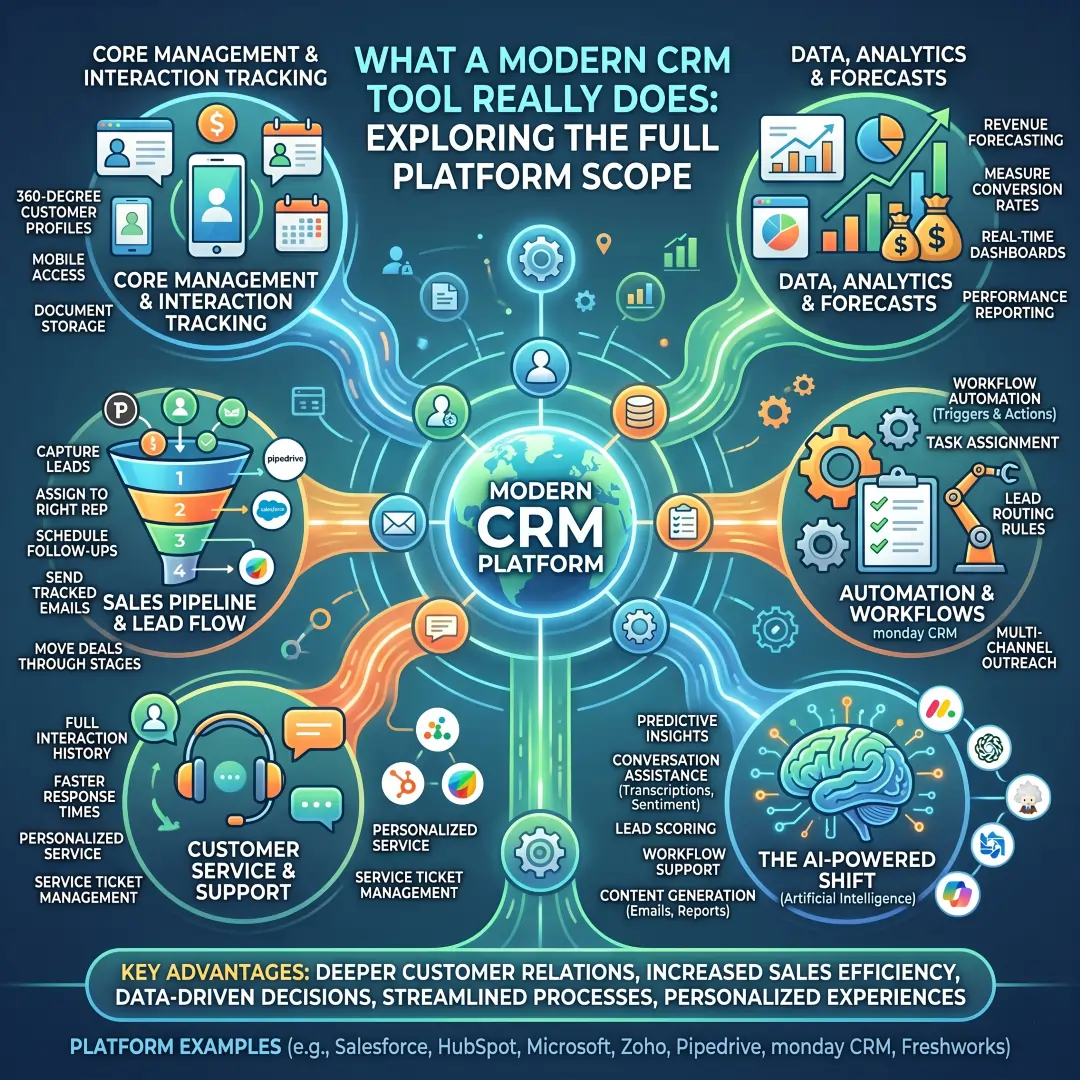
Another major shift is the rise of AI inside CRM. Salesforce, HubSpot, Microsoft, Freshworks, and Zoho all now describe AI-powered capabilities in their platforms, including predictive insights, conversation assistance, lead scoring, workflow support, and content generation.
How to choose the right CRM for sales and customer growth
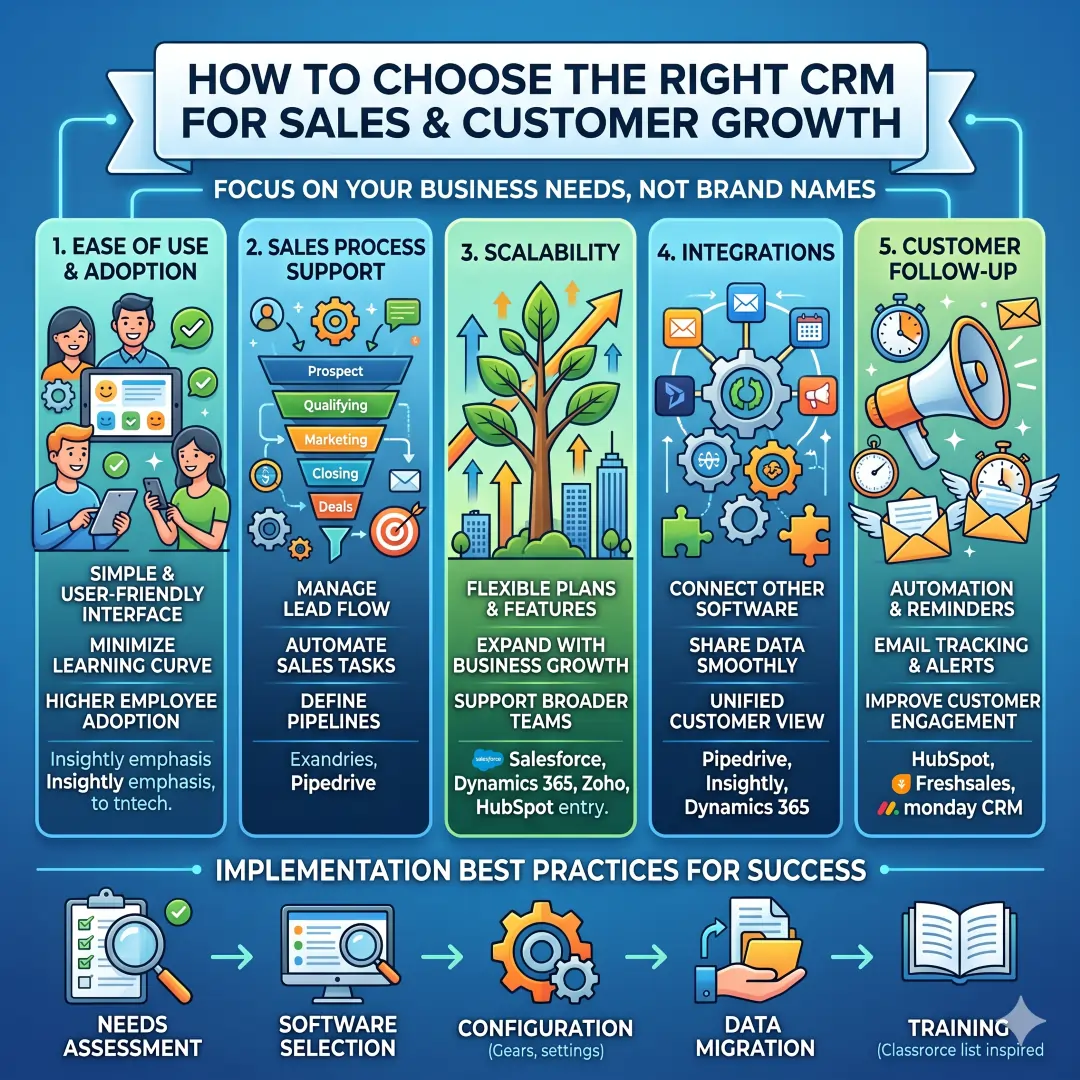
A useful CRM choice starts with business needs, not brand names. Salesforce says CRM implementation begins with a needs assessment, software selection, configuration, data migration, and training. Pipedrive also recommends choosing based on ease of use, onboarding, and whether the tool fits your sales process.
Here are the main questions worth asking.
- How easy is it to use? Teams adopt simple tools faster, and adoption is what makes a CRM valuable in the first place. Insightly emphasizes CRM adoption strategy, employee training, and user-friendly features as key best practices.
- Does it support your sales process? Pipedrive focuses on visual pipelines, workflow automation, lead and team management, and data insights, which makes it especially attractive for sales-driven teams.
- Can it scale with the business? Salesforce and Dynamics 365 both position themselves for broader, multi-department growth, while Zoho and HubSpot offer lighter entry points that can expand over time.
- Does it connect with other tools? Pipedrive, Insightly, and Dynamics 365 all highlight integrations and platform connectivity.
- Does it improve customer follow-up? HubSpot, Freshsales, and Monday CRM all emphasize automation, email tracking, reminders, and actionable insights.
Top CRM tools for sales and customer growth at a glance
| CRM tool | Best for | Standout strengths | Free plan or trial | Why it stands out |
|---|---|---|---|---|
| Salesforce | Large businesses, enterprise sales teams, multi-department growth | Unified CRM platform, AI agents, analytics, dashboards, automation, secure data handling, broad business coverage across sales, service, marketing, commerce, and IT. | Free trial available. | Best when you need deep functionality, scale, and broad customer operations. |
| HubSpot CRM and Sales Hub | Startups, SMBs, and teams that want a fast rollout | Free CRM, deal and task management, email tracking, templates, scheduling, live chat, quotes, AI sales tools, forecasting, customer service alignment. | Free CRM and 14-day free trial for sales tools. | Strong for teams that want an easy system that connects sales, marketing, and service. |
| Zoho CRM | Cost-conscious businesses and growing teams | Lead, deal, workflow, report, and mobile features, plus AI and customization. Free edition supports small teams. | Free forever for 3 users and a trial option. | Strong value for teams that want a flexible CRM without a heavy entry cost. |
| Pipedrive | Sales teams that want pipeline clarity | Visual pipelines, automation, lead and team management, data insights, AI report creation, 500+ integrations, email and deal workflow tools. | 14-day free trial. | Excellent for reps who need a clean, sales-first workflow. |
| Microsoft Dynamics 365 Sales | Microsoft-heavy teams and enterprise organizations | Forecasts, charts, Copilot assistance, call and email summaries, customer 360 style visibility, Power Platform integration, security controls. | Free trial available and paid tiers. | Best for teams already invested in Microsoft 365 and Power Platform. |
| Freshsales | SMBs that want AI-assisted sales execution | Auto-profile enrichment, sales sequences, marketing automation, lead capture, qualification, routing, and pipeline visibility. | 21-day free trial, no credit card required. | Good for teams that want practical AI without a steep learning curve. |
| monday CRM | Teams that prefer visual workflows and customization | Code-free automation, real-time insights, mobile access, customizable dashboards, email logging, and activity automation. | 14-day free trial. | Works well for teams that want a flexible CRM that feels close to work management software. |
| Insightly | Businesses that want CRM plus project handoff | Pipeline management, lead tracking, opportunity management, workflow automation, project management, support and ticketing, dashboards, and no-code integrations. | Free 14-day trial. | Useful when sales, projects, and support need to stay connected after the deal closes. |
Best CRM tools in detail
1. Salesforce, best for enterprise growth and complex operations
Salesforce is one of the strongest choices for large organizations that need a broad CRM platform with deep customization. Salesforce describes its platform as a unified system that brings together AI agents, data, and CRM apps, and it emphasizes sales, service, marketing, commerce, and IT working together. The sales product page also highlights alerts, forecast tracking, analytics, AI-assisted email and call support, and security controls.
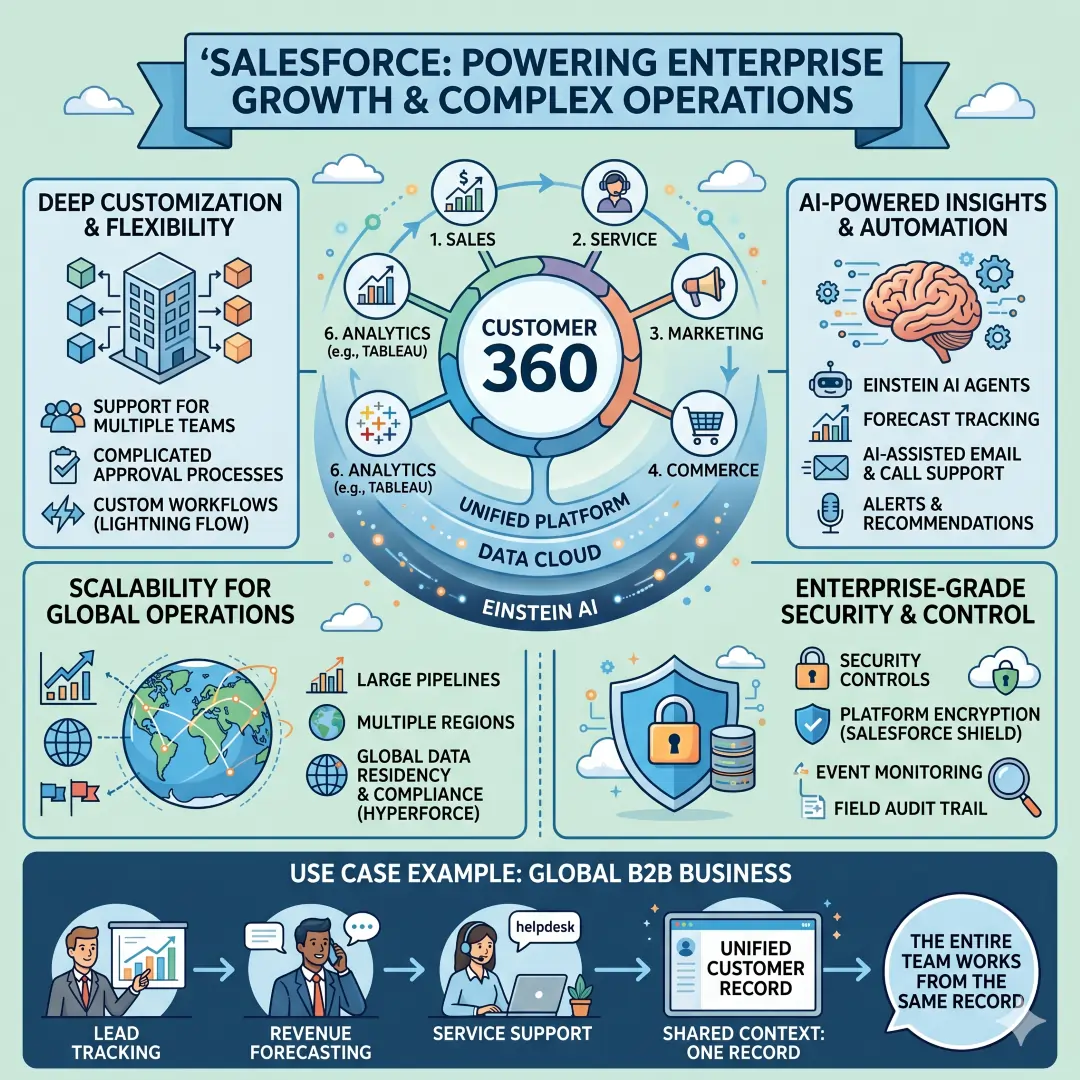
That combination matters when sales teams do not work in isolation. A company with a large pipeline, multiple regions, or a complicated approval process usually needs more than simple contact storage. Salesforce is especially compelling when leadership wants a broad view of the customer journey and enough flexibility to support different teams inside the same system.
Example: A global B2B business can use Salesforce to track leads, forecast revenue, support service cases, and keep all customer context in one shared environment. That makes it easier for the sales manager, account executive, and service team to work from the same record.
2. HubSpot, best for ease of use and all-in-one customer growth
HubSpot is a strong fit for teams that want quick adoption and a platform that connects sales, marketing, and service. HubSpot’s free CRM includes contact, deal, and task management, email tracking, templates, meeting scheduling, document sharing, live chat, and sales quotes. Its sales platform also adds pipeline tools, call tracking, forecasting, automation, and AI-guided selling.
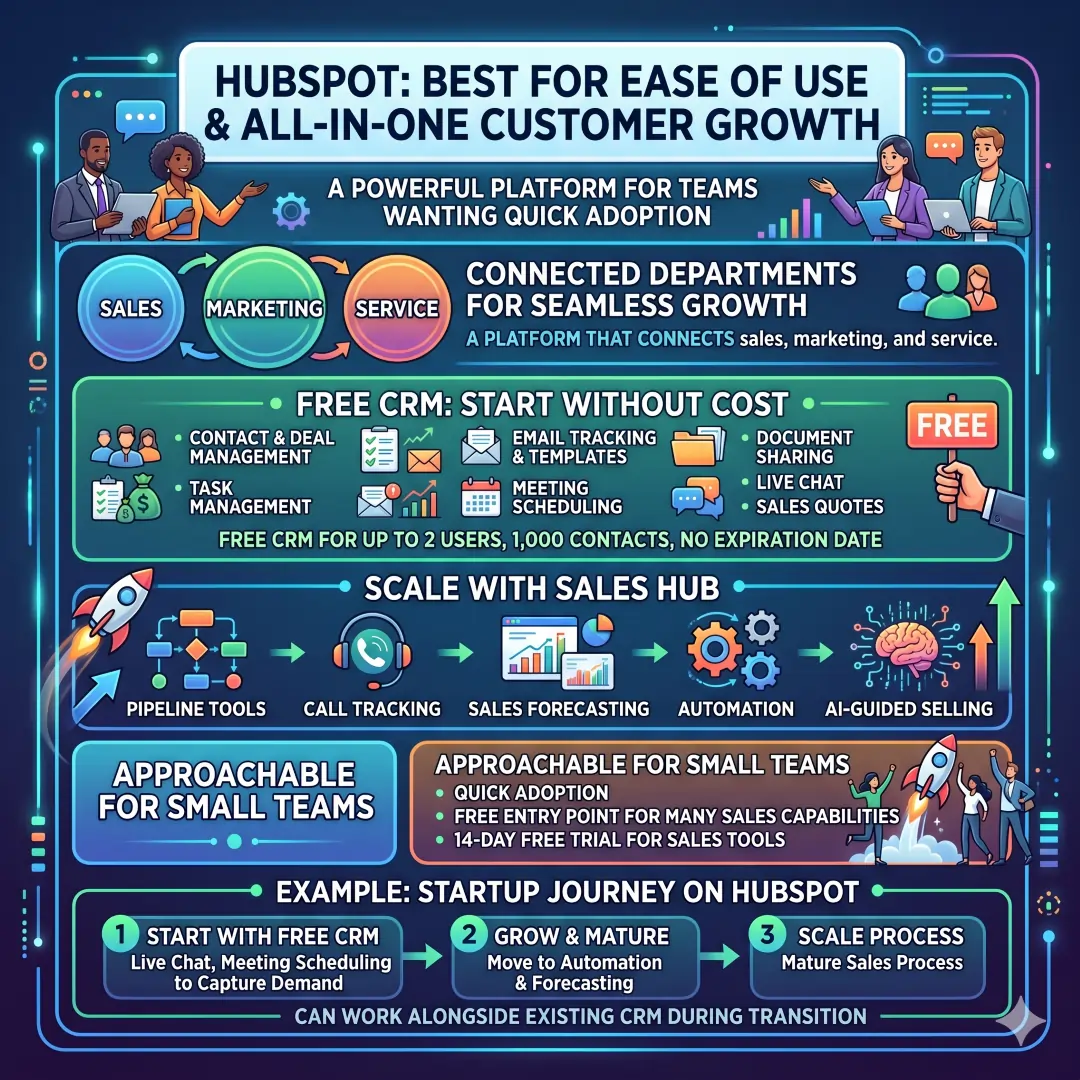
One of HubSpot’s biggest strengths is how approachable it feels for small teams. HubSpot says its free CRM is available at no cost for up to two users, with up to 1,000 contacts and no expiration date. It also provides a 14-day free trial for sales tools and a free entry point for many of its sales capabilities.
Example: A startup can begin with free CRM, use live chat and meeting scheduling to capture demand, then move into automation and forecasting as the sales process gets more mature. HubSpot also notes that Sales Hub can work alongside an existing CRM, which is useful during transition periods.
3. Zoho CRM, best for value and flexibility
Zoho CRM is attractive for teams that want a broad feature set without starting at a premium price point. Zoho says its free edition includes leads, deals, workflows, reports, and a mobile app, and it supports up to 3 users. The features page also points to AI, automation, and business intelligence as part of the platform’s selling power.
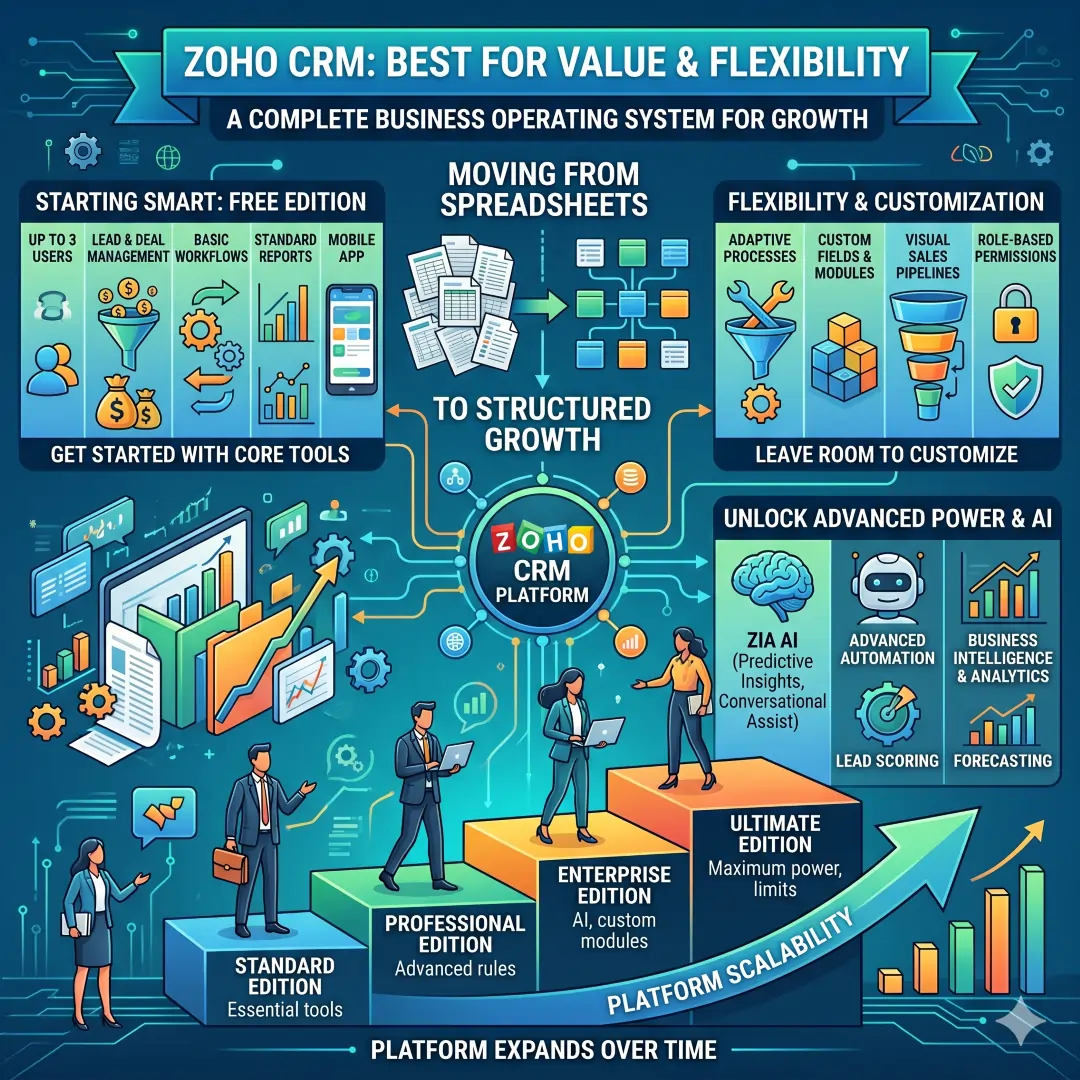
Zoho is especially useful for businesses that are moving away from spreadsheets and need structure without complexity. It can support a practical sales process while still leaving room to customize as the company grows. Zoho also provides an extended feature list across editions, which signals that the platform can expand with the business over time.
Example: A small agency could use Zoho CRM Free Edition to manage leads, track deals, and handle mobile updates while a lean sales team tests what works before moving into a paid tier.
4. Pipedrive, best for visual sales pipelines
Pipedrive is a sales-first CRM with a strong reputation for pipeline clarity. Its official pages highlight visual pipeline management, lead and deal organization, workflow automation, contact history, reporting, and more than 500 integrations. Pipedrive also offers AI-powered report creation, email sync, nurturing sequences, lead routing, and e-signature support in higher tiers.
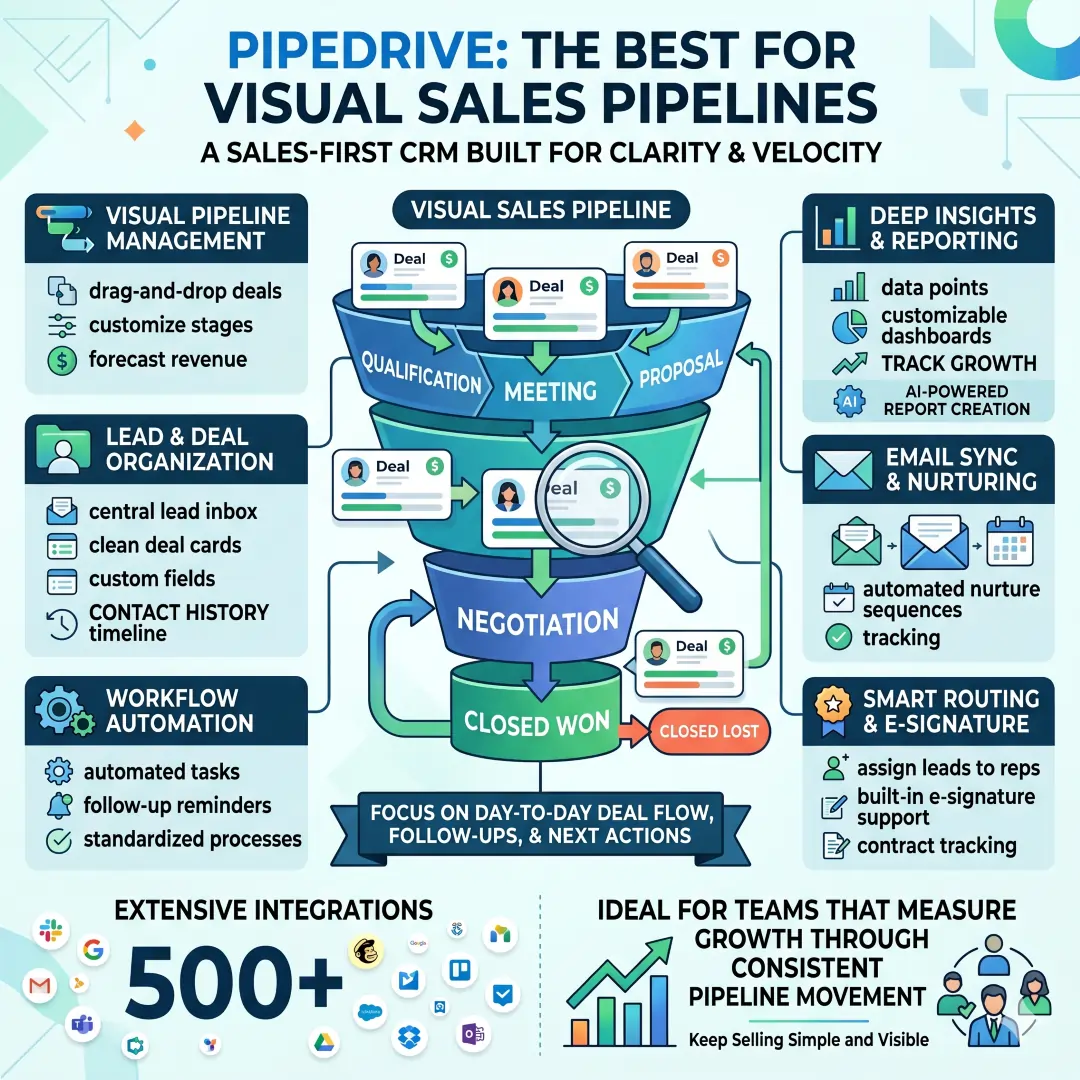
This is a great option for teams that want to keep selling simply and visibly. Instead of forcing reps into a heavy system, Pipedrive focuses on the day-to-day flow of deals, follow-ups, and next actions. That makes it especially practical for teams that measure growth through consistent pipeline movement.
Example: A mid-sized B2B sales team can use Pipedrive to see which deals are stuck, automate follow-ups, connect email and calendar, and track every contact history in one place.
5. Microsoft Dynamics 365 Sales, best for Microsoft ecosystems
Dynamics 365 Sales is a strong choice for organizations already using Microsoft tools. Microsoft describes it as an agentic CRM with insights, sales automation, and collaboration. The product page highlights Copilot-assisted emails and call summaries, forecasts and charts, performance analytics, Power Platform integration, and data protection features.
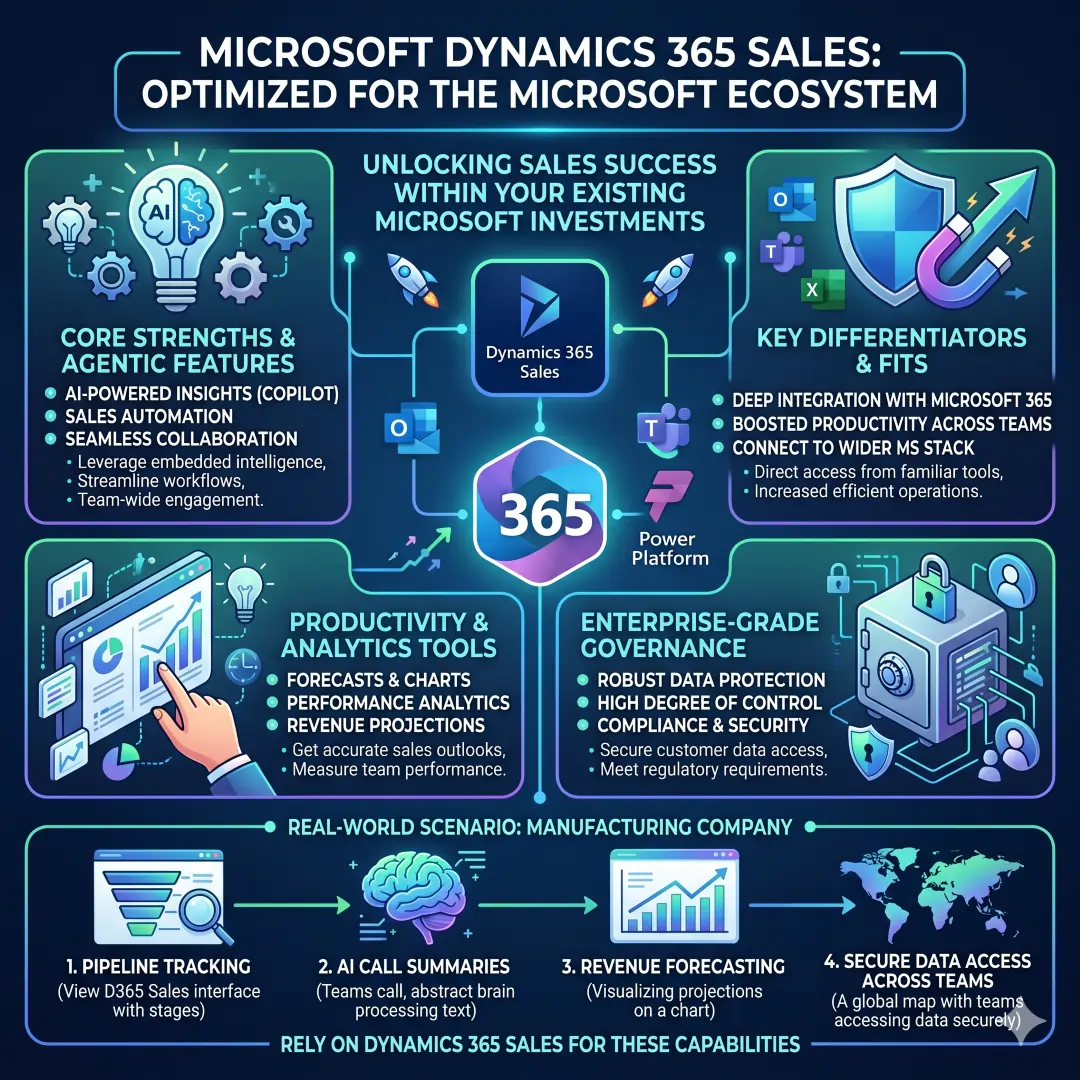
This CRM fits especially well when sales operations live inside Microsoft 365 and when leaders want forecasting and productivity tools that connect to the wider Microsoft stack. It can also be a strong enterprise option for teams that need a high degree of control and governance.
Example: A manufacturing company using Microsoft 365 can rely on Dynamics 365 Sales for pipeline tracking, AI-generated call summaries, revenue forecasting, and secure access to customer data across teams.
6. Freshsales, best for AI-assisted sales execution
Freshsales from Freshworks is built around lead generation, qualification, routing, and pipeline visibility. Freshworks says the platform automatically enriches contacts with social and publicly listed information, and it supports marketing automation with workflows, behavioral segmentation, and end-to-end personalization. The pricing page also notes a 21-day free trial with no credit card required.
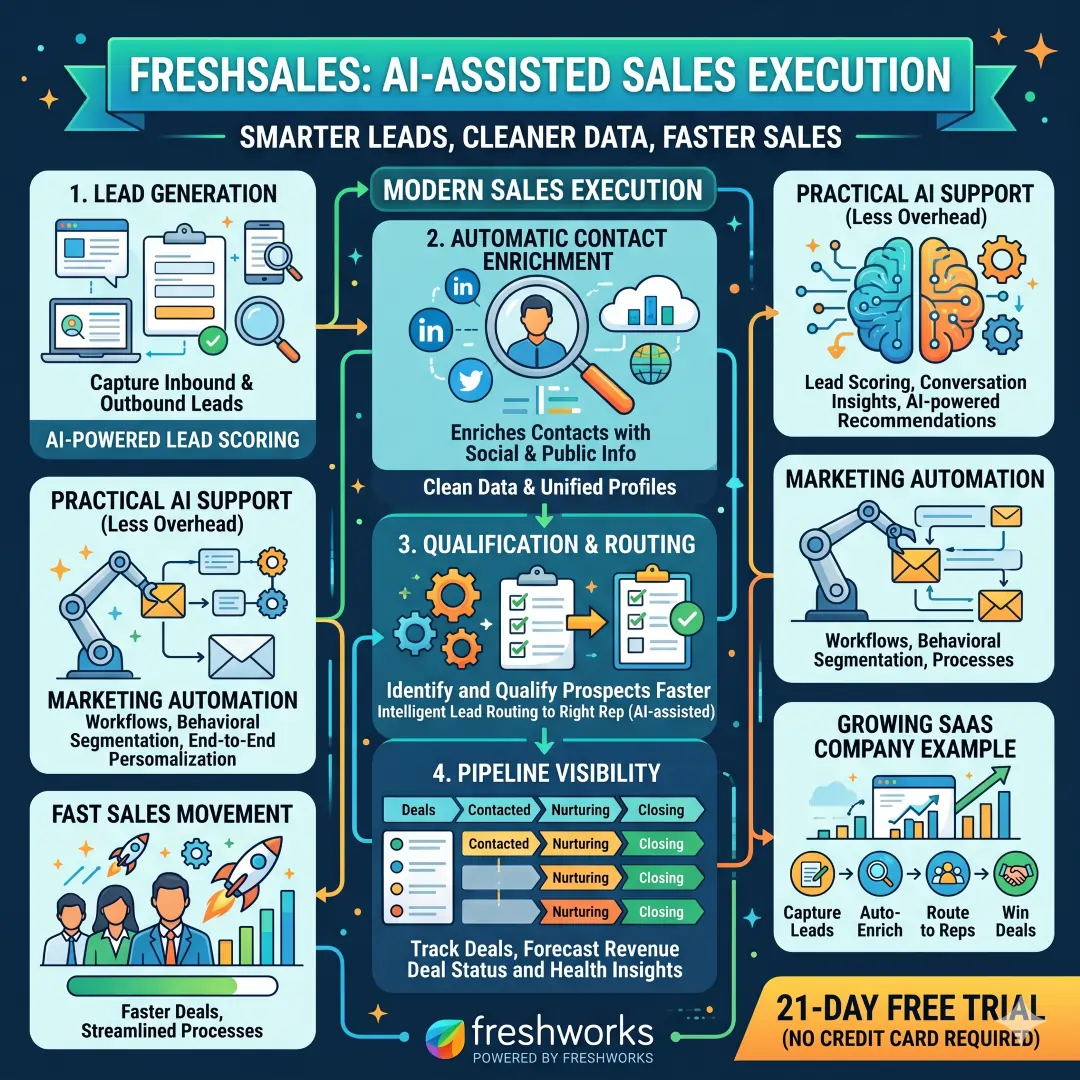
Freshsales is appealing when a team wants practical AI support without adding too much process overhead. It works well for businesses that need smarter lead handling, cleaner data, and faster sales movement.
Example: A growing SaaS company could use Freshsales to capture inbound leads, enrich contact profiles automatically, qualify prospects faster, and route them to the right rep with less manual work.
7. Monday CRM: Best for customizable workflows
Monday CRM is designed for teams that want a highly visual and flexible system. Monday says the platform is built on code-free automations, intelligent workflows, and real-time insights, with mobile support and customizable dashboards. Its pricing pages show a 14-day free trial, and the product page emphasizes reducing repetitive work like lead assignment, follow-ups, and activity logging.
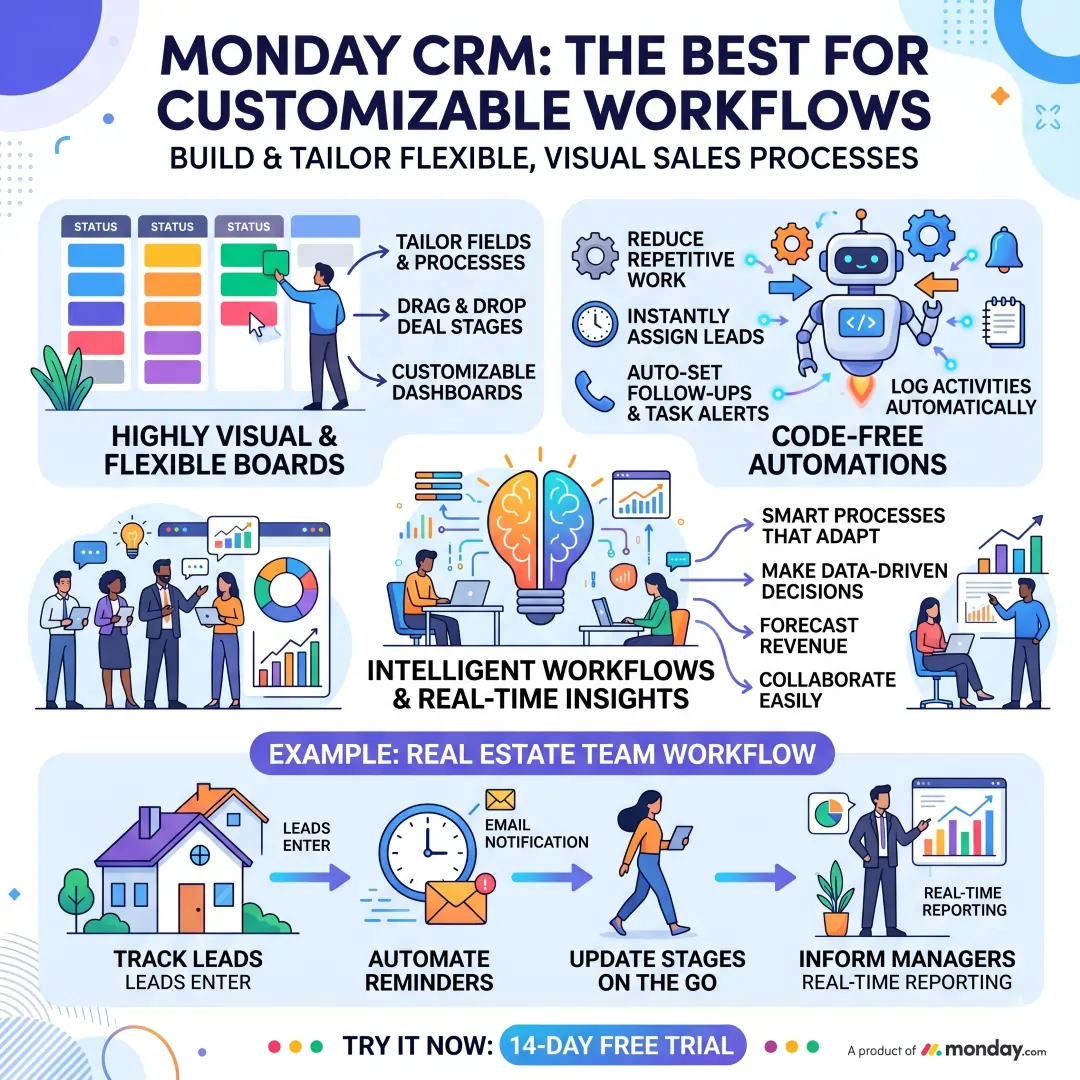
Monday CRM is a good choice when a company already likes Monday.com’s style of work management. It is especially useful for teams that want to tailor fields, boards, and automations to the way they operate rather than forcing the team into a rigid process.
Example: A real estate team can use monday CRM to track leads, automate reminders, update deal stages on the go, and keep managers informed through real-time dashboards.
8. Insightly, best for CRM plus projects and support
Insightly is interesting because it reaches beyond classic sales CRM. Its platform highlights pipeline management, lead tracking, opportunity management, workflow automation, project management, marketing automation, and support and ticketing. Its pricing page also mentions a free 14-day trial and no credit card required.
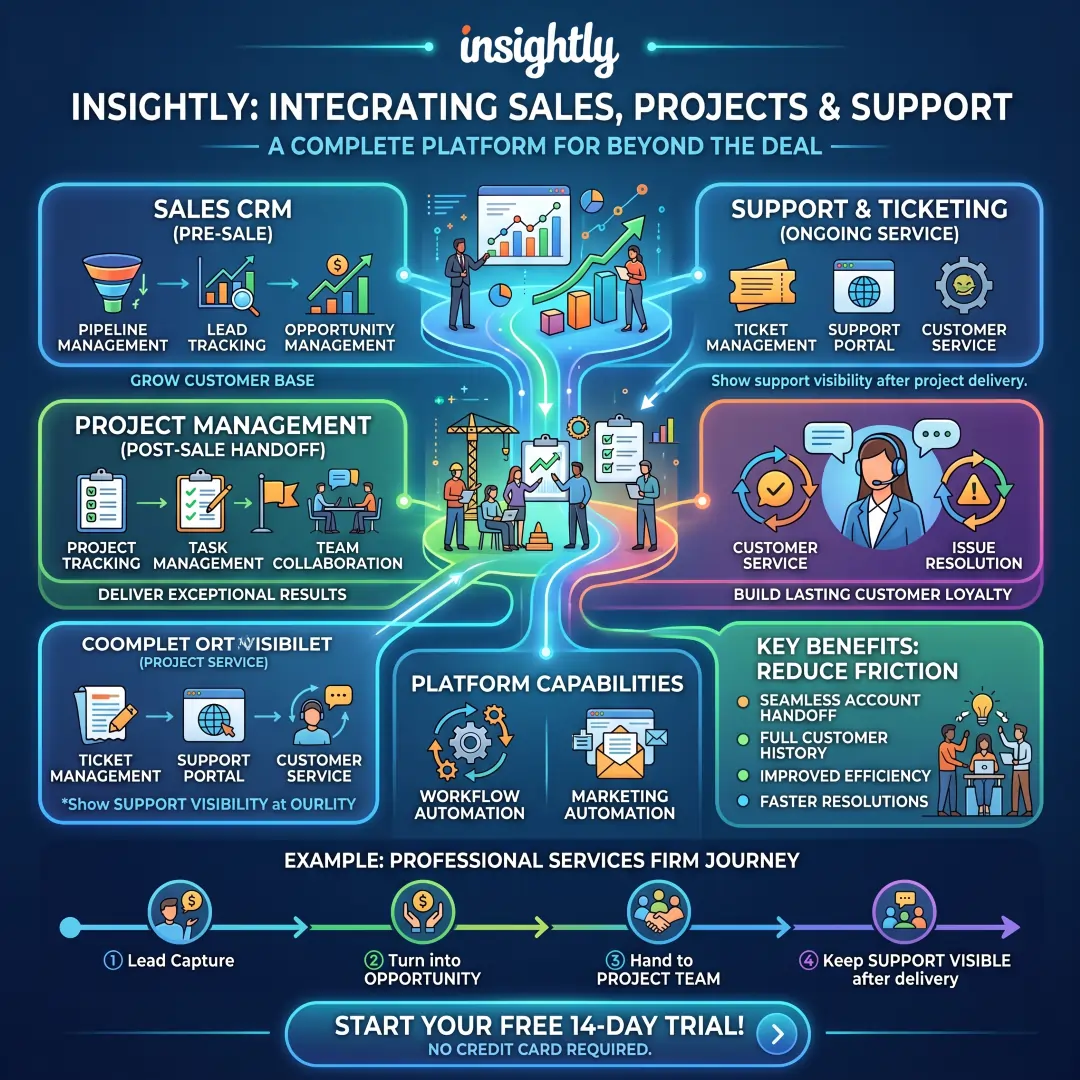
That makes Insightly especially valuable for businesses where the sale is only the beginning. When account handoff, implementation, or ongoing service matters just as much as closing the deal, Insightly’s broader structure can reduce friction between teams.
Example: A professional services firm can manage the lead in Insightly, turn it into an opportunity, hand the work to a project team, and keep support visible after delivery.
Which CRM fits which kind of business?
| Business need | Best fit | Why it fits |
|---|---|---|
| Fast setup and easy adoption | HubSpot | Free CRM, simple sales tools, live chat, meeting scheduling, and a friendly rollout path. |
| Pipeline-first selling | Pipedrive | Visual deal flow, automation, data enrichment, reporting, and strong integrations. |
| Budget-friendly starting point | Zoho CRM | Free edition for 3 users with leads, deals, workflows, reports, and mobile access. |
| Enterprise-wide customer operations | Salesforce | Unified platform, AI agents, analytics, security, and cross-department support. |
| Microsoft 365 integration | Dynamics 365 Sales | Copilot, forecasting, Power Platform, and secure enterprise workflows. |
| AI-guided lead handling | Freshsales | Auto-enrichment, routing, lead qualification, and automation. |
| Custom workflow design | Monday CRM | Code-free automations, dashboards, mobile access, and visual customization. |
| Sales plus delivery or service | Insightly | CRM, project management, and ticketing in one platform. |
Practical ideas for using CRM to drive growth
A CRM does not create growth by itself. Growth comes from using the CRM in a disciplined way. Salesforce’s implementation guidance and Insightly’s best-practice advice both point toward the same essentials, including needs assessment, adoption planning, training, data quality, and automation.
Here are practical ways to get more value from a CRM.
- Define the pipeline clearly. Use stages that match real buying behavior, not just internal labels. Pipedrive and HubSpot both show how useful pipeline visibility is for moving deals forward.
- Automate the routine work. Follow-ups, lead assignment, reminders, and email sequences are common automation wins across monday CRM, Freshsales, HubSpot, and Pipedrive.
- Track the right metrics. Forecasts, conversion rates, win rates, and activity history matter more than raw contact counts. Salesforce and Microsoft both emphasize forecasting and performance insight.
- Keep data clean. Good reporting depends on accurate records, and Salesforce and Pipedrive both stress centralized, organized customer data.
- Train the team properly. A CRM only works when people actually use it. Insightly’s best-practice guidance strongly emphasizes adoption strategy and employee training.
Common CRM mistakes that slow growth
One of the biggest mistakes is choosing a platform only because it looks powerful. Salesforce’s implementation guide makes it clear that CRM success starts with business needs, and Insightly warns that adoption, training, and the right data matter just as much as the software itself.
A few mistakes appear repeatedly in real-world CRM rollouts.
- Buying too much too soon can overwhelm the team and reduce adoption. This is a practical inference from the emphasis on needs assessment and rollout planning.
- Skipping training often leads to messy records and incomplete usage. Insightly directly highlights employee training as part of success.
- Using bad data makes automation and reporting far less useful. Salesforce stresses the need to organize and synchronize customer data.
- Ignoring integrations creates duplicate work and broken workflows. Pipedrive, Insightly, and Dynamics 365 all emphasize connected systems.
A simple recommendation guide
For teams that want the easiest entry point, HubSpot and Zoho CRM are strong starting options because both offer free access paths and broad usefulness for smaller teams.
For teams that care most about a clean sales process, Pipedrive usually feels the most focused. Its visual pipeline, automation, and integration depth make it especially useful for sales reps who want clarity and speed.
For companies that need broader customer operations, Salesforce and Dynamics 365 Sales bring enterprise depth, AI, reporting, and cross-functional support.
For teams that want flexibility and workflow design, Monday CRM and Insightly are appealing because they combine CRM with customization, automation, project flow, and customer service elements.
For teams that want practical AI support inside a lighter sales process, Freshsales is a smart middle ground. It adds enrichment, routing, and automation while staying focused on sales productivity.
Final thoughts
The best CRM tool is not the one with the longest feature list. It is the one your team will actually use every day, the one that fits your pipeline, and the one that helps you serve customers without adding friction. Across the current CRM landscape, HubSpot stands out for accessibility, Pipedrive for sales clarity, Zoho CRM for value, Salesforce for enterprise depth, Dynamics 365 Sales for Microsoft alignment, Freshsales for AI-assisted selling, monday CRM for customization, and Insightly for connecting sales with delivery and support.
A strong CRM supports sales growth, customer retention, better forecasting, and faster follow-up. The right choice depends on whether your business needs simplicity, scale, automation, or stronger cross-team coordination. With the right setup, a CRM becomes one of the most valuable growth systems in the company.
Also, Read these Articles in Detail
- Best Business Tools for Small Businesses in 2026
- Top Business Tools Every Startup Needs
- Best Productivity Tools for Modern Teams
- Essential Business Tools for Remote Teams
- Best AI Business Tools to Save Time and Money
- Top 10 Project Management Tools for Growing Businesses
Article’s References And Sources
- Salesforce CRM Overview
- Salesforce CRM Features
- Salesforce CRM Benefits
- Salesforce CRM Implementation Guide
- HubSpot CRM Software
- HubSpot Sales Hub
- HubSpot Product Suite
- Zoho CRM Pricing and Features
- Pipedrive CRM Official Website
- Pipedrive CRM Functions for Sales Teams
- Pipedrive Pricing Plans
- Microsoft Dynamics 365 Sales
- Freshsales CRM Features by Freshworks
- Freshsales CRM Pricing
- What is Freshsales by Freshworks
- Monday CRM Official Website
- Monday CRM Product Information
- Monday.com Free Trial Information
- Insightly CRM Official Website
- Insightly Pricing Plans
- Insightly CRM Best Practices Guide
Frequently Asked Questions (FAQs)
FAQ 1. What is a CRM tool, and why is it important for sales and customer growth?
A CRM tool is a Customer Relationship Management system that helps a business store, manage, and use customer information in one place. It keeps track of leads, contacts, deals, conversations, follow-ups, and customer history so that sales and support teams do not have to work from scattered notes, spreadsheets, or memory. In simple terms, a CRM helps a business stay organized while building stronger relationships with customers.
The importance of a CRM becomes very clear when a business starts growing. As the number of leads and customers increases, it becomes harder to remember who said what, which leads need a follow-up, and which deals are close to closing. A CRM solves this problem by creating a single system where everything is recorded. This makes the sales process smoother, faster, and more reliable.
A good CRM also supports customer growth by helping teams respond faster and more personally. When a sales rep can see previous emails, phone calls, purchases, and support requests, they can offer a more relevant response. That kind of personal attention builds trust and increases the chances of closing a sale or keeping a customer long term. In this way, a CRM is not just a record-keeping tool. It becomes a growth engine for the business.
It also helps managers and business owners see what is happening in the pipeline. They can track how many leads are coming in, where deals are getting stuck, and which sales activities are producing results. This makes it easier to make better decisions and improve performance over time. A CRM is important because it turns customer data into action, and action into growth.
FAQ 2. Which CRM tools are considered the best for sales and customer growth?
There is no single best CRM tool for every business, because the right choice depends on the company size, budget, sales process, and growth goals. However, some of the strongest CRM tools for sales and customer growth include Salesforce, HubSpot, Zoho CRM, Pipedrive, Microsoft Dynamics 365 Sales, Freshsales, monday CRM, and Insightly. Each one has its own strengths.
Salesforce is often preferred by large organizations and teams that need a highly flexible and powerful system. It is strong in automation, analytics, AI, and cross-team customer management. HubSpot is a popular choice for businesses that want a simple system with a smooth learning curve and a strong free CRM. Zoho CRM is well known for offering good value and flexibility, especially for smaller teams and growing businesses. Pipedrive is loved by sales teams that want a clean and visual pipeline.
Microsoft Dynamics 365 Sales fits well for companies already using Microsoft tools. Freshsales is useful for teams that want AI support and easier lead handling. Monday CRM works well for businesses that like visual workflows and customization. Insightly is a smart option for companies that want CRM, projects, and support in one system.
The best CRM is the one that fits your workflow and that your team will actually use every day. A powerful CRM only creates value when it is adopted properly. That is why many growing businesses choose a tool based not only on features, but also on ease of use, integration, training needs, and long-term scalability. A tool that matches the way your team works will usually bring better results than one that looks impressive but feels too complex.
FAQ 3. How do I choose the right CRM tool for my business?
Choosing the right CRM tool starts with understanding your business needs. Before comparing products, it helps to ask a few important questions. How many people will use the CRM? Do you mainly need help with lead tracking, deal management, customer support, or all three? Do you want strong automation, detailed analytics, or a simple interface? Your answers will guide the decision.
For small businesses, a CRM with easy setup, clear design, and a low cost may be the best choice. For example, tools like HubSpot and Zoho CRM are often attractive because they give smaller teams a practical way to get started without a heavy learning curve. For sales-driven teams that depend on pipeline visibility, Pipedrive is often a strong choice because it focuses on deal stages and next steps. For larger businesses with more complex operations, Salesforce or Microsoft Dynamics 365 Sales may be a better fit because they offer deeper customization and broader customer management features.
It is also important to think about integration. A CRM should connect well with your email, calendar, marketing tools, support software, and other daily systems. If a CRM does not connect smoothly with your existing workflow, the team may avoid using it. Another important factor is training and adoption. Even the best CRM will fail if the team does not understand how to use it. That is why simplicity and team comfort matter so much.
A good way to choose is to test two or three platforms, try them with real sales tasks, and see which one feels most natural. The right CRM should save time, improve visibility, and help your business grow without creating extra confusion. In other words, the best choice is the one that fits the way you work today and can still support you as you grow.
FAQ 4. What features should I look for in a good CRM system?
A strong CRM system should include features that make sales work easier, faster, and more organized. One of the most important features is contact management, which stores customer names, email addresses, phone numbers, company details, and interaction history in one place. This gives the team a full picture of each customer.
Another key feature is pipeline management. This allows businesses to track deals from first contact to final sale. It helps sales teams know which opportunities are moving forward and which ones need attention. Task management and reminders are also very useful because they keep follow-ups from being forgotten. A CRM should help salespeople know what to do next and when to do it.
Automation is another major feature to look for. Automation can handle lead assignment, follow-up emails, reminders, and repetitive updates. This saves time and helps teams stay consistent. Many modern CRMs also offer reporting and analytics, which show conversion rates, sales activity, team performance, and revenue trends. These insights help managers make better decisions.
Other helpful features include email tracking, mobile access, workflow customization, document storage, lead scoring, AI assistance, and integration with other tools. The best CRM should also be easy to use, secure, and flexible enough to grow with the business. When these features work together, the CRM becomes more than a database. It becomes a smart system that helps businesses sell more and serve customers better.
FAQ 5. Why is CRM automation so valuable for sales teams?
CRM automation is valuable because it removes many of the repetitive tasks that slow sales teams down. In a busy business, sales reps can spend a lot of time sending follow-up emails, assigning leads, updating deal stages, and setting reminders. Automation handles many of these tasks automatically, which gives the team more time to focus on real selling.
One of the biggest benefits of automation is consistency. Every lead can be treated in the same structured way, which reduces the chance of missed follow-ups. For example, if a new lead comes in, the CRM can automatically assign it to the correct rep, send a welcome email, and create a follow-up task. That process happens quickly and without manual effort.
Automation also improves speed. A fast response often makes a big difference in sales. If a prospect receives a quick reply, they are more likely to stay engaged. Automation helps businesses respond faster and stay active even when the team is busy. It also helps with lead nurturing, which means keeping prospects warm over time with helpful emails and actions.
Another advantage is that automation reduces errors. Human work can be inconsistent, especially when people are handling many leads at once. Automated workflows help ensure that nothing important gets missed. This improves the customer experience and supports steady growth. In short, CRM automation helps sales teams work smarter, not harder.
FAQ 6. How does a CRM help improve customer relationships and retention?
A CRM improves customer relationships by helping a business remember and understand each customer better. When all customer details are stored in one place, teams can see the full history of communication, purchases, concerns, and support requests. This allows them to respond in a more personal and informed way.
Customers value being remembered. They do not want to repeat the same information every time they contact a company. A CRM helps prevent that frustration by making the full conversation history available to the team. This creates a smoother and more professional experience. It also helps the business build trust, because customers feel that the company is paying attention to their needs.
A CRM also supports retention, which means keeping existing customers for the long term. It can remind teams to check in at the right time, send renewal notices, track support issues, and identify accounts that may be at risk. When a business can see signs of customer dissatisfaction early, it can act before the customer leaves. That is a very important part of growth, because keeping a customer is often easier and more cost-effective than finding a new one.
Good CRM use also helps with upselling and cross-selling. When a business knows what a customer has already bought and what they need next, it can offer more relevant products or services. This makes the customer journey feel more helpful and less random. Strong customer relationships are built on memory, timing, and consistency, and a CRM supports all three.
FAQ 7. Is a free CRM enough for a small business or startup?
A free CRM can absolutely be enough for a small business or startup, especially in the early stages. In fact, many companies begin with a free plan because they need structure, but they do not yet need advanced enterprise features. A free CRM can help with contact storage, deal tracking, basic automation, task reminders, and simple reporting, which is often enough to bring order to a growing sales process.
For a startup, the most important thing is usually adoption. A simple system that the team actually uses is far more valuable than a complicated platform that no one enjoys working with. Free CRM plans from tools like HubSpot and Zoho CRM are often attractive because they allow small teams to get organized without a large financial commitment. This helps businesses test their process before investing in a paid upgrade.
That said, a free CRM has limits. It may restrict the number of users, advanced automations, custom reporting, integrations, or storage. As the company grows, these limits can start to matter. At that point, upgrading to a paid plan may make sense. The right time to upgrade is usually when the team starts needing more control, better analytics, or more collaboration across departments.
So yes, a free CRM can be enough at the beginning. It is a smart way to start, learn, and build habits. The key is to choose a platform that can grow with the business when the time comes.
FAQ 8. What is the difference between a simple CRM and an enterprise CRM?
A simple CRM is usually designed for ease of use, fast setup, and basic sales management. It often focuses on essential features like contact storage, pipeline tracking, task reminders, email tracking, and basic automation. Simple CRMs are ideal for startups, small businesses, and teams that want to get up and running quickly without a lot of technical complexity.
An enterprise CRM, on the other hand, is built for larger organizations with more complex needs. It usually offers deeper customization, advanced reporting, stronger security, multiple team roles, cross-department collaboration, and broader integration options. Enterprise CRMs often support sales, service, marketing, and operations in one connected system. They are designed for scale.
The difference is not only about size. It is also about complexity. A small business may only need a few core workflows, while a large business may need approval chains, territory management, forecasting by region, and advanced analytics. Enterprise systems like Salesforce and Microsoft Dynamics 365 Sales are often chosen when those deeper capabilities matter.
A simple CRM is easier to adopt and faster to learn. An enterprise CRM offers more power but usually needs more setup and training. The right choice depends on how your business operates today and how much complexity you expect in the future. In many cases, a business starts with a simpler CRM and moves to a more advanced one as its needs evolve.
FAQ 9. How can CRM tools support better sales forecasting and reporting?
Sales forecasting and reporting are two of the most useful parts of a CRM because they help businesses see what is likely to happen next. Forecasting uses pipeline data, deal stages, and historical performance to estimate future sales. Reporting shows what has already happened, such as how many leads were created, how many deals were closed, and which sales activities worked best.
A CRM supports forecasting by keeping the sales pipeline visible and updated. When every deal is tracked properly, managers can see which opportunities are close to closing and which ones need more work. This makes revenue planning much more accurate. Tools like Salesforce, Microsoft Dynamics 365 Sales, and Pipedrive place a strong focus on forecasting and pipeline visibility because these are critical for growth.
Reporting is equally important. Good reports help managers identify patterns. For example, they may discover that one source of leads converts better than another, or that certain sales reps close faster than others. This kind of insight helps leaders improve the sales process and make better decisions. Without CRM reporting, a team may rely too much on guesswork.
Modern CRM systems can also use AI to improve forecasts and highlight risks. This can help businesses notice slow-moving deals, weak pipelines, or missed follow-up activity earlier. Strong forecasting and reporting turn raw sales data into real business intelligence, which is one of the biggest reasons companies invest in CRM software.
FAQ 10. Can a CRM help both sales teams and customer support teams at the same time?
Yes, a CRM can help both sales teams and customer support teams at the same time, and this is one of its biggest strengths. In many businesses, sales and support work separately, even though they are both dealing with the same customers. A CRM brings that information together so both teams can work with a full view of the customer journey.
For sales teams, the CRM helps with lead tracking, deal management, follow-ups, pipeline visibility, and forecasting. For support teams, it helps with case history, customer context, previous conversations, and issue tracking. When these details are connected in one system, support agents can respond faster and more accurately, and sales reps can better understand a customer’s past experience.
This shared visibility is especially useful after a sale is closed. A customer may need onboarding, implementation support, renewal conversations, or product help. If the support team can see the original sales record, they can understand what was promised and what the customer actually needs. That reduces confusion and improves satisfaction.
Platforms like Salesforce, HubSpot, and Insightly are especially useful in this area because they support broader customer operations, not just sales activity. This makes the CRM a shared customer platform instead of a single-purpose tool. When sales and support work from the same customer data, communication improves, problems get solved faster, and the business delivers a more complete customer experience.
Article Disclaimer
The information provided in this article, “8 Best CRM Tools for Sales and Customer Growth,” is intended for general informational and educational purposes only. While every effort has been made to ensure the content is accurate, relevant, and up to date at the time of writing, software products, pricing plans, features, integrations, and service terms may change over time without notice. Readers are encouraged to verify all details directly with the official providers before making any purchasing or business decisions.
This article contains general comparisons, opinions, research-based observations, and industry insights regarding various CRM tools, customer management platforms, and sales growth solutions. The content should not be considered professional business, legal, financial, technical, or investment advice. Every business has unique goals, budgets, workflows, and operational needs, so what works well for one company may not be the best option for another.
Any references to product performance, usability, scalability, automation features, AI capabilities, or customer growth potential are based on publicly available information, common market understanding, and general use cases. Actual experiences may vary depending on company size, implementation quality, user adoption, employee training, customization, integrations, and internal sales processes.
The inclusion or mention of any CRM software brand, company, platform, or service in this article does not constitute a guarantee, endorsement, certification, or recommendation beyond the scope of editorial comparison. Rankings, evaluations, and feature summaries are subjective and may differ based on future updates or individual business priorities.
Readers should conduct their own independent research, request product demonstrations, compare official pricing pages, test free trials where available, and consult qualified professionals when needed before selecting a CRM solution. A careful review of security standards, support options, scalability, compliance requirements, and long-term costs is strongly recommended.
The publisher and writer of this article shall not be held responsible for any loss, inconvenience, damages, business disruption, or decisions made based on the use of the information presented here. By reading this content, you acknowledge that all decisions regarding software selection and business implementation remain solely your responsibility.
