Artificial intelligence is no longer a side experiment for businesses. It is now a practical layer inside everyday work, from drafting emails and summarizing meetings to analyzing data, automating workflows, and handling customer support. The strongest tools today are not only fast, but they are built to work inside the apps teams already use, which makes adoption easier and waste lower. OpenAI, Microsoft, Google, Slack, Notion, Zapier, Grammarly, Canva, HubSpot, Zendesk, Intercom, and Otter all position their products around productivity, collaboration, and measurable time savings.
For businesses, the real value of generative AI is not just speed. It is the chance to reduce repetitive work, lower outside service costs, improve consistency, and help small teams act like larger ones. Microsoft says its Copilot can deliver projected productivity gains and time savings, Google says Gemini helps teams move faster and reduce repetitive work, and several customer support platforms now promise quicker resolutions and lower operating costs.
Table of Contents
What Makes an AI Business Tool Worth Paying For
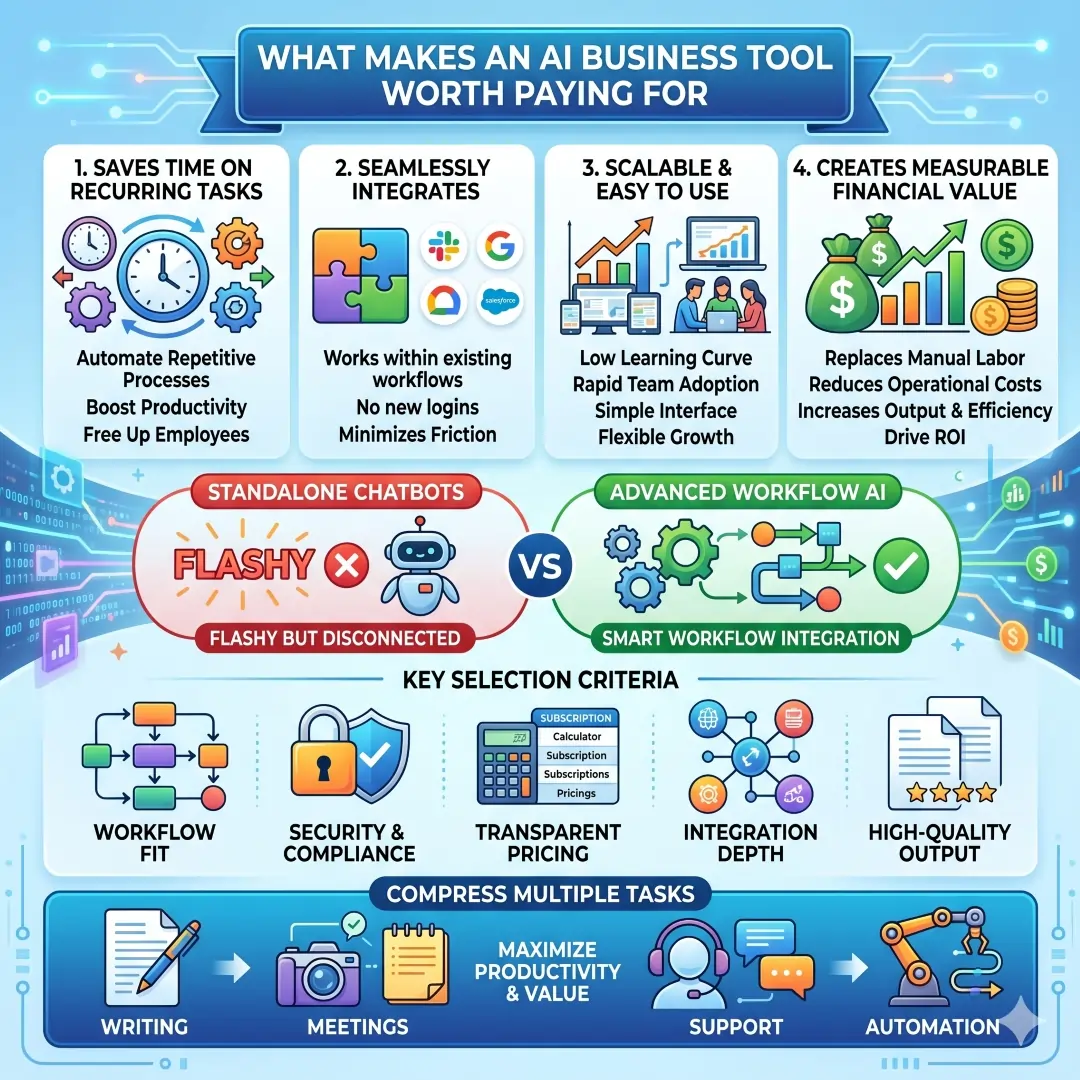
The best AI tools for business usually do four things well. First, they save time on recurring tasks. Second, they fit naturally into the tools your team already uses. Third, they scale without forcing every employee to learn a new system from scratch. Fourth, they create real financial value, either by replacing manual labor, reducing support tickets, or improving the output of existing staff. That is why tools with strong integrations, team features, and workflow automation are often more useful than flashy standalone chatbots.
When choosing the right tool, focus on workflow fit, security, pricing model, integration depth, and output quality. A tool that saves ten minutes per task but causes confusion, extra logins, or compliance risk is not a good buy. The smartest purchases are the ones that compress multiple tasks into one platform, especially for writing, meetings, support, and automation.
Best AI Business Tools at a Glance
| Tool | Best for | Money-saving angle | Pricing snapshot or access | Source-backed reason to care |
|---|---|---|---|---|
| ChatGPT Business | Drafting, analysis, research, ideation | Replaces scattered brainstorming, first drafts, and repetitive analysis work | €21 per user/month for Business | OpenAI says Business is a secure collaborative workspace with data analysis, shared projects, custom workspace GPTs, and access to agents like deep research and Codex. |
| Microsoft 365 Copilot | Office productivity, documents, spreadsheets, email, presentations | Saves time across Word, Excel, Outlook, PowerPoint, and Teams | $30 per user/month paid yearly, or $31.50 monthly | Microsoft says Copilot works inside Microsoft 365 apps and offers AI chat, search, notebooks, agents, and content creation. It also cites a Forrester study with projected ROI and time savings. |
| Google Workspace with Gemini | Gmail, Docs, Sheets, Meet, Drive, Chat | Reduces repetitive writing, summarizing, and meeting work | Business Starter begins at $7 per user/month annual commitment | Google says Gemini is built into Workspace and helps teams work faster, while lower tiers already include Gemini in Gmail and the Gemini app. Higher tiers add Gemini in Docs, Sheets, Meet, Drive, and Chat. |
| Slack AI | Team communication and internal knowledge | Cuts time spent searching conversations and writing summaries | Free plan available, paid plans start from $7.25 per user/month annually on Pro | Slack says its AI can summarize chats, search files, take meeting notes, translate conversations, generate workflows, and create daily recaps. |
| Notion AI | Knowledge base, docs, project coordination | Replaces manual note taking and disconnected knowledge work | Business plan: €19.50 per member/month | Notion says its AI can automate meeting notes, search across connected apps, and power custom agents that build, edit, and take action. |
| Zapier AI | Workflow automation across apps | Eliminates repetitive handoffs between systems | Platform-based pricing, plan dependent | Zapier says it connects 8000+ apps and lets teams build AI workflows, agents, and chatbots in one orchestration platform. |
| Grammarly Business | Writing quality, communication, consistency | Reduces editing time and improves team communication | Free AI writing access, business plans available | Grammarly says it combines AI with company knowledge, offers generative AI, Knowledge Share, and security controls such as 256-bit AES and SSL/TLS. |
| Canva Magic Studio / Canva Business | Visual content, marketing assets, branded design | Replaces outside design work for everyday graphics | Free tools available, business pricing varies by location and team size | Canva says Magic Studio brings AI-powered creation into one place, and Canva Business helps teams design, market, and stay on-brand with AI tools and brand kits. |
| HubSpot Breeze | Marketing, sales, service, CRM workflows | Helps teams use CRM context to create faster and work smarter | Plan dependent | HubSpot says Breeze uses CRM data for meeting prep, content creation, and strategic analysis, and its AI agents can support marketing, sales, and service tasks. |
| Zendesk AI | Customer support and service automation | Reduces ticket volume and speeds up resolutions | A startup offer of 6 months free is available on a current promotion | Zendesk says its AI agents can deliver fast, personalized support, and its customer stories highlight outcomes such as $100K savings in three months and major resolution-rate improvements. |
| Intercom Fin | AI customer service and support automation | Charges by outcome, which can align cost with value | Starting from US$29 per month on the current pricing page, plus $0.99 per outcome for Fin | Intercom says Fin handles customer support across chat, email, SMS, WhatsApp, and social channels, and its pricing is outcome-based. |
| Otter | Meeting notes, transcription, summaries | Removes manual note-taking and follow-up work | Free basic plan, business trial available, paid plans from $8.33 per user/month annually | Otter says it records, transcribes, summarizes, and joins Zoom, Microsoft Teams, and Google Meet automatically. |
The Best AI Business Tools, Explained in Simple Terms
1. ChatGPT Business
ChatGPT Business is a strong choice for teams that need one AI workspace for drafting, analysis, research, and rapid thinking. OpenAI says Business gives organizations a secure collaborative environment with features like data analysis, shared projects, tasks, record mode, custom workspace GPTs, and access to agents such as deep research and Codex. It also connects with tools like Google Drive, SharePoint, GitHub, and Dropbox, which makes it more useful than a simple chat interface.
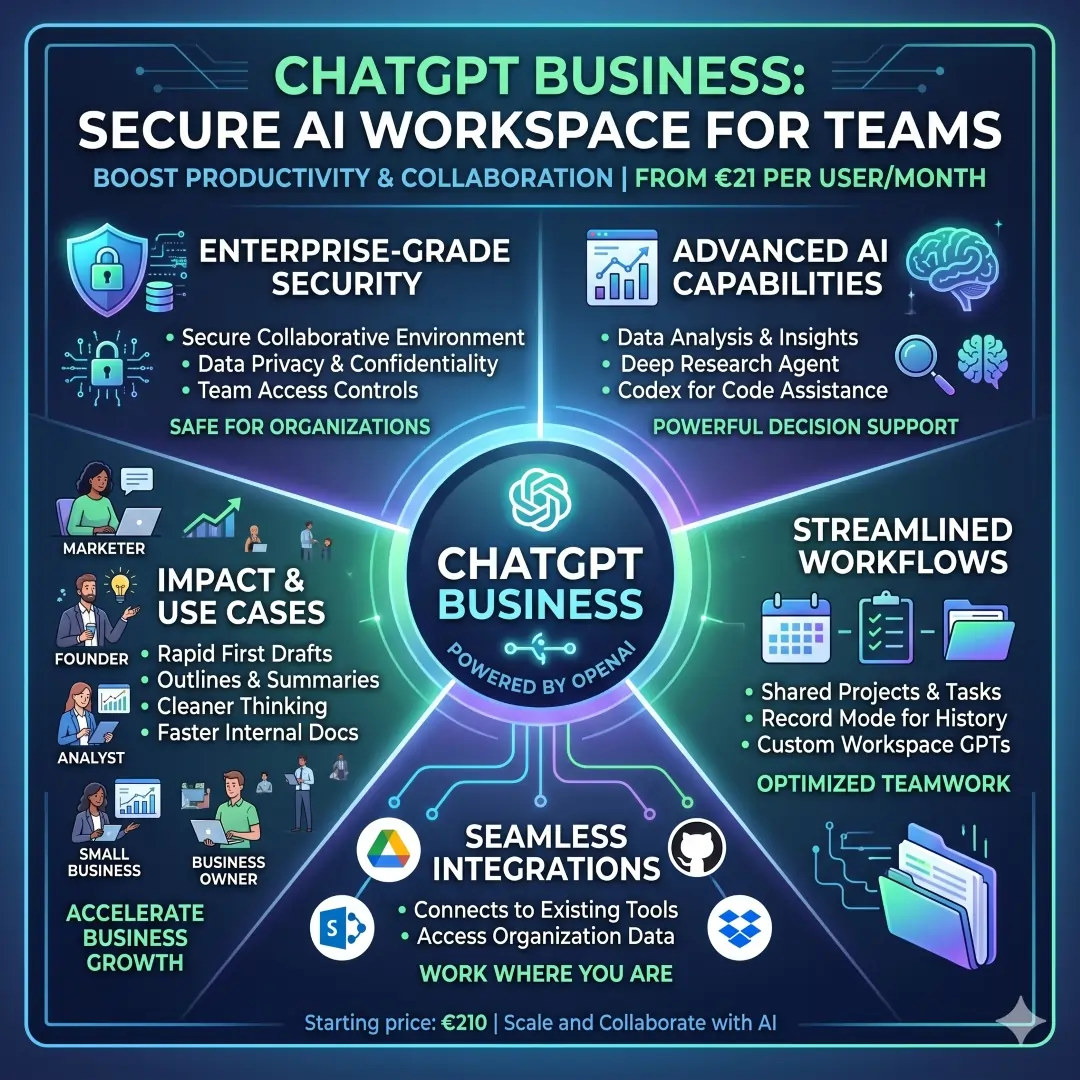
This tool is especially useful for marketing teams, founders, analysts, and small businesses that need quick first drafts and cleaner thinking. Instead of hiring extra help for routine writing and brainstorming, a team can use ChatGPT Business to generate outlines, compare ideas, and prepare internal documents much faster. With Business pricing starting at €21 per user/month, it can be a practical spend if it replaces several smaller tools.
2. Microsoft 365 Copilot
Microsoft 365 Copilot is one of the best options for companies already living inside Word, Excel, Outlook, PowerPoint, Teams, and Microsoft 365. Microsoft says Copilot can summarize, draft, analyze, create images, and centralize content in notebooks. It also says the product works with work and web data, includes AI-powered search, and supports agents grounded in organizational data.
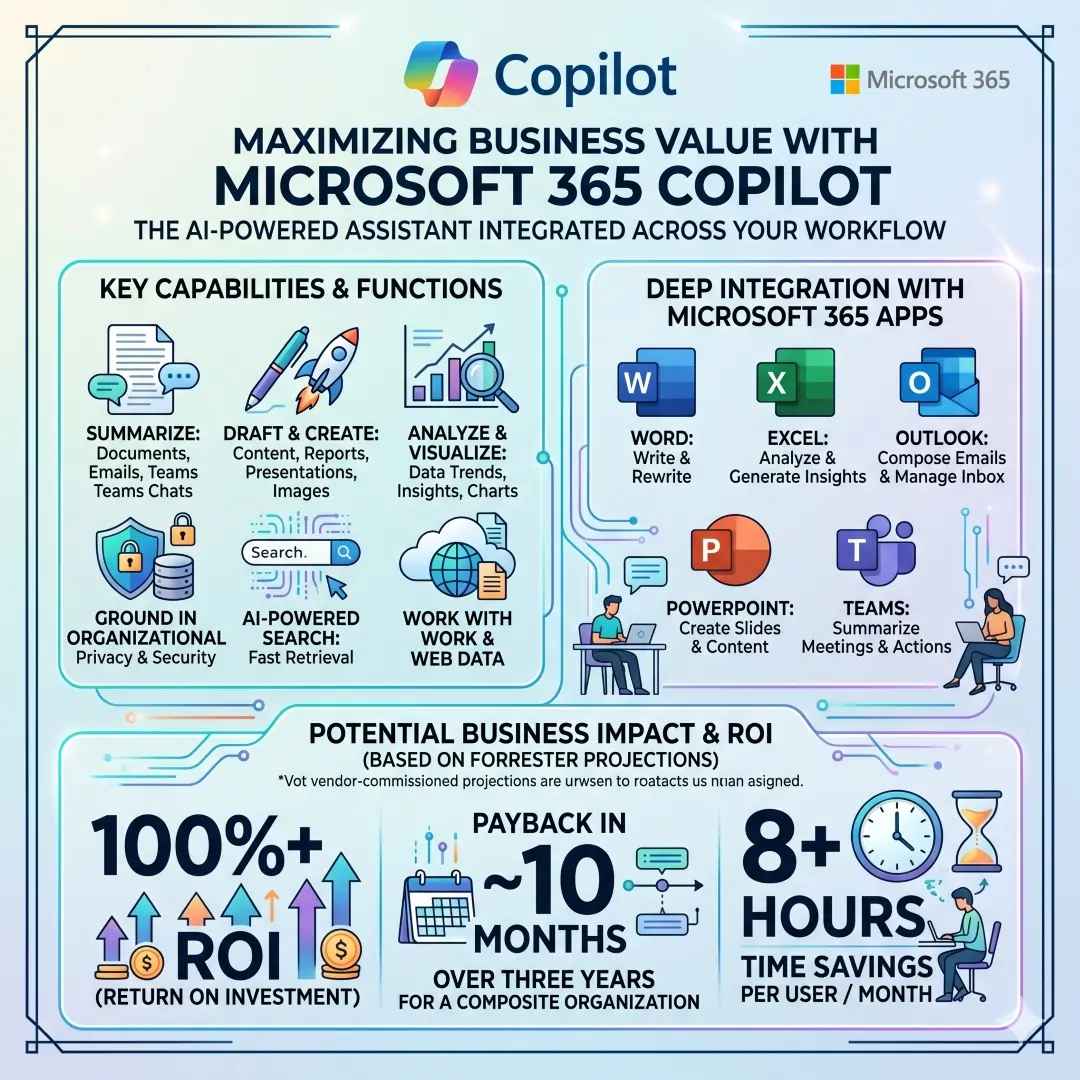
What makes this especially valuable is the scale of its possible time savings. Microsoft cites a Forrester study that projects more than 100 percent ROI, payback in 10 months, and 8+ hours of time savings per user per month over three years for a composite organization. Those are vendor-commissioned projections, so they should be read carefully, but they do show why many enterprises treat Copilot as a budget-saving tool rather than a luxury.
3. Google Workspace with Gemini
If your team uses Gmail, Docs, Sheets, Meet, and Drive, Google Workspace with Gemini is one of the cleanest AI upgrades available. Google says Gemini is built directly into Workspace apps and helps teams work faster, collaborate in real time, and use enterprise-grade security and privacy controls. Its pricing page shows that even the Business Starter plan includes Gemini in Gmail and the Gemini app, with higher plans unlocking Gemini in Docs, Sheets, Meet, Drive, and Chat.
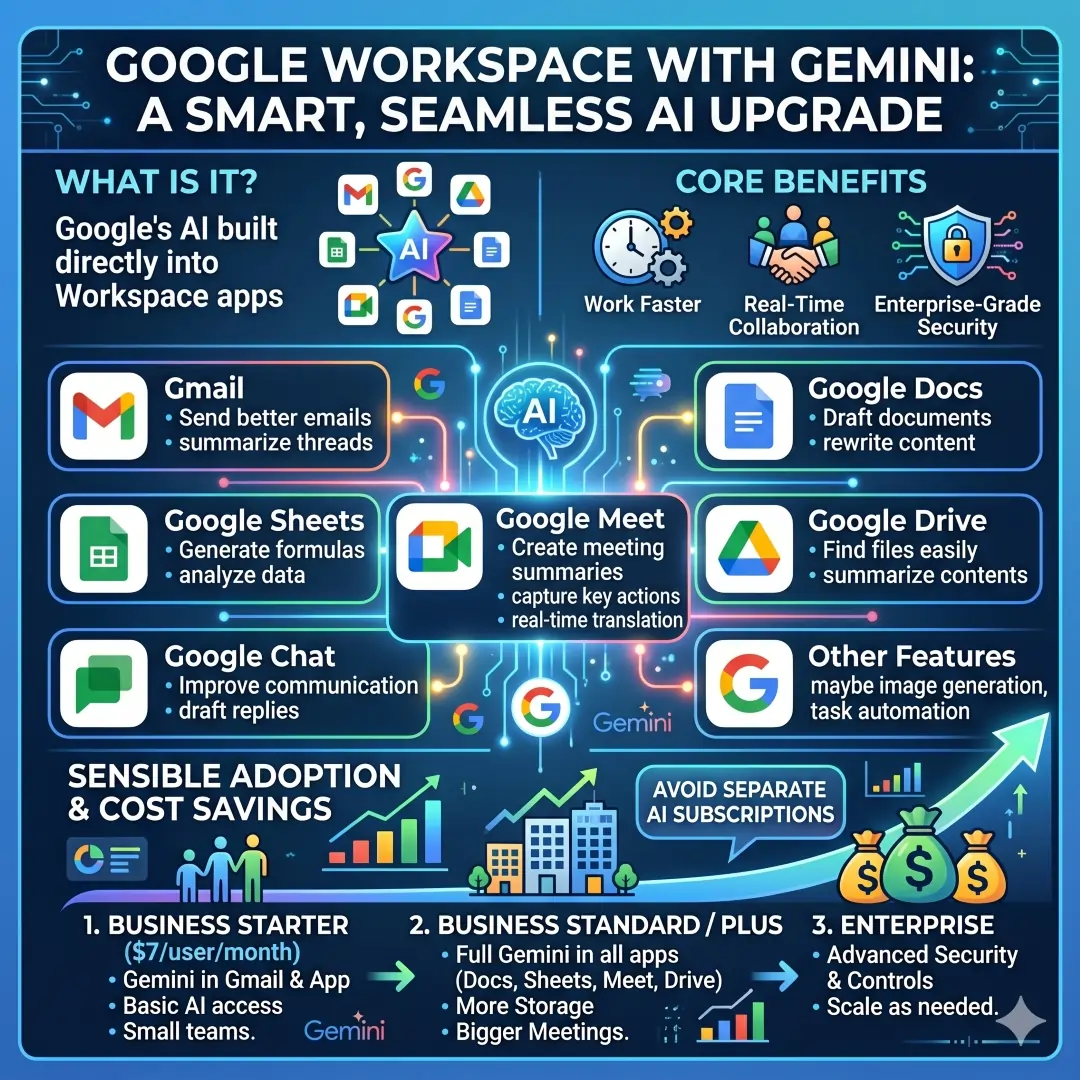
This matters because many teams do not need a separate AI subscription just to write emails, summarize meeting notes, or speed up document drafting. Google’s plan structure makes the value easy to understand. A small team can begin at $7 per user/month, then move up only when it needs more AI depth, storage, or meeting features. That is a sensible way to save money while still adopting generative AI.
4. Slack AI
Slack AI is ideal when the main problem is not writing new content but finding and understanding what the team has already said. Slack says its AI can summarize chats, search files, take meeting notes, translate conversations, generate workflows, and provide daily recaps. That means less time hunting through channels and more time making decisions.
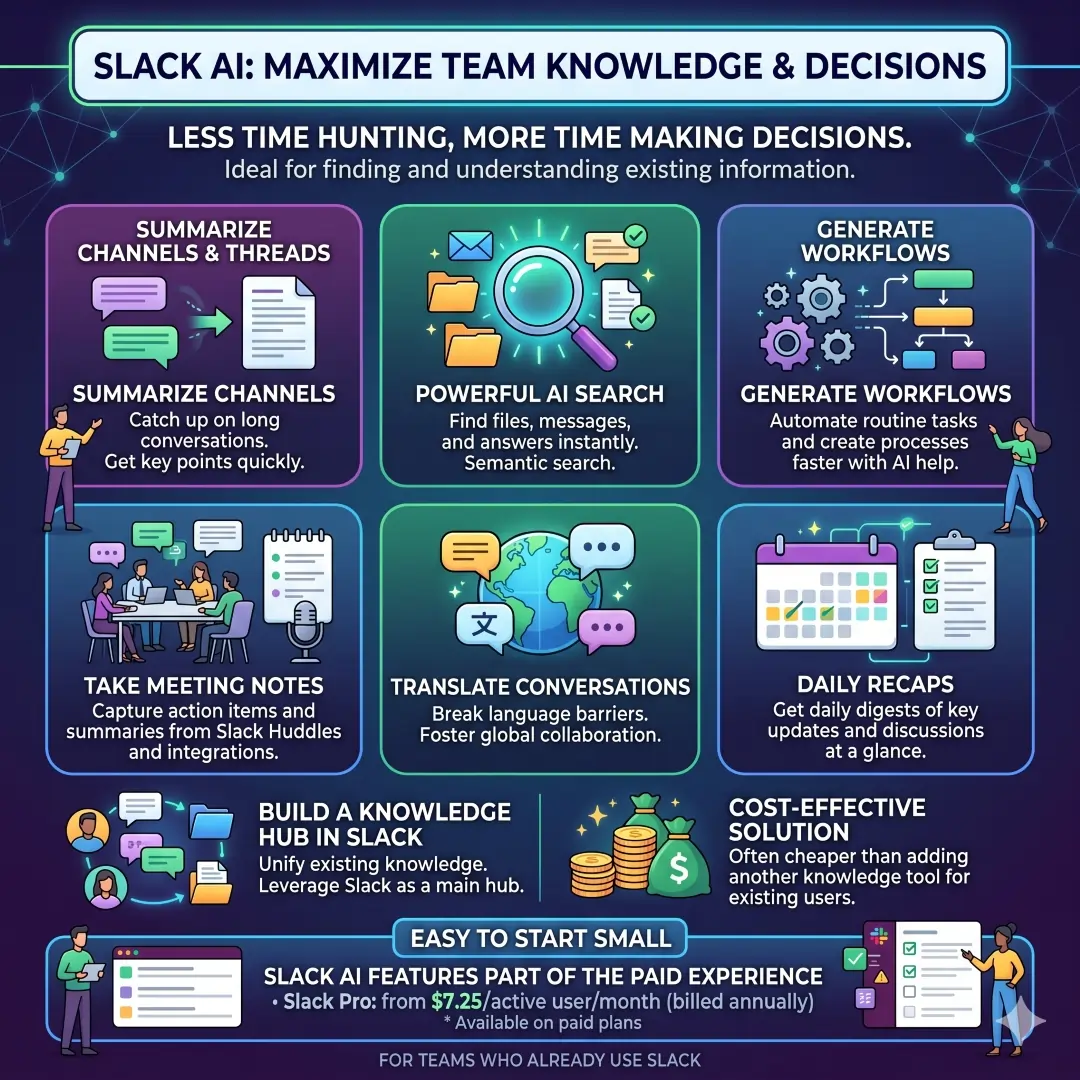
Slack’s pricing also makes it easy to start small. The platform has a Free tier and paid plans, including Pro at $7.25 per active user/month when billed annually, while Slack’s AI features are part of the paid experience. For teams that already use Slack as their main communication hub, AI summaries and search are often cheaper than adding another knowledge tool.
5. Notion AI
Notion AI is a great fit for teams that want a single place for docs, projects, and internal knowledge. Notion says its AI can help users discover answers, bring information together, and automate tedious tasks. Its product pages also highlight Custom Agents, AI Meeting Notes, and Enterprise Search, with the ability to search across apps like Slack, Google Drive, and GitHub.
The money-saving angle is simple. Instead of paying for a separate note-taking app, a wiki tool, a project tracker, and an AI assistant, Notion aims to combine those roles into a single workspace. Its Business plan is listed at €19.50 per member/month, and it adds the kind of context-rich automation that growing teams usually need.
6. Zapier AI
Zapier AI is best when your team already uses many apps and wastes time moving information between them. Zapier says it connects 8000+ apps and lets you build AI workflows, agents, and chatbots on one orchestration platform. That makes it a serious option for automating lead routing, form follow-up, content handoff, CRM updates, and internal notifications.
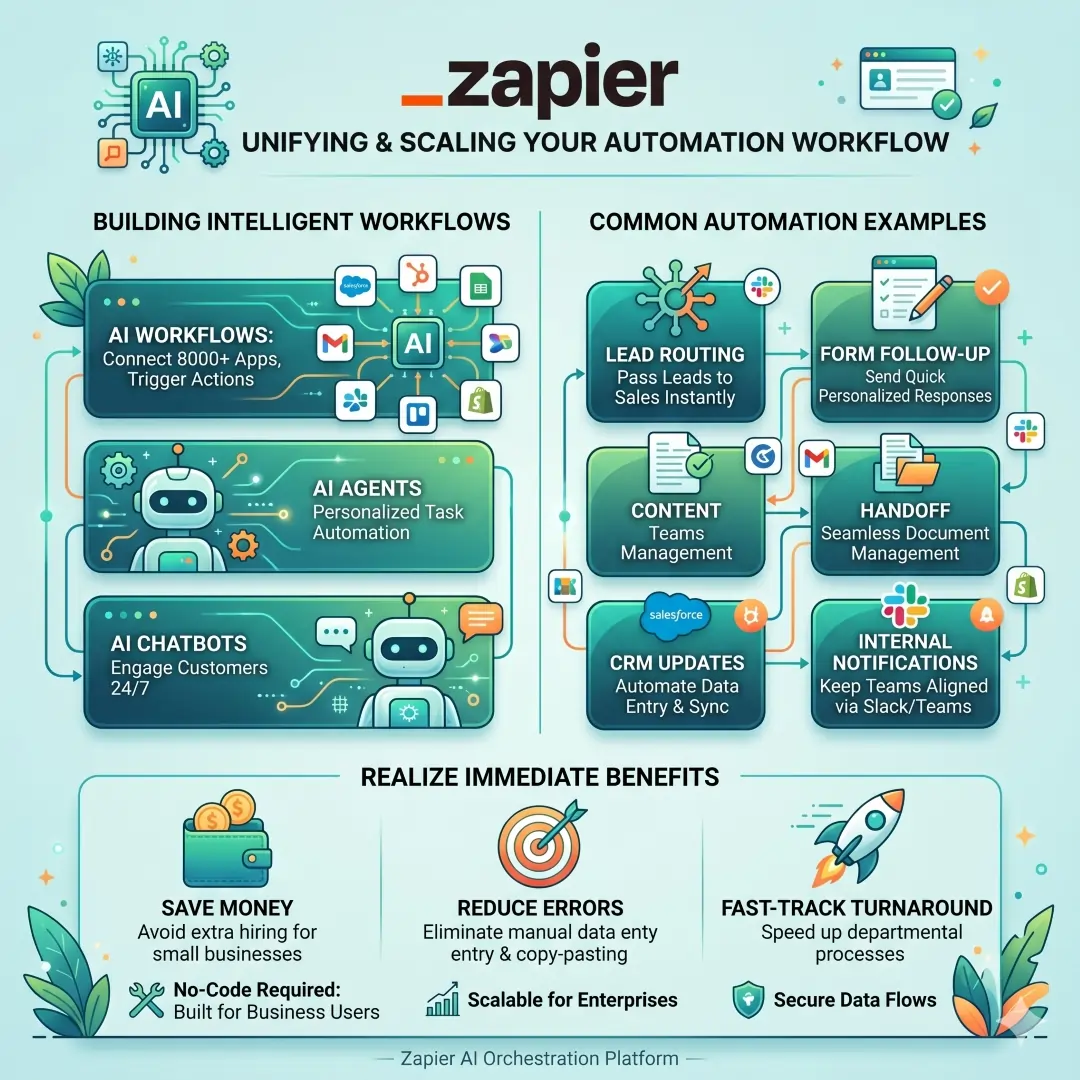
This tool can save money in a very direct way. If a process still depends on someone copying data from one app to another, Zapier can often remove that manual step. For small businesses, that is often more valuable than hiring extra admin support. For larger teams, it can reduce errors and improve turnaround times across departments.
7. Grammarly Business
Grammarly Business is not just a grammar checker. Grammarly says it uses AI and company knowledge to help teams communicate better, create first drafts, and surface relevant internal information while people type. It also says it supports business privacy and security with 256-bit AES encryption for files at rest and SSL/TLS for data in transit.
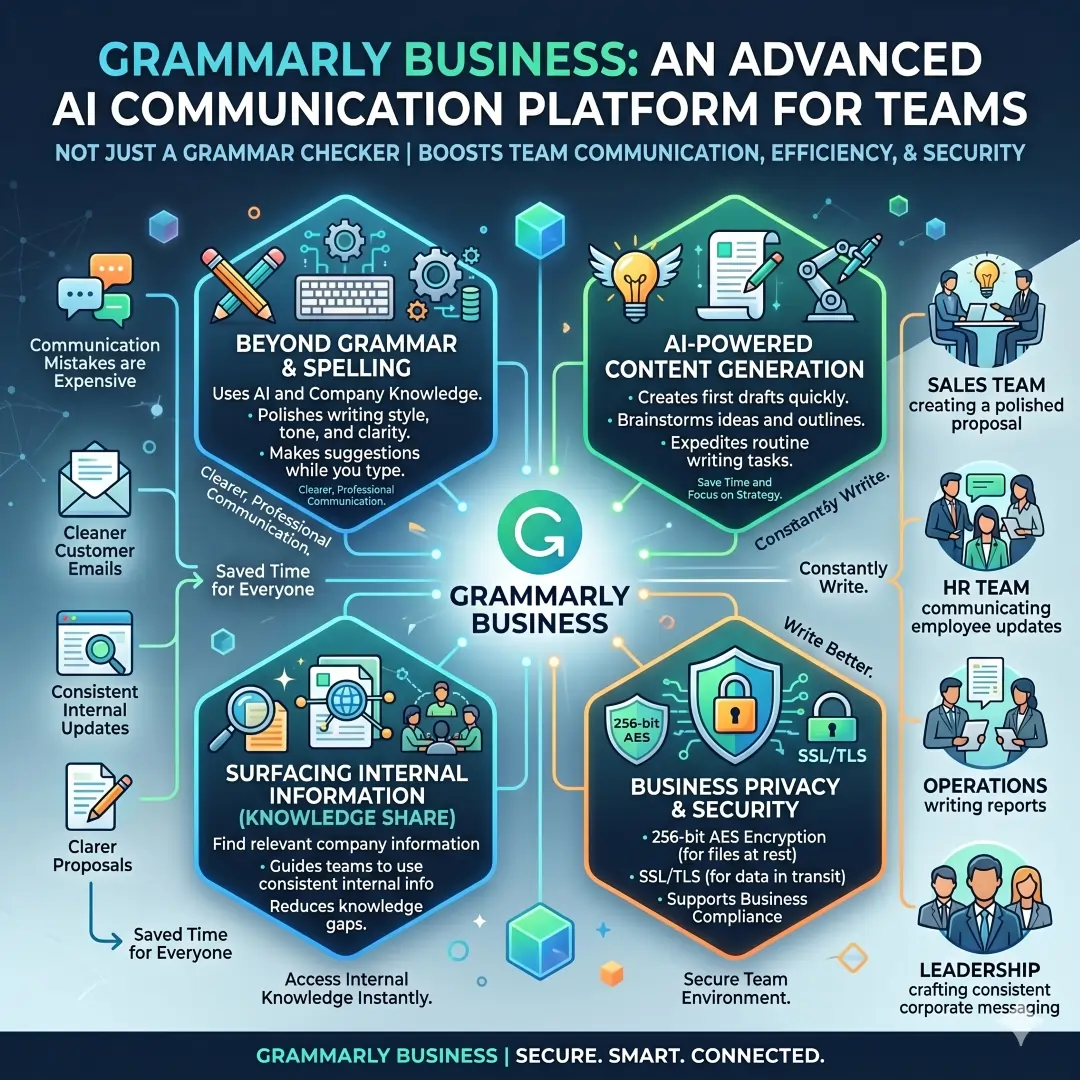
That matters because communication mistakes are expensive. A clearer proposal, cleaner customer email, or more consistent internal update can save time for everyone who reads it. Grammarly’s generative AI and Knowledge Share features make it especially useful for sales, HR, operations, and leadership teams that write constantly.
8. Canva Magic Studio and Canva Business
Canva Magic Studio and Canva Business are strong choices for businesses that need design without a full-time design department. Canva says Magic Studio combines its AI tools in one place so teams can move from brainstorm to finished product more quickly. Canva Business says it helps small teams design, market, and stay on-brand with AI tools, templates, and brand kits.
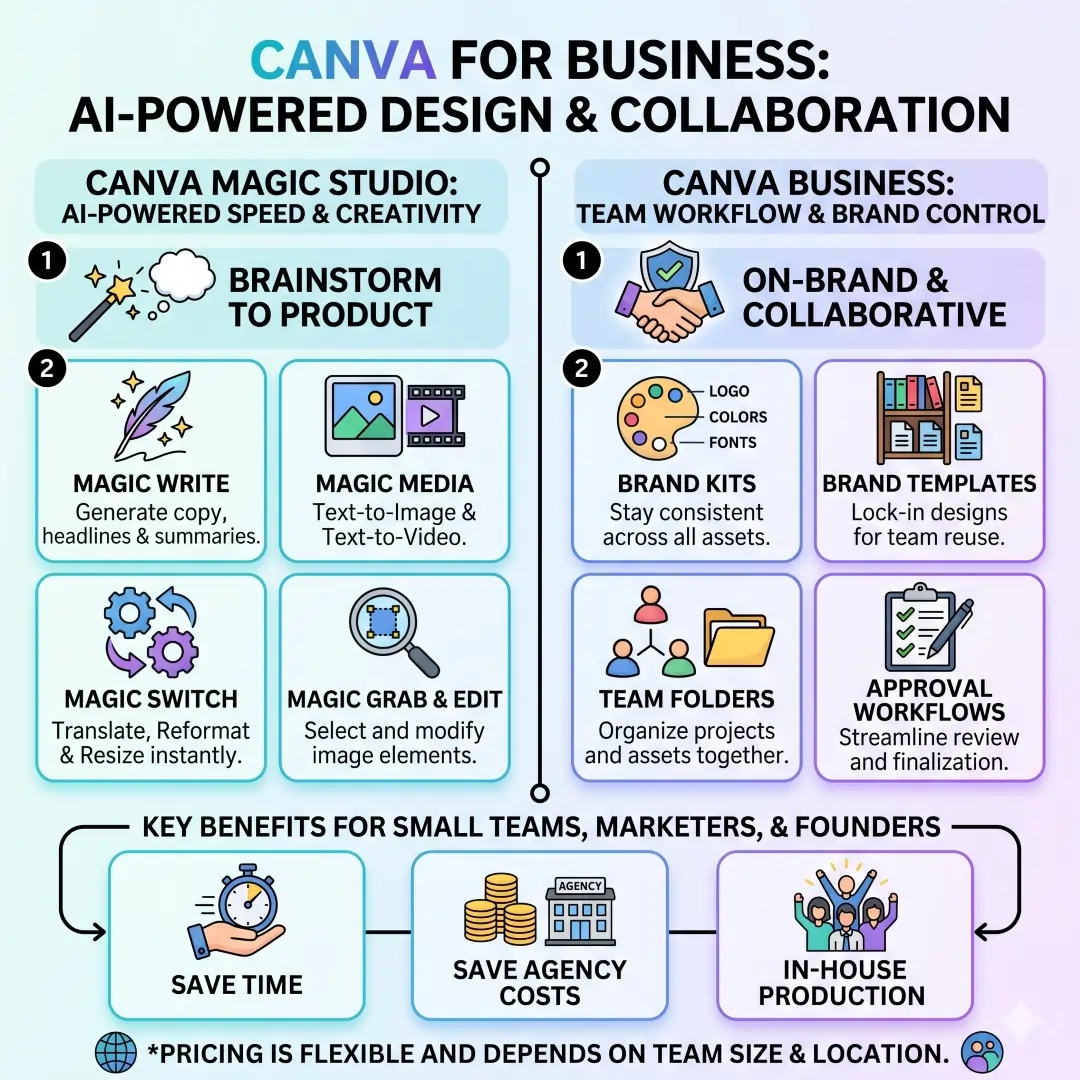
This is one of the easiest ways to save both time and agency costs. Instead of outsourcing every social graphic, ad variation, one-page site, or presentation deck, teams can build a lot of their own visual content in-house. Canva also says its business pricing depends on location and team size, which makes it flexible for global use.
9. HubSpot Breeze
HubSpot Breeze is especially useful for revenue teams. HubSpot says Breeze Assistant uses CRM data and business context to help with meeting prep, content creation, and strategic analysis. It also says Breeze Agents can support marketing, sales, and service work, which makes the tool valuable across the customer lifecycle.
The biggest advantage here is context. A generic AI tool may write something acceptable, but Breeze can work with CRM context already inside HubSpot. That usually means better personalization, fewer manual lookups, and faster follow-up work. For businesses focused on pipeline, customer experience, and retention, that can translate into real cost savings.
10. Zendesk AI
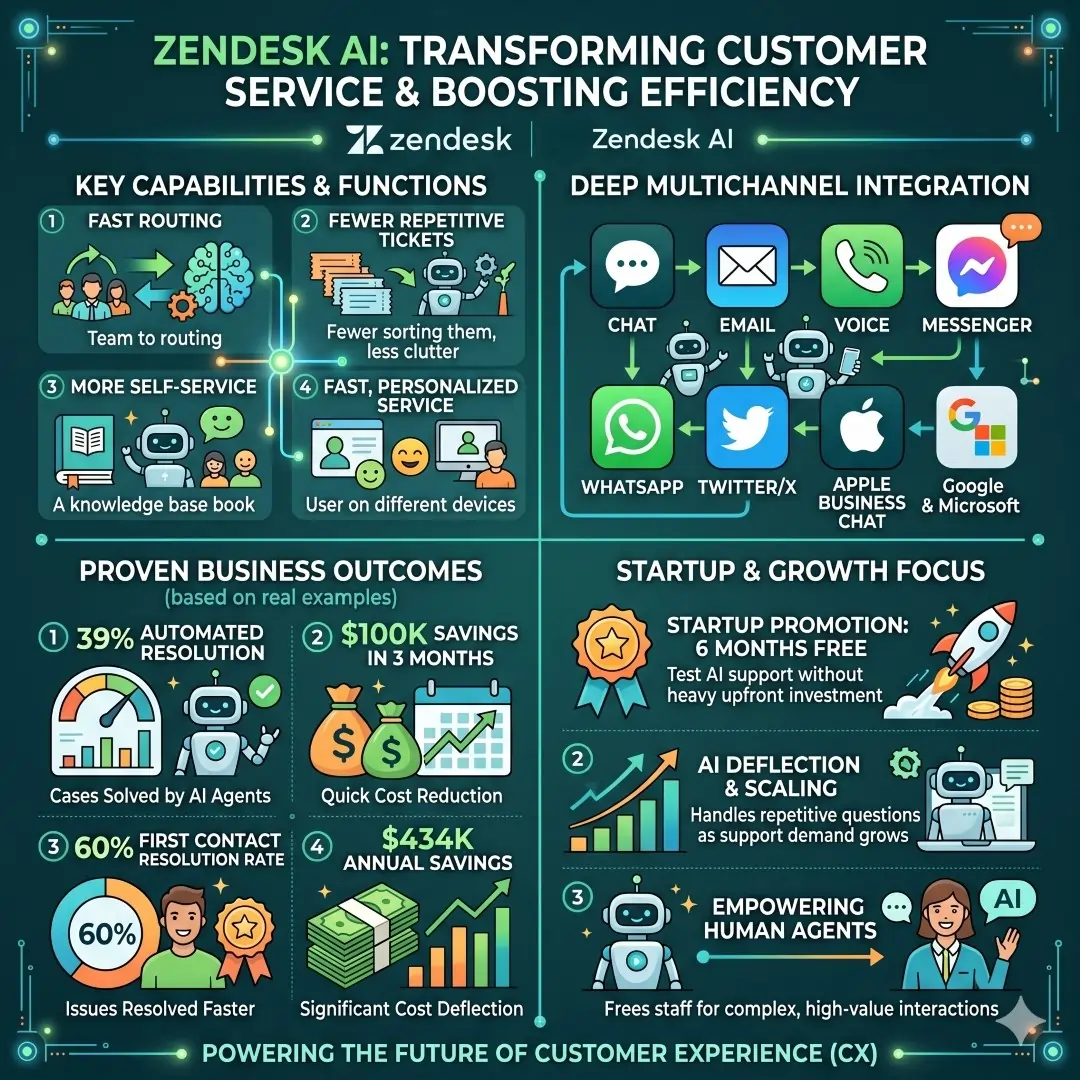
Zendesk AI is a strong fit for customer service teams that need faster routing, fewer repetitive tickets, and more self-service. Zendesk says its AI agents support fast, personalized service across chat, email, voice, and other channels. Its customer stories also highlight outcomes such as 39 percent automated resolution, $100K savings in three months, 60 percent first contact resolution rate, and $434K annual savings, as shown on the site.
Zendesk also offers a startup promotion with six months free, which makes it easier for smaller companies to test AI support without a high upfront cost. For businesses where customer support volume is growing fast, this kind of tool can quickly pay for itself by deflecting repetitive questions and freeing staff for tougher cases.
11. Intercom Fin
Intercom Fin is built for companies that want a more specialized AI customer service agent. Intercom says Fin handles support across live chat, email, SMS, WhatsApp, and social channels, and it can integrate with platforms like Intercom, Zendesk, Salesforce, HubSpot, Freshworks, and others.
The pricing model is interesting because it is tied to outcomes. Intercom says Fin is priced at $0.99 per outcome, and its customer service platform starts from US$29 per month. That can make budgeting easier if you want costs that rise with actual value instead of flat fees for unused capacity.
12. Otter
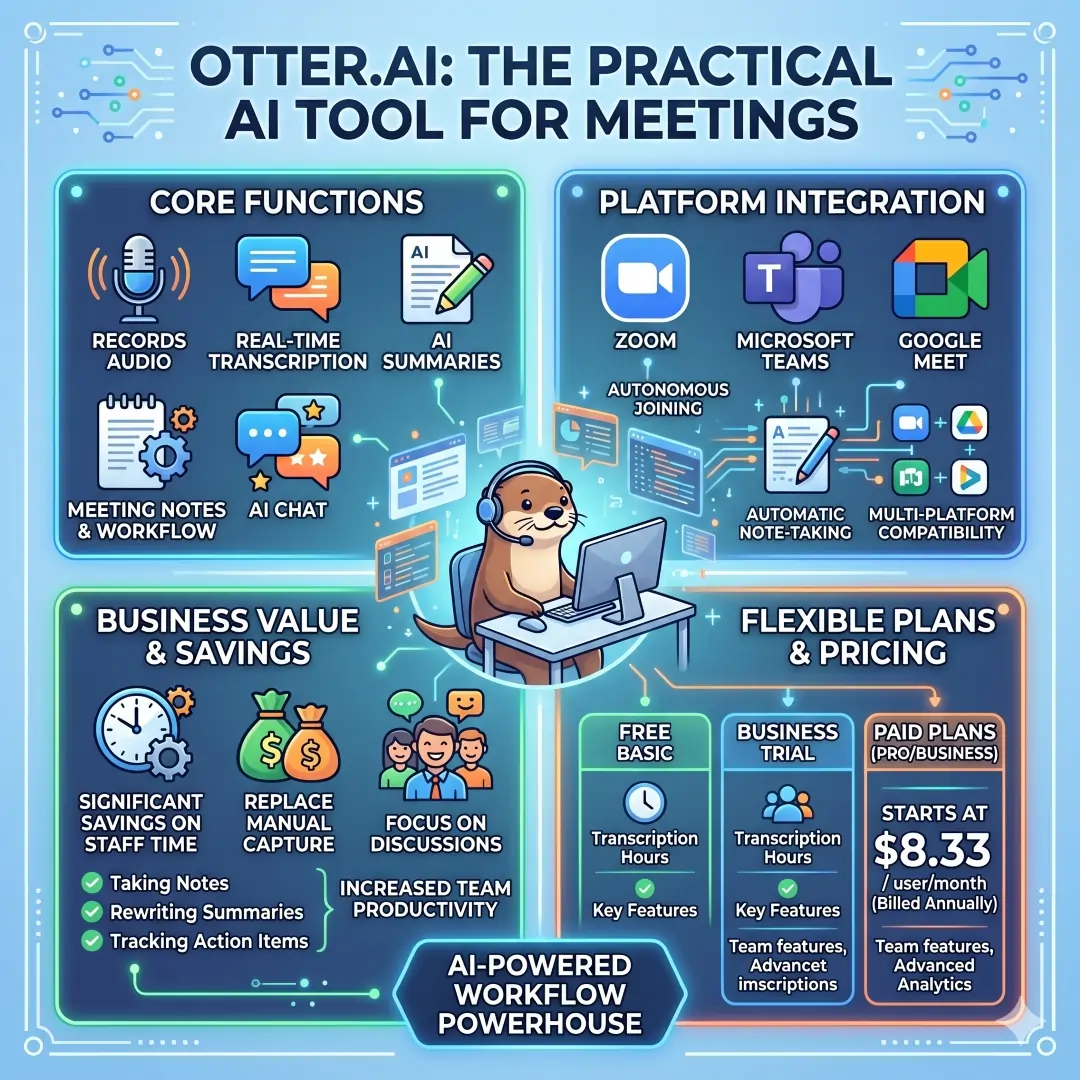
Otter is one of the most practical AI tools for meetings. Otter says it records, transcribes, summarizes, and powers workflow with meeting notes and AI Chat. It also automatically joins Zoom, Microsoft Teams, and Google Meet to write and share notes.
For many teams, this is where the first real savings show up. Instead of paying staff to take notes, rewrite summaries, and chase action items, Otter can handle the capture step automatically. Its paid plans start at $8.33 per user/month when billed annually, and it also offers a free basic plan and business trial.
Which AI Tool Fits Which Business Need
| Business need | Best tool | Why it fits best |
|---|---|---|
| Fast drafting and brainstorming | ChatGPT Business | Strong for ideation, analysis, shared projects, and custom GPTs. |
| Office documents and presentations | Microsoft 365 Copilot | Works inside Word, Excel, Outlook, PowerPoint, and Teams. |
| Email and collaborative docs | Google Workspace with Gemini | Gemini is built into Gmail, Docs, Meet, Sheets, Drive, and Chat on eligible plans. |
| Internal communication search | Slack AI | Summaries, search, recaps, translations, and workflow generation. |
| Knowledge management | Notion AI | Meeting notes, agents, and search across connected apps. |
| Workflow automation | Zapier AI | Connects 8000+ apps and automates repetitive handoffs. |
| Better writing quality | Grammarly Business | Improves clarity, consistency, and company communication. |
| Branded visuals | Canva Magic Studio | Fast design for social graphics, presentations, and marketing assets. |
| Sales and marketing context | HubSpot Breeze | Uses CRM data and business context for content and analysis. |
| Support automation | Zendesk AI or Intercom Fin | Built for customer service workflows and ticket deflection. |
| Meetings and notes | Otter | Automatic transcription and summaries for major meeting platforms. |
Real-World Examples of Where These Tools Save Money
A marketing team can use ChatGPT Business to draft campaign copy, then use Grammarly Business to polish the final language and Canva to turn that copy into brand-ready visuals. That means fewer outsourced drafts and faster publishing cycles. OpenAI, Grammarly, and Canva all position their products around faster creation and team workflows.
A sales team can use HubSpot Breeze to prepare for meetings using CRM context, while Zapier AI moves lead data between forms, CRM records, and email tools automatically. This reduces the hidden cost of manual updates and improves response speed. HubSpot and Zapier both emphasize context-aware help and workflow automation.
A support team can combine Zendesk AI or Intercom Fin with Otter for internal meetings and Slack AI for team coordination. Zendesk and Intercom both focus on faster resolution, while Slack and Otter reduce the time spent searching conversations and taking notes. That is a powerful mix for businesses that live in tickets, meetings, and messages all day.
How to Save the Most Money with AI Business Tools
The smartest approach is usually not to buy everything at once. Start with the highest-friction task in your business, then choose one tool that removes that pain first. For many teams, that means meetings, writing, support, or workflow automation. Once that system is running, expand into the next layer only when the cost is justified by the real time saved. This approach matches the way the leading platforms are packaged, with tiers, trials, add-ons, and usage-based pricing.
A practical rollout often looks like this:
- Pick one department to pilot the tool.
- Measure the time saved on the exact task it should improve.
- Compare that saving with subscription cost and setup effort.
- Decide whether to expand, replace another tool, or stop.
This is especially useful with tools like Copilot, Gemini, Notion AI, Zapier, and Intercom, where the value depends heavily on how deeply they are used.
A few simple rules help a lot.
- Choose tools that integrate with your current stack.
- Prefer tools that work where people already spend time.
- Avoid buying two products that solve the same problem.
- Track real outcomes such as hours saved, tickets deflected, drafts completed, and response time.
These are practical business metrics, not vanity metrics. They tell you whether the AI is truly saving money or just adding another login.
Common Mistakes Businesses Make When Buying AI Tools
The biggest mistake is buying AI for its novelty instead of its workflow value. A shiny chatbot that does not connect to your documents, CRM, inbox, or support desk often looks impressive for a week and then gets ignored. The stronger products today are the ones that live inside the tools people already use, such as Microsoft 365, Google Workspace, Slack, Notion, and HubSpot.
Another common mistake is failing to define success. If you do not know whether the goal is fewer support tickets, faster drafting, better note-taking, or less manual data movement, you will not know whether the subscription is worth it. The best AI business tools are measurable. They should show up in saved hours, cleaner output, or lower operating costs.
Security is also easy to overlook. Business buyers should pay attention to privacy policies, access controls, and data handling, especially when using AI with internal documents or customer information. Vendors such as Microsoft, Google, Grammarly, Slack, and Notion all emphasize enterprise-grade security, privacy, or data controls on their official pages.
Final Thoughts
The best AI business tools are the ones that quietly remove friction from everyday work. ChatGPT Business helps teams think and draft faster. Microsoft 365 Copilot and Google Workspace with Gemini bring AI into the office tools people already know. Slack AI, Notion AI, and Otter reduce the cost of communication and meetings. Zapier cuts manual handoffs. Grammarly and Canva improve output quality. HubSpot, Zendesk, and Intercom bring AI into customer-facing work where speed and consistency matter most.
If your business wants to save time, reduce costs, and improve quality at the same time, the smartest move is to start with one high-impact workflow and let the results guide the next purchase. The right AI stack does not just automate tasks. It gives your team more room to think, create, and grow.
Article Disclaimer
The information provided in this article, “Best AI Business Tools to Save Time and Money,” is intended for general informational and educational purposes only. While every effort has been made to ensure accuracy and relevance, AI tools, features, pricing, and capabilities may change over time without notice. The tools mentioned are based on publicly available information and commonly accepted industry insights, and they may not be suitable for every business or situation.
Readers are encouraged to conduct their own research, evaluate their specific needs, and consider factors such as budget, security, data privacy, and business goals before making any purchasing decisions. The use of any AI software, automation platform, or productivity tool is at the user’s own discretion, and no guarantees are made regarding performance, outcomes, or financial savings.
Also, Read these Articles in Detail
- Best Business Tools for Small Businesses in 2026
- Top Business Tools Every Startup Needs
- Best Productivity Tools for Modern Teams
- Essential Business Tools for Remote Teams
Article’s References And Sources
- OpenAI. (2026). ChatGPT Business and Pricing
- OpenAI. (2026). ChatGPT Pricing Details
- Microsoft. (2026). Microsoft 365 Copilot for Enterprise
- Microsoft. (2026). Copilot Overview and Features
- Google. (2026). Google Workspace Pricing and Plans
- Google. (2026). Google Workspace Overview
- Slack. (2026). Slack AI Features Overview
- Slack. (2026). Slack Pricing Plans
- Notion. (2026). Notion AI Product Overview
- Notion. (2026). Notion Pricing Plans
- Zapier. (2026). Zapier AI and Automation Platform
- Zapier. (2026). AI Automation Features
- Grammarly. (2026). Grammarly Business Features
- Canva. (2026). Canva Magic Studio Overview
- Canva. (2026). Canva Business Billing and Plans
- HubSpot. (2026). HubSpot AI and Breeze Platform
- Zendesk. (2026). Zendesk AI Customer Service Solutions
- Zendesk. (2026). Zendesk for Startups Program
- Intercom. (2026). Intercom Pricing and AI Fin Overview
- Otter.ai. (2026). Otter AI Meeting Assistant Overview
- Otter.ai. (2026). Otter Pricing Plans
Frequently Asked Questions (FAQs)
FAQ 1: What are the best AI business tools for saving time and money?
The best AI business tools are the ones that remove repetitive work, help teams make faster decisions, and reduce the need for manual effort. In most businesses, the biggest time losses come from writing, meetings, customer support, data movement, and routine communication. Tools that solve those problems clearly are usually the most valuable. That is why many companies now use AI writing assistants, AI meeting note tools, workflow automation platforms, customer support AI, and design tools that can produce content much faster than a human starting from scratch.
A strong AI tool should not only be smart. It should also be practical, easy to use, and connected to the work your team already does every day. For example, a business may use one AI tool to draft emails, another to summarize meetings, and another to automate lead follow-up. The best setup is not always the one with the most features. It is usually the one that saves the most time in the most important parts of the business. When chosen well, AI productivity tools can reduce overhead, improve quality, and help even small teams act like much larger ones.
FAQ 2: How do AI business tools actually save money?
AI business tools save money in several practical ways. One of the biggest savings comes from reducing the number of hours employees spend on repetitive work. When a tool can generate first drafts, summarize meetings, sort support requests, or move data between apps automatically, the team can focus on more valuable work instead of manual tasks. That lowers labor waste and makes operations more efficient. In many cases, a business can delay hiring extra support because AI is handling part of the load.
Another major way AI saves money is by reducing outside service costs. A company may spend less on freelance writing, design help, transcription, or support staffing when it has the right AI software stack in place. AI also helps lower the cost of mistakes because automated workflows can reduce missed follow-ups, inconsistent communication, and duplicated effort. Over time, those small savings become very meaningful. A tool that costs a monthly fee can still save much more than it costs if it removes enough manual work.
FAQ 3: Which AI tools are best for writing and content creation?
For writing and content creation, the strongest tools are usually the ones that help with drafting, editing, brainstorming, and rewriting. A good AI writing assistant can generate blog outlines, product descriptions, email drafts, ad copy, social captions, and internal documents in a fraction of the time it would take to write everything manually. This is especially useful for marketing teams, freelancers, business owners, and content creators who need a steady flow of polished material.
The best way to use these tools is to treat them as a starting point, not a final replacement for human judgment. AI can speed up the first draft, but a person should still check the tone, clarity, accuracy, and brand style. That combination is powerful because it combines machine speed with human quality control. Businesses that use AI this way often publish faster, communicate more consistently, and avoid the stress of starting every project from a blank page.
FAQ 4: Are AI business tools useful for small businesses?
Yes, AI business tools are especially useful for small businesses because they help teams do more with fewer people. Small businesses often do not have large departments for writing, support, operations, design, or administration. A few well-chosen AI tools can fill those gaps and reduce the pressure on the owner or small team. For example, AI can help write emails, organize notes, answer common customer questions, and automate follow-ups without requiring a full-time employee for each task.
Small businesses also benefit from the lower entry cost of many AI platforms. Some offer free plans, trial periods, or affordable monthly pricing that makes testing easy. This matters because small teams usually need tools that create immediate value without a big upfront investment. A simple AI workflow automation tool, a reliable meeting summary tool, and a strong AI writing tool can already make a big difference. When used wisely, these tools can improve speed, reduce errors, and help a small business look and operate more professionally.
FAQ 5: What is the difference between AI productivity tools and automation tools?
AI productivity tools are designed to help people think, write, organize, summarize, or communicate more efficiently. They assist with work that still needs human judgment, creativity, or decision-making. For example, an AI tool might help write a proposal, summarize a meeting, or generate a list of ideas. These tools improve output quality and reduce the time needed to complete common tasks.
Automation tools, on the other hand, are focused on moving work from one step to the next with little or no manual involvement. For example, a workflow tool might send a form submission into a CRM, create a task, notify a team member, and send a follow-up email automatically. Many modern platforms combine both AI and automation, which makes them even more powerful. The AI part helps with thinking and content, while the automation part handles repetitive process work. Together, they help businesses save both time and labor costs.
FAQ 6: How can AI tools help with meetings and note-taking?
AI meeting tools can save a huge amount of time by recording conversations, creating transcripts, summarizing discussions, and capturing action items automatically. In many businesses, meetings produce a lot of valuable information, but that information gets lost when no one takes good notes. An AI meeting assistant solves that problem by turning spoken conversation into a written record that can be reviewed later. This is useful for team check-ins, sales calls, interviews, planning sessions, and client meetings.
The biggest benefit is that people no longer need to divide their attention between participating in a meeting and writing notes at the same time. Everyone can stay focused on the discussion while the AI handles the documentation. This often leads to better participation, fewer misunderstandings, and clearer follow-up steps. It also helps employees who could not attend the meeting by giving them a quick summary instead of forcing them to watch a full recording. For many businesses, this one change alone can save hours every week.
FAQ 7: Are AI customer support tools worth it for businesses?
Yes, AI customer support tools are often worth it because they can reduce ticket volume, speed up responses, and improve service consistency. Many businesses receive the same questions over and over again, such as payment issues, order updates, account access problems, and basic product questions. AI support tools can answer these common questions instantly, which saves support staff from repeating the same work all day. That makes the support team faster and more effective.
These tools are also useful because they can help route more complicated cases to the right person. Instead of making customers wait in a long queue or sending them through a confusing process, AI can triage the request and direct it properly. That improves the customer experience while lowering the workload on the support team. When done well, AI support does not replace human service. It handles the simple tasks so humans can focus on the more valuable ones that need empathy, judgment, or problem-solving.
FAQ 8: What should a business look for before buying an AI tool?
Before buying an AI tool for business, the most important thing to check is whether it solves a real problem. A tool can look impressive, but if it does not save time, improve quality, or reduce costs, it may not be worth the monthly fee. Businesses should ask what task the tool is meant to improve, who will use it, how often it will be used, and what the expected result should be. Clear goals make it much easier to judge whether the tool is a smart purchase.
It is also important to look at integration, security, ease of use, and pricing. A tool that fits into the current workflow is usually more valuable than one that requires a complete change in process. Security matters too, especially when dealing with customer data, internal documents, or financial information. The best tools usually offer a balance of convenience, control, and reliable output. Businesses should also test the tool with real tasks before fully committing, because practical use often reveals more than product descriptions do.
FAQ 9: Can AI tools replace employees?
In most cases, AI tools do not fully replace employees. They are better understood as assistants who handle repetitive or time-consuming parts of a job. For example, AI can draft a report, summarize a call, sort messages, or move data between systems, but it still usually needs a person to review, approve, and make decisions. The human role remains important because businesses still need judgment, creativity, emotional intelligence, and accountability.
What AI often does instead is change how work is done. One employee can now complete more tasks in less time, or a small team can support a larger workload without becoming overwhelmed. That means AI is more often a productivity multiplier than a full replacement. In some cases, it may reduce the need for certain kinds of repetitive work, but it also creates space for employees to do higher-value work. The businesses that benefit most are the ones that use AI to support their people, not try to remove them entirely.
FAQ 10: How should a business start using AI tools without wasting money?
The smartest way to begin is to start small and focus on the biggest pain point first. A business does not need to buy every AI product at once. It is better to choose one area where time is being lost, such as meeting notes, content drafts, customer support, or workflow automation, and then test one tool that solves that specific problem. This makes the value much easier to measure and lowers the risk of overspending.
After the first test, the business should check whether the tool actually saved time, improved quality, or reduced effort. If the result is strong, then the next step is to expand it to more people or more workflows. If the result is weak, the business can stop before wasting more money. This careful approach helps companies build a useful AI stack over time without buying unnecessary subscriptions. The goal is not to use AI everywhere just because it is available. The goal is to use the right AI tools in the right places so the business becomes faster, leaner, and more effective.
