Small business software in 2026 is being shaped by three big forces: AI, cloud collaboration, and automation. The U.S. Small Business Administration now has a dedicated page on AI for small businesses, and it also highlights its digital modernization efforts, which is a strong reminder that modern businesses are expected to move faster, work smarter, and stay secure while doing it.
That is why the best tools are no longer the ones with the most features on paper. The best tools are the ones that save time, reduce manual work, keep your money visible, and make your team easier to manage. In a real business, a good stack should support communication, bookkeeping, customer management, content creation, payments, task tracking, and security without becoming messy or expensive. This article breaks down the strongest options for 2026 in a simple, practical way, with official pricing and feature details where available.
Table of Contents
How to choose business tools for a small business in 2026
Before buying anything, it helps to think in terms of problems, not software names. Start with the biggest bottleneck in your business. Is it scattered communication, slow invoicing, weak follow-up, messy files, or too much manual work?
A simple way to choose is to ask five questions.
- Does this tool save time every week?
- Does it connect with the rest of my stack?
- Does it have a free trial or a free plan?
- Can my team actually learn it quickly?
- Will it still be useful when the business grows?
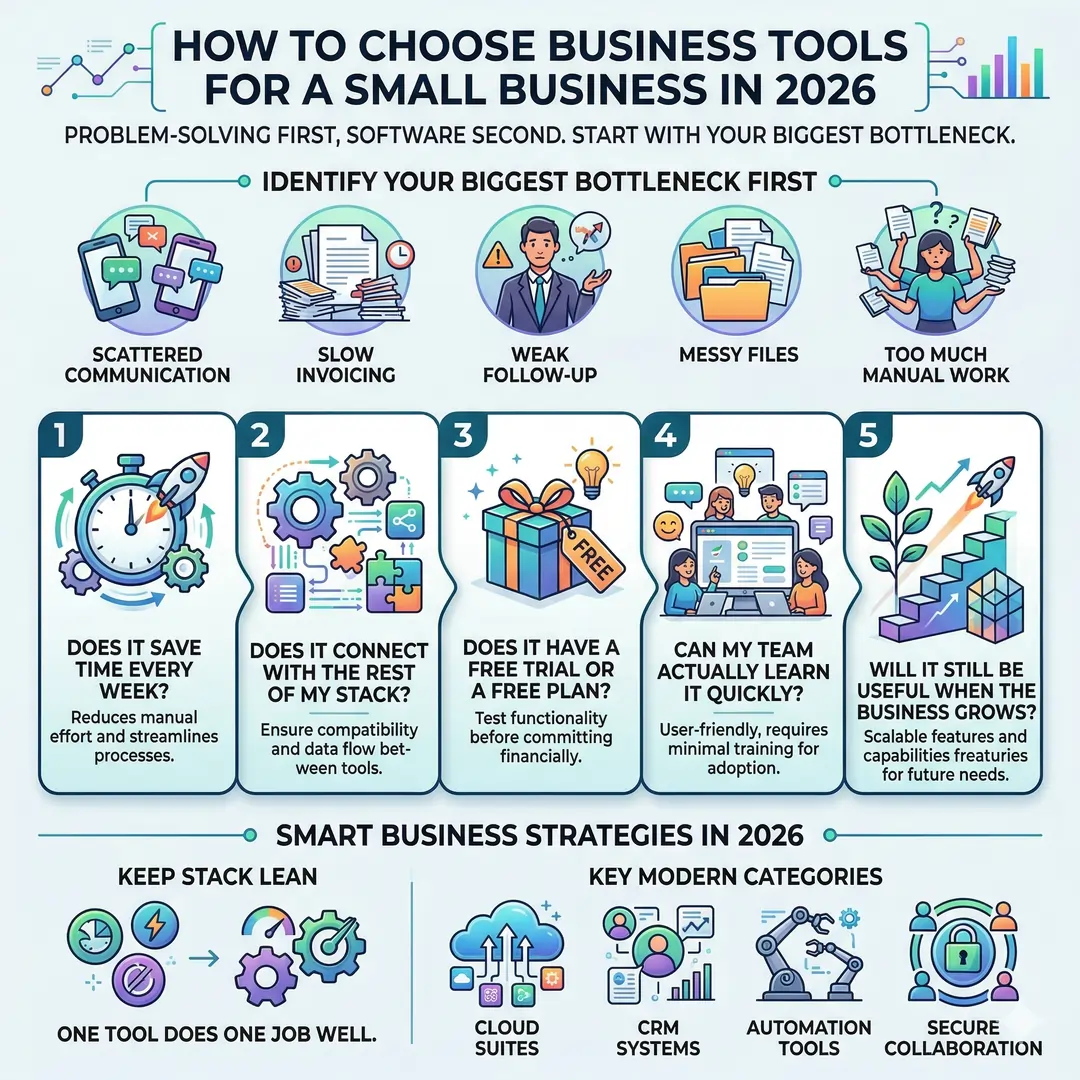
The smartest small businesses keep their stack lean. One tool should do one job well. A business does not become more professional just because it uses more apps. It becomes more professional when the apps work together cleanly. That is why cloud suites, CRM systems, automation tools, and secure collaboration platforms matter so much in 2026.
Best business tools for small businesses in 2026
The tables below are organized by function, not hype. That makes it easier to build a real stack instead of collecting random subscriptions.
Table 1. Core tools for daily operations
| Tool | Best for | Why it stands out | Starting price (USD) |
|---|---|---|---|
| Google Workspace | Email, documents, cloud storage, meetings | Includes business email, AI-powered writing assistance, secure cloud storage, and team collaboration tools in one place | $2.50 – $7 per user/month (approx. based on region) |
| Microsoft 365 Business | Office apps and team productivity | Offers Word, Excel, Outlook, cloud storage, and strong security and identity management for teams | $1.75 – $9 per user/month (approx. annual billing) |
| Zoho Books | Accounting and invoicing | Supports GST, automated workflows, inventory tracking, and easy financial reporting | Free plan available, paid plans start at $10/month |
| HubSpot CRM | Customer relationship management | Provides unlimited users, contact tracking, and sales pipeline tools with a free forever plan | Free, premium upgrades available |
| Slack | Team communication | Features channels, real-time messaging, AI search, and workflow automation for better collaboration | $15 per user/month |
| Notion | Documentation and project organization | Combines notes, databases, AI tools, and team collaboration in a single workspace | Free, paid plans start at $10 per user/month |
| 1Password | Password management and security | Ensures secure password storage, team access control, and data protection across devices | $7.99 per user/month |
Table 2. Growth tools for marketing, automation, design, and sales
| Tool | Best for | Why it stands out | Starting price (USD) |
|---|---|---|---|
| Canva Business | Graphic design and branding | Offers AI-powered design tools, brand kits, templates, and collaboration features for marketing teams | $20 per user/month |
| Mailchimp | Email marketing and campaigns | Provides automation, audience segmentation, and AI-powered campaign optimization | Free plan available, paid plans vary |
| Zapier | Automation and integrations | Connects 8,000+ apps, enabling workflow automation and multi-step processes without coding | $19.99/month |
| Zoom Workplace | Video meetings and collaboration | Includes HD meetings, AI meeting summaries, and collaboration tools like whiteboards and docs | $14.16 per user/month |
| Dropbox | File storage and sharing | Allows secure file sharing, PDF editing, and digital signatures for business workflows | $15 per user/month |
| Shopify | E-commerce and online stores | Enables businesses to build online stores, manage inventory, and sell across multiple channels | $67/month (approx. converted) |
| Stripe | Payment processing | Supports online payments, subscriptions, and global transactions with flexible billing options | ~2.9% + fees per transaction |
Note on Pricing
All prices are approximate USD conversions based on standard plans and may vary depending on region, billing cycle, and currency fluctuations. Always check official pricing pages for the most accurate and updated details.
What each tool is best at in real life
A useful business tool is not just one that looks impressive in a comparison chart. It has to fit how a business actually works.
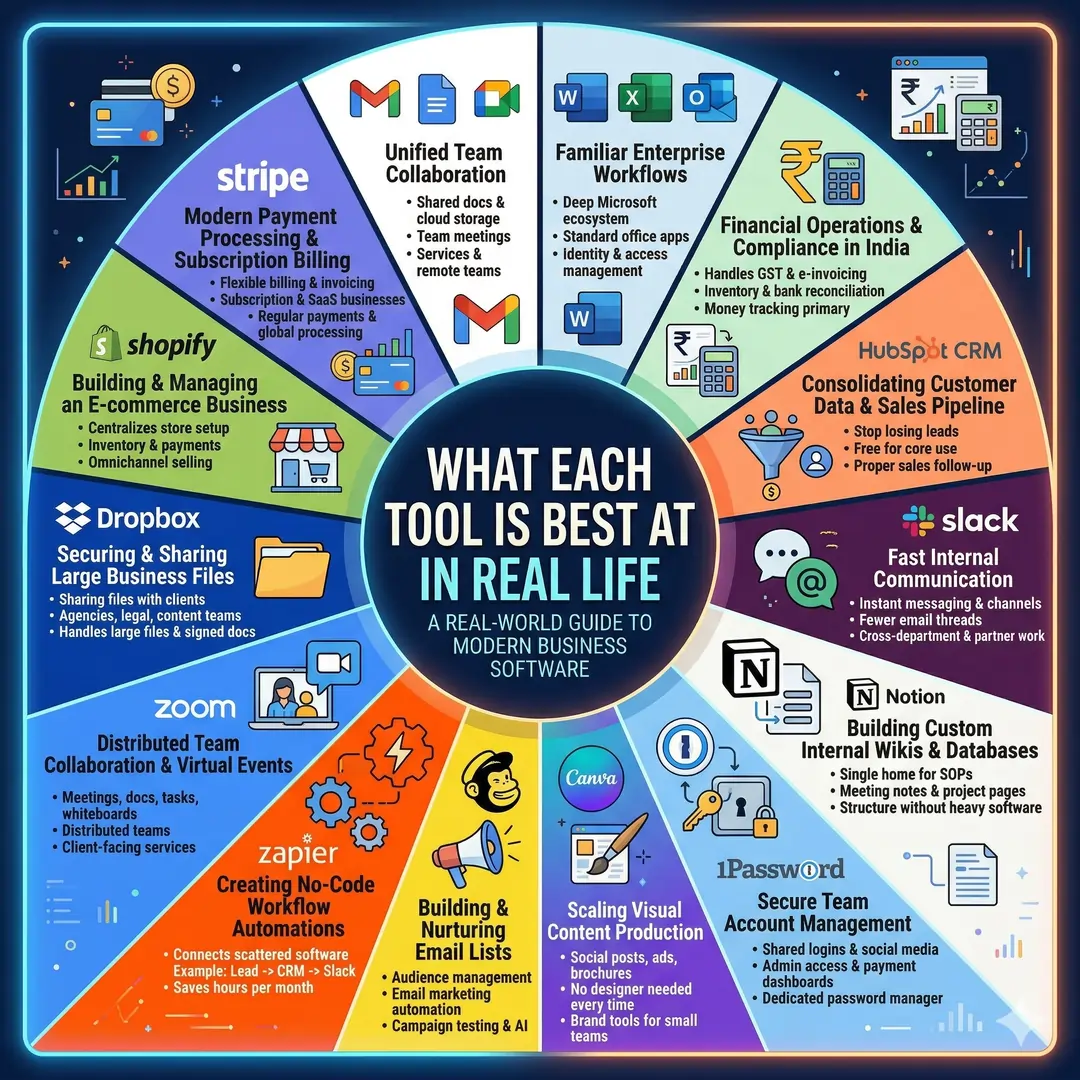
Google Workspace is ideal when you want a professional email address, shared documents, cloud storage, and team meetings in one place. It is especially useful for service businesses, agencies, consultancies, and remote-first teams. The AI features in Gmail, Docs, and Meet make it feel more modern than a basic office suite.
Microsoft 365 Business is a strong fit for companies already deep in Word, Excel, Outlook, and Teams. It is especially practical if your team is accustomed to Microsoft workflows or needs straightforward identity and access management.
Zoho Books deserves special attention for Indian small businesses because it handles GST, e-invoicing, inventory, bank reconciliation, and automation in a way that is easy to tie to daily operations. If money tracking matters more than anything else, this is one of the best places to start.
HubSpot CRM is a smart foundation when you want to stop losing leads in spreadsheets. Since it is free forever for core use, it lowers the barrier to proper sales follow-up and keeps your customer data in one place.
Slack works best when your business needs fast internal communication, fewer email threads, and simple workflow automation. It is especially valuable for teams that work across departments or with external partners.
Notion is useful when your business needs a single home for SOPs, meeting notes, project pages, and internal knowledge. It shines in teams that like structure but do not want heavy software.
1Password is one of those tools that seems invisible until something goes wrong. Once a business has shared logins, social media accounts, admin access, or payment dashboards, a dedicated password manager becomes essential.
Canva Business is a great fit for business owners who need social posts, ad creatives, brochures, thumbnails, and brand visuals without hiring a designer every time. Its brand tools and AI features make it especially appealing to small teams that publish content often.
Mailchimp remains a dependable choice for email marketing because it combines audience management, automation, campaign testing, and growing AI features. It is especially useful for stores, creators, and service businesses that rely on repeat communication.
Zapier is the glue that connects scattered software. A simple automation like “new lead from a form goes to CRM, then Slack, then email list” can save hours every month. For a small team, that time is worth more than the subscription fee.
Zoom Workplace is no longer just a meeting app. It is now a wider collaboration layer with docs, tasks, whiteboards, and AI support, which makes it useful for distributed teams and client-facing service businesses.
Dropbox still matters if file sharing with clients is a daily problem. It is especially practical for agencies, legal teams, content teams, and businesses that handle large files or signed documents.
Shopify is the most natural pick when your business is selling products online. It centralizes store setup, inventory, payments, and omnichannel selling, which is why it remains one of the most useful e-commerce tools for small businesses in 2026.
Stripe matters when you need clean payment processing plus flexible billing. That is especially true for subscription businesses, SaaS products, coaching programs, agencies, and service firms that invoice regularly.
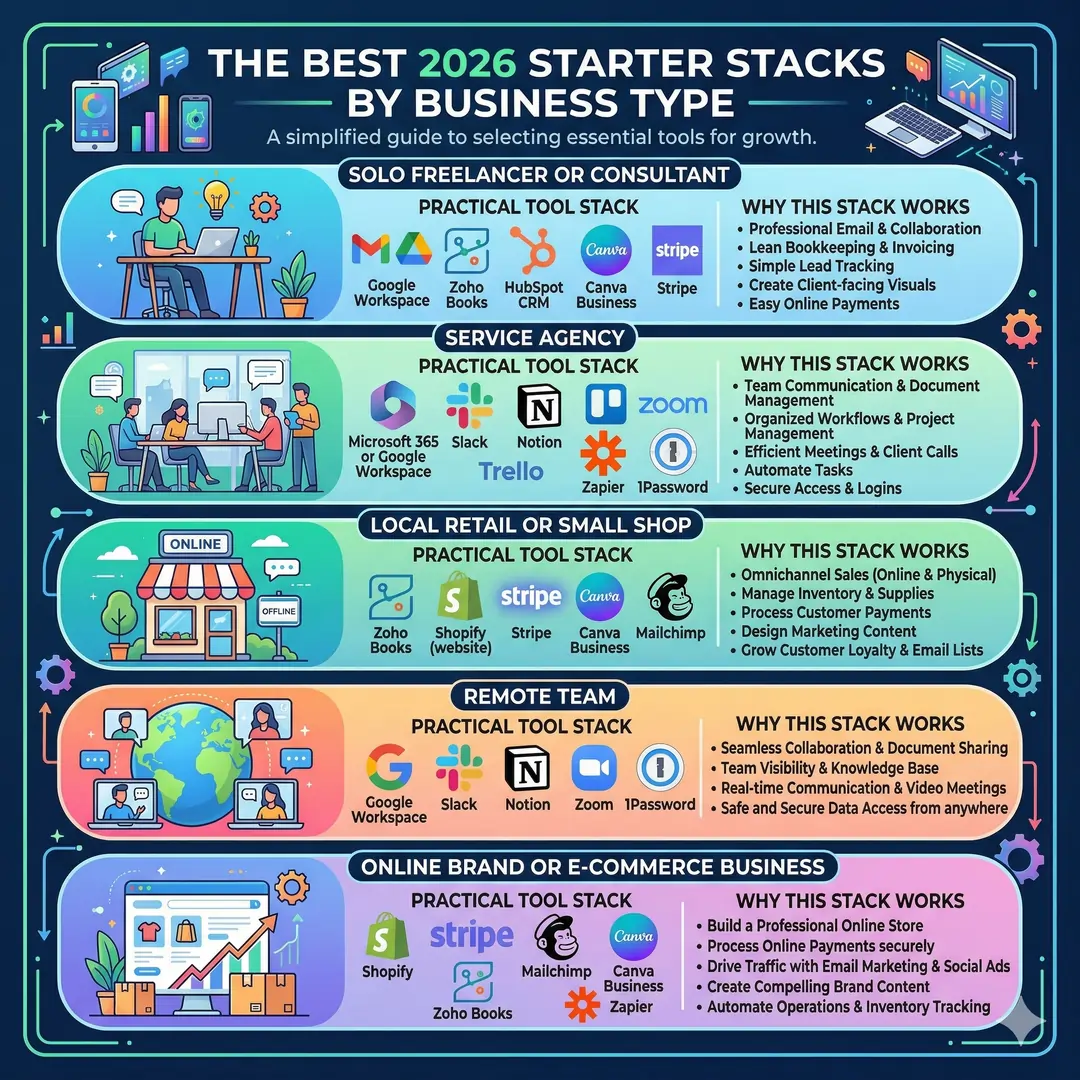
The best 2026 starter stack by business type
Here is a simple way to think about the best stack for different kinds of businesses.
| Business type | Practical tool stack | Why this stack works |
|---|---|---|
| Solo freelancer or consultant | Google Workspace, Zoho Books, HubSpot CRM, Canva Business, Stripe | You get professional email, bookkeeping, lead tracking, client-facing visuals, and easy payments in a lean setup. |
| Service agency | Microsoft 365 or Google Workspace, Slack, Notion, Trello, Zoom, Zapier, 1Password | This stack keeps communication, internal documentation, meetings, workflow, and security in good order. |
| Local retail or small shop | Zoho Books, Shopify, Stripe, Canva Business, Mailchimp | This combination supports stock, online selling, payments, promotions, and repeat customer marketing. |
| Remote team | Google Workspace, Slack, Notion, Zoom, 1Password | The focus here is shared work, team visibility, and safe access from anywhere. |
| Online brand or e-commerce business | Shopify, Stripe, Mailchimp, Canva Business, Zoho Books, Zapier | This stack covers storefront, payments, email sales, visuals, accounting, and automation. |
A practical way to spend money without wasting it
A lot of small businesses make the same mistake. They buy too many tools too soon. That usually creates more admin, not less.
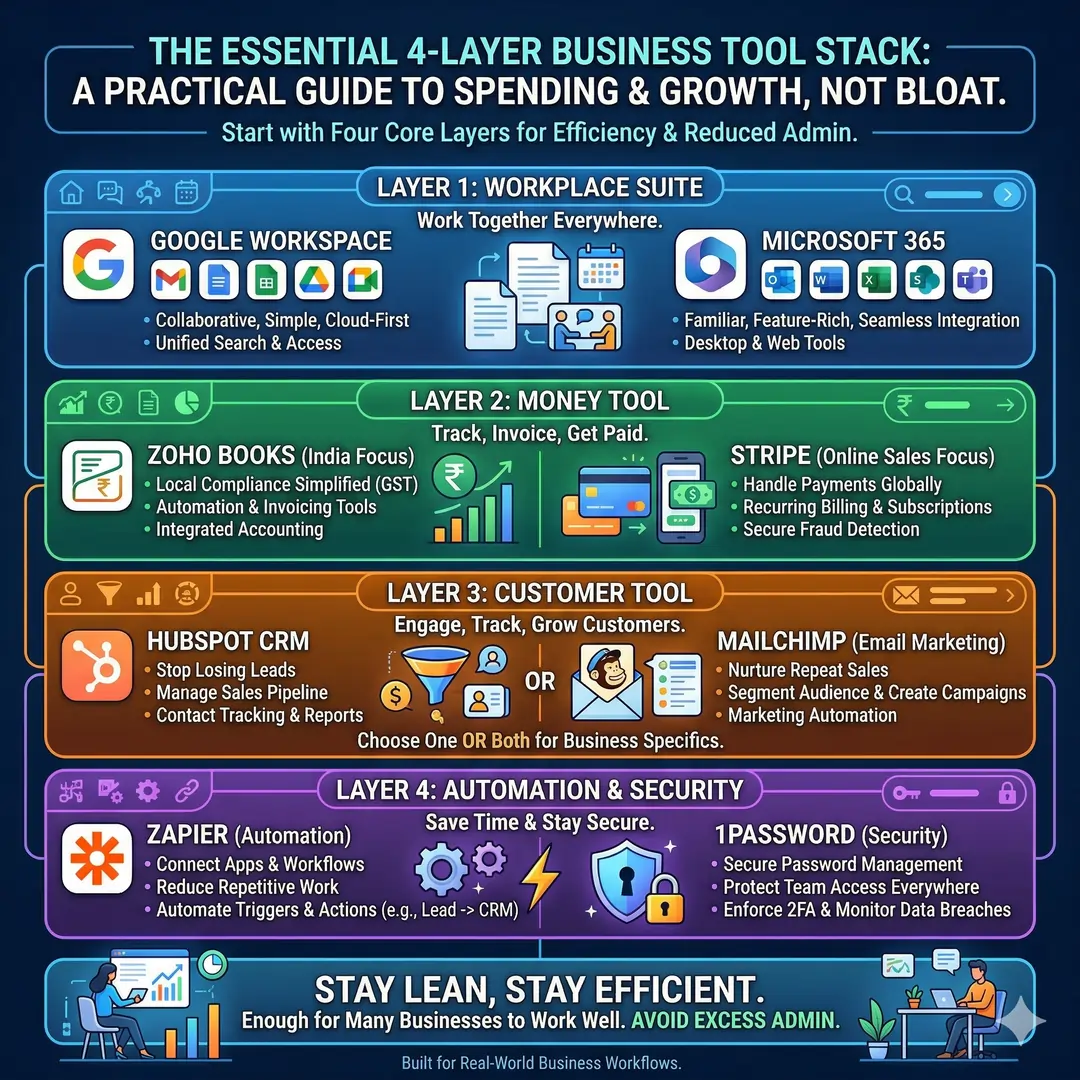
A smarter approach is to start with just four layers.
First, choose a workplace suite. That means either Google Workspace or Microsoft 365. Both can cover email, docs, meetings, and file sharing.
Second, choose your money tool. For many Indian businesses, Zoho Books is the cleanest fit because it is local-friendly and includes GST features, automation, and invoicing tools. For online selling, Stripe can handle payments and recurring billing.
Third, choose your customer tool. That may be HubSpot CRM for lead tracking, Mailchimp for email marketing, or both if your business depends on repeat sales.
Fourth, add one automation and one security layer. Zapier reduces repetitive work, and 1Password protects access across the team.
That is enough for many businesses to work well without becoming bloated.
Thoughts on AI in small business tools
The biggest change in 2026 is not just that tools have added AI. It is that AI is now embedded into everyday business software.
Google Workspace has Gemini in Gmail, Docs, and Meet. Microsoft 365 Business plans now emphasize AI features in their business offering. Slack highlights AI search and recaps. Notion includes AI Meeting Notes, Enterprise Search, and agents. Canva Business offers higher AI access for content creation and brand work. Even Zoom now builds an AI Companion into paid plans. That means small businesses can get meaningful help from the tools they already use, not just from separate AI apps.
My view is simple. AI should remove drudgery, not add complexity. If a tool helps you reply faster, summarize meetings, produce better content, or avoid repetitive data entry, it is doing real work. If it only looks exciting in a demo, it is probably not worth the subscription. That is where the best tools in 2026 separate themselves from the rest.
Final verdict
The best business tools for small businesses in 2026 are the ones that do three things well. They save time, they connect, and they grow with your business.
If you are starting from scratch, a very strong starter stack looks like this:
Google Workspace or Microsoft 365 for communication and collaboration, Zoho Books for accounting, HubSpot CRM for leads, Canva Business for design, Slack or Notion for team organization, Zapier for automation, 1Password for security, and Stripe or Shopify if you sell online. That combination gives a small business a serious, modern foundation without feeling overloaded.
The real secret is not finding one perfect app. It is building a stack that makes your business easier to run every single day.
Article References and Sources
- U.S. Small Business Administration. (2026).
AI for Small Business: Tools and Resources.
Retrieved from: https://www.sba.gov/business-guide/manage-your-business/ai-small-business - Google Workspace. (2026).
Google Workspace Pricing and Plans (India).
Retrieved from: https://workspace.google.com/intl/en_in/ - Microsoft. (2026).
Microsoft 365 Business Plans and Pricing.
Retrieved from: https://www.microsoft.com/en-in/microsoft-365/business - Zoho. (2026).
Zoho Books Pricing and Features (India).
Retrieved from: https://www.zoho.com/in/books/ - HubSpot. (2026).
HubSpot CRM for Small Businesses.
Retrieved from: https://www.hubspot.com/products/crm/small-business - Slack. (2026).
Slack Business+ Plan and Features.
Retrieved from: https://slack.com/intl/en/pricing/businessplus - Notion. (2026).
Notion Pricing and Plans.
Retrieved from: https://www.notion.so/pricing - 1Password. (2026).
1Password Business Pricing.
Retrieved from: https://1password.com/pricing/password-manager - Canva. (2026).
Introducing Canva Business.
Retrieved from: https://www.canva.com/newsroom/news/introducing-canva-business/ - Mailchimp. (2026).
Mailchimp Marketing Pricing Plans.
Retrieved from: https://mailchimp.com/pricing/marketing/ - Zapier. (2026).
Zapier Pricing and Automation Features.
Retrieved from: https://zapier.com/pricing - Zoom. (2026).
Zoom Workplace Pro Plans and Features.
Retrieved from: https://www.zoom.com/en/products/collaboration-tools/zoom-workplace-pro/ - Dropbox. (2026).
Dropbox Business Plans.
Retrieved from: https://www.dropbox.com/business - Shopify. (2026).
Shopify Pricing Plans (India).
Retrieved from: https://www.shopify.com/in/pricing - Stripe. (2026).
Stripe Payments Features (India).
Retrieved from: https://stripe.com/in/payments/features
Frequently Asked Questions
FAQ 1: What are the best business tools for small businesses in 2026?
The best business tools for small businesses in 2026 are the ones that help owners save time, stay organized, and grow without creating extra confusion. A strong business stack usually includes tools for email and collaboration, accounting, customer management, marketing, automation, design, file sharing, and security. When these tools work well together, a small business can handle daily work more smoothly and with fewer mistakes.
Some of the most useful categories include a workplace suite for communication, a CRM for lead tracking, an accounting tool for money management, a design platform for graphics, and an automation tool for repetitive tasks. The best choice depends on the type of business, but the goal is always the same. A small business should use tools that reduce manual work, improve professionalism, and make growth easier.
FAQ 2: Why do small businesses need business tools in 2026?
Small businesses need business tools in 2026 because competition is faster, customer expectations are higher, and manual work slows everything down. A business owner cannot afford to waste time searching for files, sending repeated emails, or tracking invoices by hand. Good tools help turn scattered work into a clear system.
These tools also help small businesses look more professional. A proper email system, a reliable CRM, a clean invoice process, and simple team communication can make even a very small company feel well-run. In 2026, using the right tools is not about looking modern. It is about staying efficient, secure, and ready to grow.
FAQ 3: Which tool should a small business buy first?
The first tool a small business should buy is usually a workplace suite. That means a tool for professional email, documents, cloud storage, and meetings. Without this foundation, communication becomes messy, and files are harder to manage. A business that starts with a solid workspace system can organize its daily work much more easily.
After that, the next priority is usually money management or customer tracking, depending on the business model. A service business may need a CRM first, while a retail or e-commerce business may need an accounting tool or payment system first. The smartest approach is to solve the biggest daily problem before buying extra software that may not be needed yet.
FAQ 4: What is the best accounting tool for a small business?
The best accounting tool for a small business is one that makes invoicing, expense tracking, and tax work simple. For many small businesses, especially in India, a tool with GST support, bank feeds, inventory tracking, and e-invoicing is extremely valuable. These features reduce the pressure on business owners and help them keep better financial records.
A good accounting tool should also be easy to use. Many small business owners are not accountants, so the software should not feel confusing or technical. The best option is one that helps the owner see cash flow clearly, send invoices quickly, and stay ready for tax season without stress.
FAQ 5: What is a CRM, and why is it important for small businesses?
A CRM, or customer relationship management tool, helps a business track leads, customers, sales conversations, and follow-ups in one place. It is important because many small businesses lose opportunities simply by forgetting to respond, missing a follow-up, or keeping customer notes in too many different places. A CRM brings all of that into one organized system.
For small businesses, a CRM is useful because it helps turn interest into real sales. It keeps track of where each lead came from, what stage they are in, and what action should happen next. That means less guesswork and better customer care. Even a free CRM can make a huge difference when a business is trying to grow steadily.
FAQ 6: How can automation tools help small businesses save time?
Automation tools help small businesses save time by handling repetitive work automatically. For example, a business can set up a workflow that sends a lead into the CRM, notifies the team, and adds the contact to an email list without manual copying. That kind of automation removes small tasks that would otherwise take up hours every week.
Automation is useful because it lowers human error too. When people do the same task again and again, mistakes happen. An automation platform keeps processes consistent. For small businesses, this can mean faster response times, smoother internal work, and more time to focus on customers instead of admin work.
FAQ 7: Which communication tools are best for small teams?
The best communication tools for small teams are the ones that make it easy to talk, share updates, and keep work visible. A platform with channels, direct messages, video calls, and file sharing is usually ideal. This helps teams avoid long email chains and keeps discussions easier to follow.
A good communication tool also supports teamwork across locations. That matters a lot in 2026, when many small businesses work remotely or in hybrid setups. The right tool should help teams discuss projects quickly, keep records of conversations, and reduce confusion. When communication is clear, the rest of the business usually becomes easier too.
FAQ 8: Why are design tools important for small businesses?
Design tools are important because small businesses need strong visuals to attract attention and build trust. A business may need social media posts, flyers, ads, presentations, product images, or brand materials. A good design platform helps create all of that quickly, even if the business does not have a full-time designer.
This matters because customers often judge a business by what they see first. Clean visuals can make a company look more credible and professional. For small businesses, design tools are not just about looking attractive. They are also about communicating clearly, promoting offers, and building a recognizable brand identity.
FAQ 9: Is AI useful in small business tools, or is it just hype?
AI is genuinely useful in many small business tools, especially when it saves time or improves quality. For example, AI can help write emails, summarize meetings, organize documents, generate content ideas, or speed up customer support. When used well, it reduces routine work and helps small teams move faster.
That said, AI is only valuable when it solves a real problem. A tool should not be chosen just because it sounds advanced. The best AI features are the ones that make everyday tasks easier, such as drafting replies, finding information, or improving workflow. For small businesses, AI is most helpful when it feels like a practical assistant instead of a complicated extra layer.
FAQ 10: How should a small business choose the right tool stack in 2026?
A small business should choose its tool stack based on real needs, not on trends. The best stack usually starts with a workplace suite, then adds an accounting tool, a CRM, a design platform, an automation tool, and a security tool. If the business sells online, it may also need a payment processor or an e-commerce platform. The key is to choose only what is truly useful.
It also helps to think about budget, ease of use, and integrations. A tool may look impressive, but if the team finds it hard to use, it becomes a burden. The best stack is one that is affordable, simple, and connected. In 2026, small businesses do best when they use fewer tools, but use them well.
FAQ 11: How many business tools should a small business use in 2026?
A small business should use as many tools as it truly needs, but not so many that the daily workflow becomes confusing. In most cases, a strong setup includes a workplace suite, an accounting tool, a CRM, a communication app, a design tool, and at least one automation tool. That is usually enough to support the main parts of a business without making the system too heavy.
The best approach is to begin with the most important problem. If communication is messy, start with a team collaboration tool. If money tracking is hard, start with accounting software. If customer follow-up is weak, start with a CRM. A small business grows faster when its tools solve real problems instead of adding extra complexity.
FAQ 12: What makes a business tool truly useful for a small business?
A business tool becomes truly useful when it saves time, reduces mistakes, and makes daily work easier. The best tools are simple enough to learn, but strong enough to support real business operations. A tool should help with tasks like file sharing, invoicing, team communication, customer tracking, or task management in a clear and reliable way.
It is also important that the tool fits the size of the business. A small business does not always need the most advanced software. It needs a tool that is practical, affordable, and flexible. The best tools are the ones that help the business run smoothly today and can still support growth tomorrow.
FAQ 13: Why is a workplace suite so important for small businesses?
A workplace suite is important because it brings together email, documents, storage, and meetings in one place. This makes it much easier for a business to communicate professionally and keep work organized. Instead of handling files in many different places, the team can work from one connected system.
It also helps build trust with clients and partners. A business email address looks more professional than a personal one, and shared documents make collaboration much easier. For many small businesses, a workplace suite is the foundation that supports everything else, from internal communication to project delivery.
FAQ 14: How does a CRM help a small business grow?
A CRM, or customer relationship management tool, helps a business keep track of leads, conversations, and customer history. This is important because small businesses often lose sales simply because follow-ups are missed, or customer details are stored in too many places. A CRM gives the business one central system for managing relationships.
Growth becomes easier when a business can see where each lead is in the sales process. A CRM helps team members know who to contact, what was discussed, and what should happen next. That means better follow-up, better customer service, and a much better chance of turning interest into actual sales.
FAQ 15: Are free business tools good enough for small businesses?
Free business tools can be very helpful, especially for startups and very small teams. Many free plans offer the basics needed to get started, such as limited storage, simple email marketing, contact management, or a free CRM. For a new business, this can be a smart way to save money while building a system.
However, free tools do have limits. They may restrict users, storage, automation, or advanced features. That means a business may eventually need to upgrade as it grows. Free tools are best seen as a starting point, not always the final solution. They are useful when the business is still small, but the team should be ready to move to a paid plan when the work becomes more serious.
FAQ 16: What kind of automation should a small business use first?
The first automation a small business should use is usually the one that saves the most time on repetitive tasks. This might include sending new leads to a CRM, notifying a team when a form is submitted, or adding a customer to an email list. These are simple tasks, but when they happen many times a week, they can take up a lot of time.
A good automation tool helps reduce manual work and keeps information moving smoothly from one app to another. This is useful because it lowers the chance of human error and improves response speed. For small businesses, even one or two good automations can make the workflow feel much more professional and organized.
FAQ 17: Why should small businesses care about security tools?
Small businesses should care about security tools because even a small team can face serious problems if passwords or accounts are not protected. Shared logins, weak passwords, and poor access control can lead to security risks that are expensive and stressful to fix. A password manager helps keep sensitive information safe and organized.
Security tools are also important because they help teams work more confidently. When everyone uses secure access and proper sharing methods, there is less risk of accidental leaks or lost login details. Good security is not just for large companies. It is one of the most important parts of a modern small business setup.
FAQ 18: How can small businesses use design tools without hiring a designer?
Small businesses can use design tools to create social media posts, ads, flyers, presentations, and brand visuals without needing a full-time designer. Many modern tools include ready-made templates, drag-and-drop editing, and brand features that make professional-looking content much easier to produce.
This is helpful because small businesses often need visuals regularly, but do not always have the budget for a dedicated design team. A good design platform allows owners or team members to create clean and consistent content quickly. That saves money while still helping the business look polished and trustworthy.
FAQ 19: What is the best tool stack for an online small business?
The best tool stack for an online small business usually includes an e-commerce platform, a payment processor, an email marketing tool, an accounting system, a design tool, and an automation tool. This combination supports everything from selling products to following up with customers after they buy.
A stack like this works well because it connects the main parts of an online business in one system. The store handles sales, the payment tool processes transactions, the email tool helps with repeat marketing, and the accounting tool keeps finances in order. When those tools work together, the business can grow more smoothly and serve customers more effectively.
FAQ 20: How can a small business avoid wasting money on software?
A small business can avoid wasting money on software by choosing tools based on real needs instead of trends. It is easy to get excited about new apps, but every subscription should have a clear purpose. The best question to ask is simple. Does this tool solve a problem that matters right now?
It also helps to test free trials, compare plans carefully, and avoid buying duplicate tools that do the same job. A small business should aim for a lean tool stack that covers the essentials well. When tools are chosen with care, the business saves money, reduces confusion, and stays focused on growth.
