Building a startup is exciting, but it is also messy. In the early days, founders usually wear every hat at once. They handle email, sales, project tracking, design, payments, documents, accounting, and team communication. That is why the right business tools matter so much. A good stack saves time, keeps work organized, improves teamwork, and helps a small team look and operate like a much bigger company. The strongest startup tools today are built around cloud collaboration, automation, customer management, secure file sharing, and simple workflows.
A startup does not need every tool on day one. It needs the right tools in the right order. The best approach is to start with a solid communication suite, add a project management system, use a CRM to track leads, choose a finance tool for invoicing and cash flow, and then layer in design, contracts, security, and payments as the business grows. That simple structure is the reason many startups build their stack around tools like Google Workspace, Slack, Asana, HubSpot CRM, Canva, QuickBooks, Stripe, DocuSign, Dropbox, and 1Password.
Table of Contents
Why the right business tools matter for startups
A startup runs on speed. When a team is small, a single person can become a bottleneck if communication is scattered or files are hard to find. Tools like Google Workspace and Microsoft 365 give startups professional email, shared storage, video meetings, and collaborative documents. Slack supports fast team communication and informal meetings. Asana, Trello, and Notion help teams organize tasks, workflows, and internal knowledge. These are not just convenience tools. They reduce confusion, keep people aligned, and make it easier to move from idea to execution.
Startups also need tools that help them earn money faster. HubSpot CRM helps capture leads and manage customer relationships. Calendly removes the friction of scheduling calls. Stripe makes it easier to accept online and in-person payments. QuickBooks helps track income, expenses, invoices, receipts, and reports. In a young company, every delayed quote, missed follow-up, or unpaid invoice can slow growth. That is why revenue tools are just as important as collaboration tools.
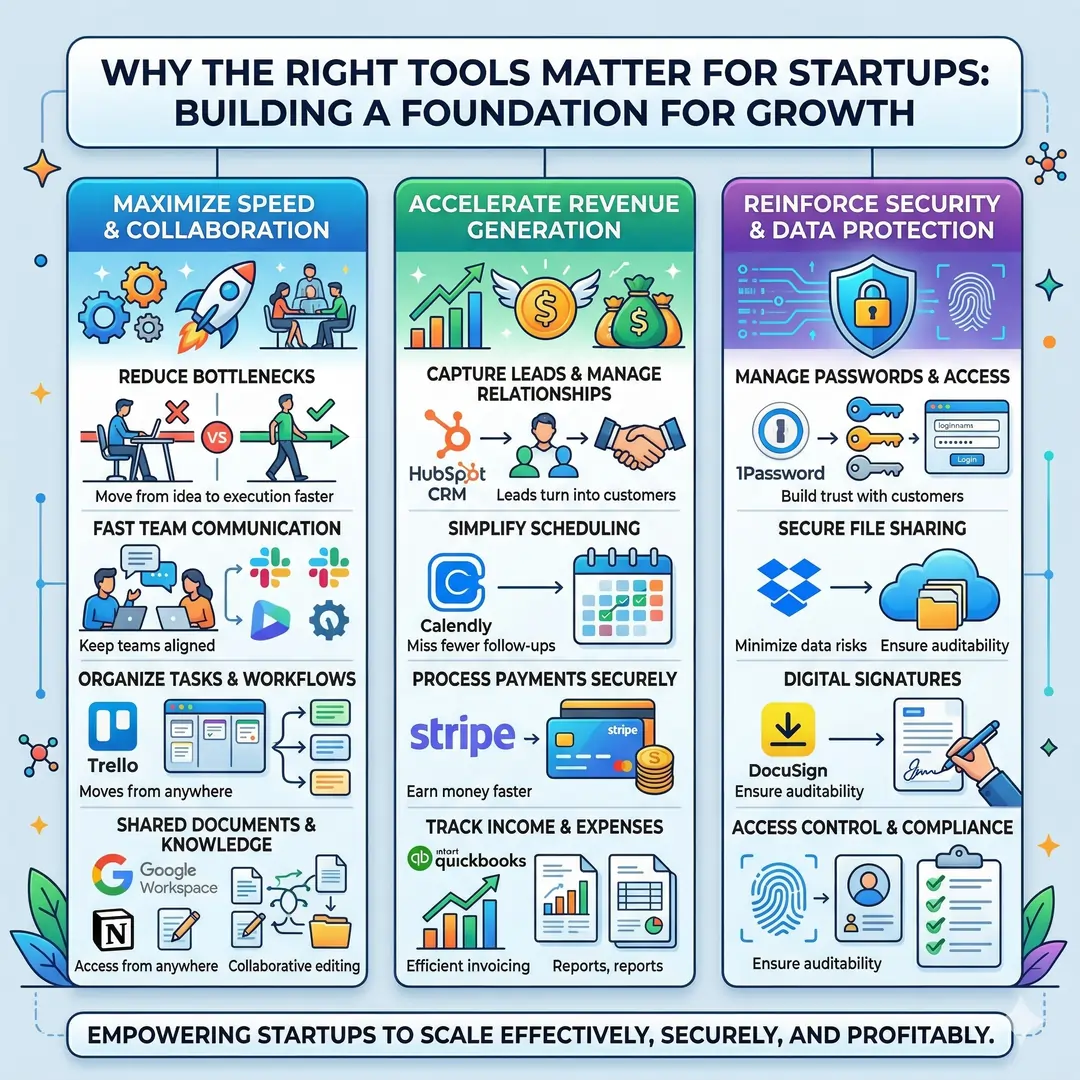
Security is another area that startups often overlook. Founders usually begin with a few shared passwords and personal accounts, then quickly discover that this approach creates risk. 1Password is built to help teams manage passwords, secrets, and access controls, while Dropbox and DocuSign help teams share files and sign documents securely. As teams grow, access control, auditability, and data protection become more important, not less.
Top business tools every startup needs at a glance
| Tool | Best for | What it helps a startup do | Why it stands out |
|---|---|---|---|
| Google Workspace | Email, docs, meetings, storage | Create a professional business identity with Gmail, Drive, Meet, Calendar, Docs, Sheets, Slides, and more. | Strong all-in-one collaboration suite for teams of all sizes. |
| Microsoft 365 | Office apps and business productivity | Use Word, Excel, PowerPoint, Outlook, OneDrive, SharePoint, and business security tools. | Great for teams that prefer the Microsoft ecosystem and need broad productivity plus security. |
| Slack | Team communication | Chat in channels, share files, automate workflows, and run quick audio or video huddles. | Excellent for reducing email overload and keeping conversations in one place. |
| Asana | Project and task management | Track projects, automate recurring work, use forms, templates, and rules to streamline tasks. | A strong choice for teams that need visibility, accountability, and workflow automation. |
| Trello | Simple visual task tracking | Organize work with boards, lists, and cards, then automate routine actions. | Lightweight, visual, and easy to adopt quickly. |
| Notion | Docs, wiki, and project hub | Centralize knowledge, manage projects, automate workflows, and search across information fast. | Ideal for startups that want one flexible workspace for docs and systems. |
| HubSpot CRM | Sales and customer tracking | Manage contacts, deals, tasks, email tracking, meeting scheduling, live chat, and more. | A popular starting point for founders who want a free CRM with room to grow. |
| Calendly | Scheduling | Let people book meetings based on your availability, connect calendars, and integrate video tools. | Saves huge amounts of back-and-forth scheduling time. |
| Canva | Design and brand assets | Create marketing graphics, collaborate on designs, and keep visuals on-brand with brand kits and approvals. | Perfect for non-designers who still need professional-looking content. |
| Mailchimp | Email marketing | Build email campaigns, use automation, segment audiences, and track reporting. | Strong for startup marketing, nurturing, and customer re-engagement. |
| QuickBooks | Accounting and cash flow | Track expenses, invoices, receipts, inventory, reports, and cash flow. | Gives founders a clearer view of business health. |
| Stripe | Payments | Accept payments online and in person, support flexible billing, and manage money movement. | A powerful revenue tool for startups selling products or services globally. |
| DocuSign | Contracts and signatures | Send, sign, and manage agreements with templates, bulk send, APIs, and embedded signing. | Speeds up contracts and reduces paper-based delays. |
| Dropbox | File storage and sharing | Store files, share links, collaborate on shared files, edit PDFs, and protect files. | Simple, reliable, and useful for teams handling large files. |
| 1Password | Security and access | Store passwords and secrets, control vault permissions, and manage secure access for teams. | Essential once multiple people need shared access without shared risk. |
1. Communication and collaboration tools
Google Workspace
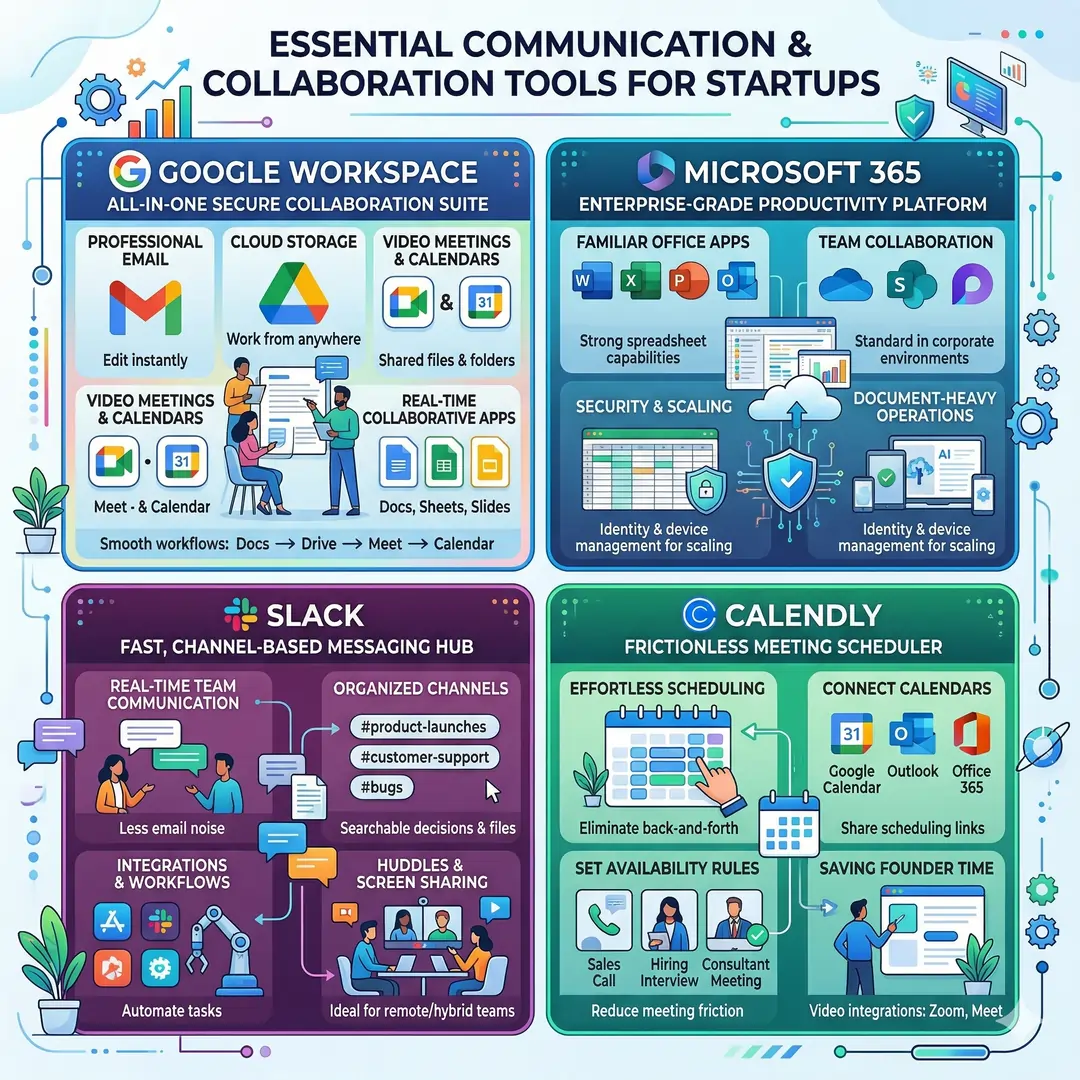
For many startups, Google Workspace is the first serious business tool stack. It combines professional email, cloud storage, video meetings, shared calendars, messaging, and collaborative apps like Docs, Sheets, and Slides. Google positions it as a secure collaboration and productivity suite for businesses of all sizes, and its small business pages highlight business email, video conferencing, cloud storage, and file sharing as core benefits.
This is especially useful for early teams that need to work from anywhere. A founder can draft a proposal in Docs, share it in Drive, discuss it in Meet, and schedule the next step in Calendar. That kind of smooth workflow matters because startups often move too fast for long approval chains or messy file versions. Google’s own real-time collaboration pages emphasize working on documents together and seeing changes instantly.
Microsoft 365
Microsoft 365 is a strong choice for startups that want the familiar Word, Excel, PowerPoint, and Outlook environment, plus cloud storage and team services such as OneDrive, SharePoint, and Loop. Microsoft describes its business suites as productivity software that includes essential apps, AI tools, and security support.
Startups that work heavily with spreadsheets, document-heavy operations, or enterprise clients often like Microsoft’s ecosystem because it feels very standard in corporate environments. It is also useful when a team needs document collaboration plus identity and device management features as it scales.
Slack
Slack works best when a startup wants fast internal communication without drowning in email. Slack highlights channels, file sharing, workflow automation, task management, apps and integrations, and huddles for quick audio or video conversations. Its help pages also describe huddles as a way to recreate informal office discussions directly in Slack with screen sharing and a dedicated thread for notes.
A practical example is a small product team that uses one channel for launches, one for customer support, and one for bugs. Instead of sending separate emails, the team can keep decisions, files, and feedback in one searchable place. That makes Slack especially useful when the startup is remote or hybrid and needs one reliable communication layer.
Calendly
A startup loses a surprising amount of time through meeting coordination. Calendly is built to remove that friction. Its official pages describe how it connects calendars, sets availability, integrates video conferencing, customizes event types, and lets people share a scheduling link. It also supports calendar integrations with platforms like Google, Microsoft, Outlook, and Office 365, plus tools like Zoom and Google Meet.
For founders, this is useful in sales calls, hiring interviews, consultant meetings, and customer demos. Instead of emailing five times to find a slot, the prospect chooses a time that fits your rules. That small change can save many hours every week.
2. Project management and knowledge systems
Asana
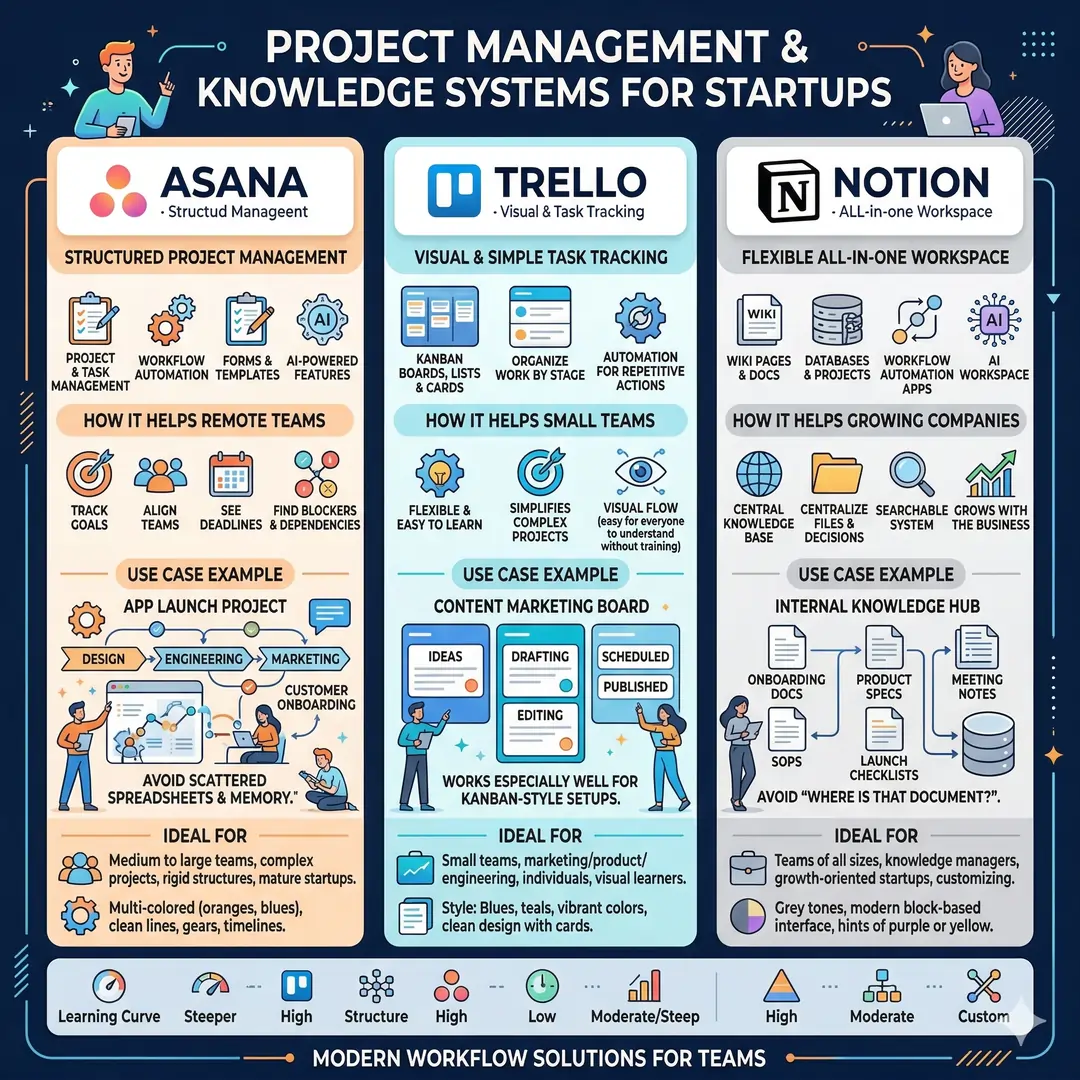
Asana is a strong project management platform for startups that need more structure than chat can provide. It offers project and task management, workflow automation, forms, templates, and AI-powered features that help teams stay aligned and move faster. Asana describes its product as a way to keep remote and distributed teams focused on goals, projects, and tasks.
Use case example. A startup launching a new app can create one project for design, one for engineering, one for marketing, and one for customer onboarding. Each team sees deadlines, blockers, and dependencies in one system. That makes it easier to keep the launch moving instead of relying on scattered spreadsheets or memory.
Trello
Trello is the visual, easy-to-learn option for task management. Its boards, lists, and cards help teams organize work by stage, and its automation tools can handle repetitive board actions. Trello describes itself as a flexible way to simplify complex projects and processes, and its boards can support many types of teams, including marketing, product, and engineering.
Trello works especially well for small teams that want a simple Kanban-style setup. A content startup might build a board with columns like Ideas, Drafting, Editing, Scheduled, and Published. That visual flow is easy for everyone to understand without training.
Notion
Notion is more than a note-taking app. It is a flexible workspace for wiki pages, docs, projects, and even workflow automation. Notion’s product pages describe it as an AI workspace where teams can build knowledge bases, manage projects, automate busywork, and search across apps. Its wiki and project guides show how teams can centralize files, decisions, and tasks in one place.
This makes Notion valuable for startups that want one central home for internal knowledge. A growing company can use it for onboarding docs, product specs, meeting notes, SOPs, and launch checklists. Instead of asking, “Where is that document?”, the team uses a searchable system that scales with the business.
3. Sales, CRM, and customer growth tools
HubSpot CRM
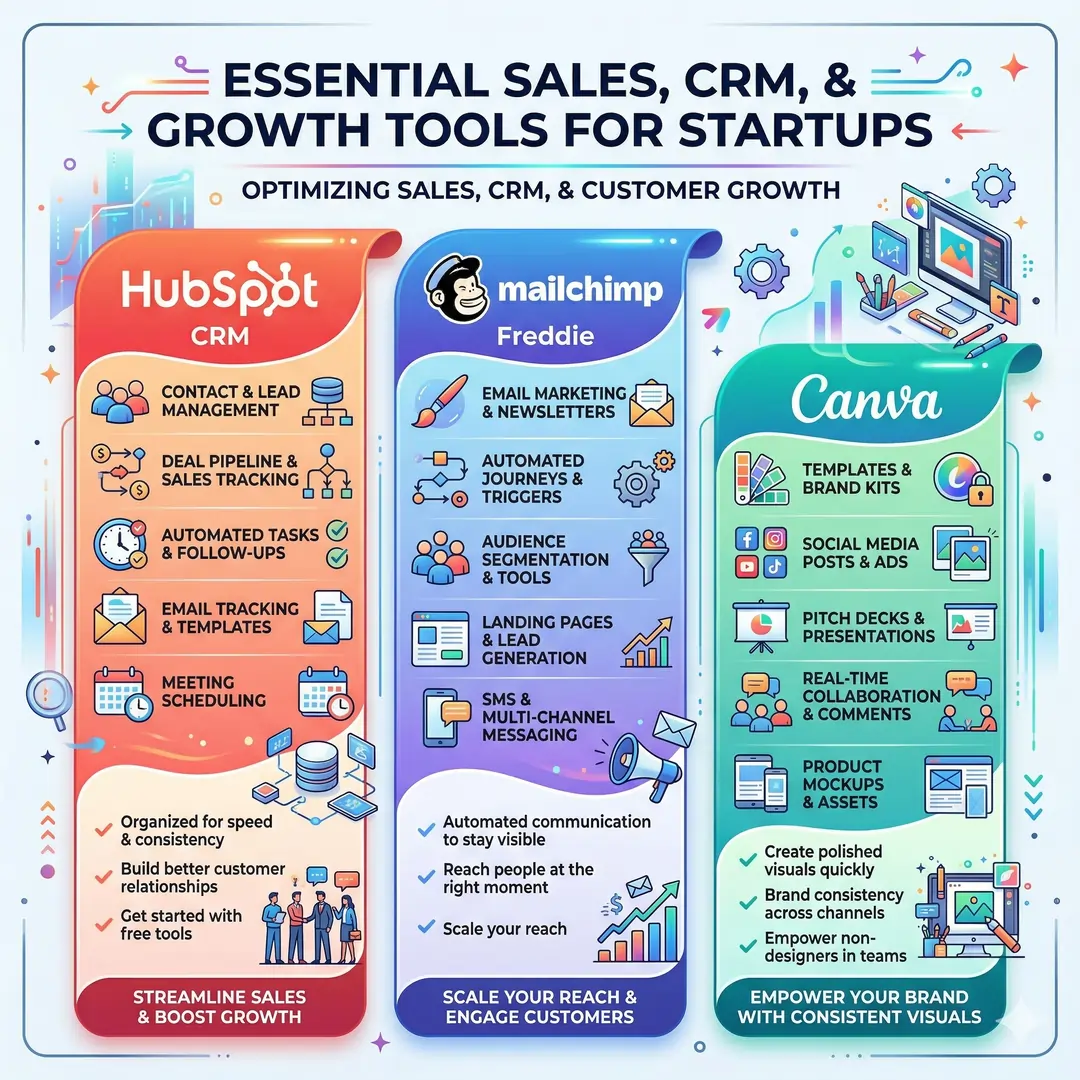
A startup can have a great product and still struggle if customer follow-up is messy. HubSpot CRM is designed to organize contacts, deals, tasks, email tracking, templates, scheduling, and live chat. HubSpot also says its CRM is free and built to help businesses organize and build better relationships with leads and customers.
This matters because early sales often depend on speed and consistency. A founder can capture a lead, assign a follow-up, track email opens, and book a meeting without switching between too many tools, for a lean team, which can make the difference between a warm lead and a lost opportunity.
Mailchimp
Mailchimp is useful when a startup wants to do email marketing without building everything manually. Mailchimp’s official pages highlight email marketing, SMS, marketing automation, reporting and analytics, lead generation, templates, and audience tools. Its automation pages also emphasize journey-based messaging that reaches people when it matters most.
A simple startup use case would be a welcome series for new subscribers, a product update newsletter, and a re-engagement flow for inactive leads. That kind of automated communication helps a young company stay visible without requiring a full marketing department.
Canva
Every startup needs visuals. Social posts, pitch decks, ads, product mockups, one-pagers, event banners, and website graphics all matter. Canva is built to help small teams design, market, and stay on-brand with templates, brand kits, and collaboration tools. Canva’s business and collaboration pages highlight real-time visual collaboration, comments, reviews, approvals, and consistent brand management.
This is especially helpful for founders who are not full-time designers. Instead of waiting on a specialist for every asset, a startup team can create polished materials quickly and keep the brand consistent across channels. That speed matters when the business needs to launch campaigns, ship announcements, or test new offers.
4. Finance, accounting, and revenue tools
QuickBooks
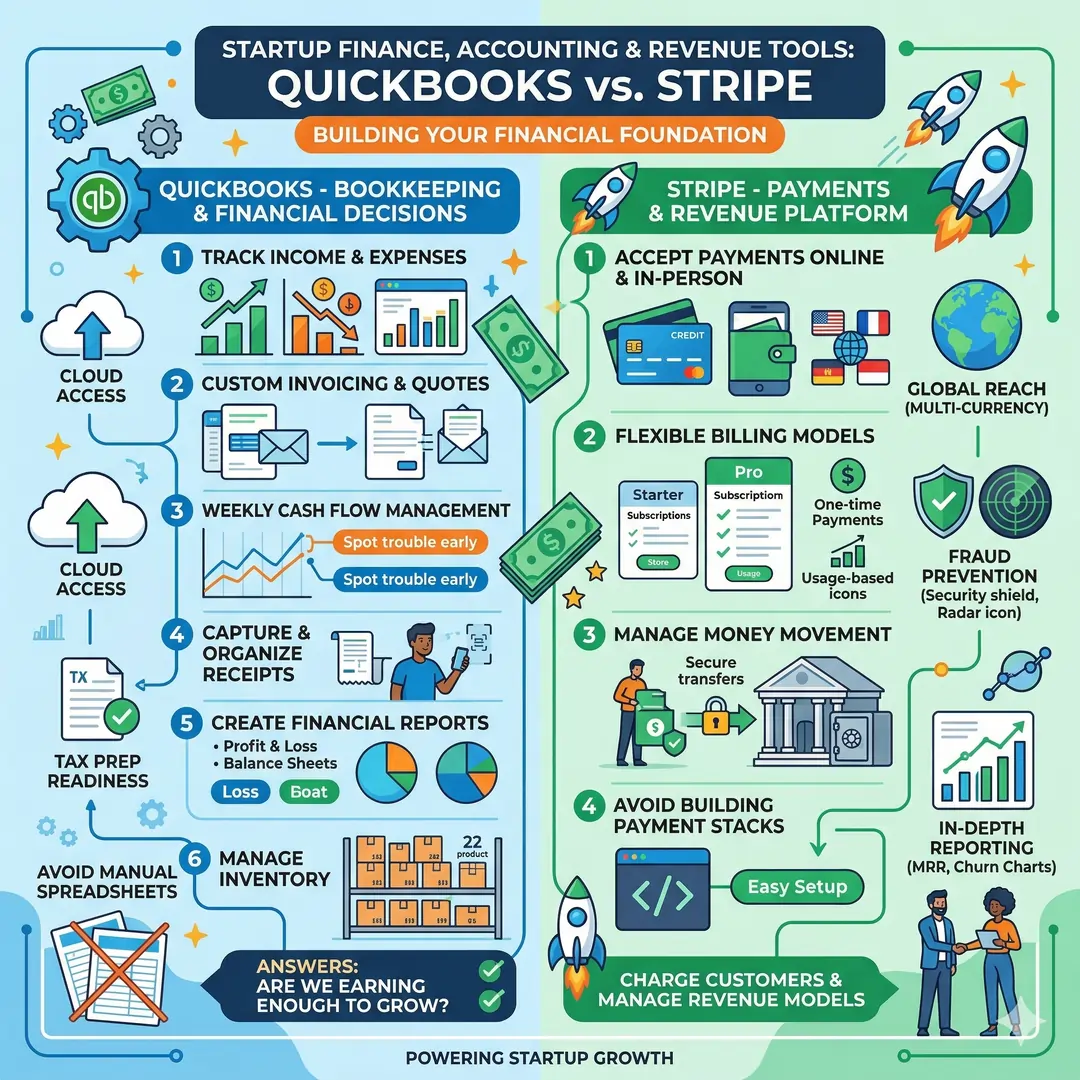
QuickBooks helps startups manage the money side of the business. Its official features pages describe tools for tracking income and expenses, sending custom invoices and quotes, managing cash flow, capturing and organizing receipts, creating financial reports, and even handling inventory. Those are exactly the kinds of tasks that become painful when done manually in spreadsheets for too long.
A founder who tracks cash flow weekly can spot trouble much earlier than one who checks the bank balance once in a while. That makes QuickBooks useful not only for bookkeeping, but for decision-making. It helps answer the question every startup must ask: Are we actually earning enough to keep growing?
Stripe
When a startup is ready to charge customers, Stripe is one of the most important tools in the stack. Stripe describes itself as a financial services platform that helps businesses accept payments, build flexible billing models, and manage money movement. Its payment pages say it supports online and in-person payments for businesses ranging from startups to large enterprises.
Stripe is especially useful for digital products, SaaS businesses, marketplaces, and service companies that need recurring billing or custom revenue models. A startup can use it to charge subscriptions, one-time payments, or usage-based pricing without building a payments stack from scratch.
5. Documents, file sharing, contracts, and approvals
Dropbox
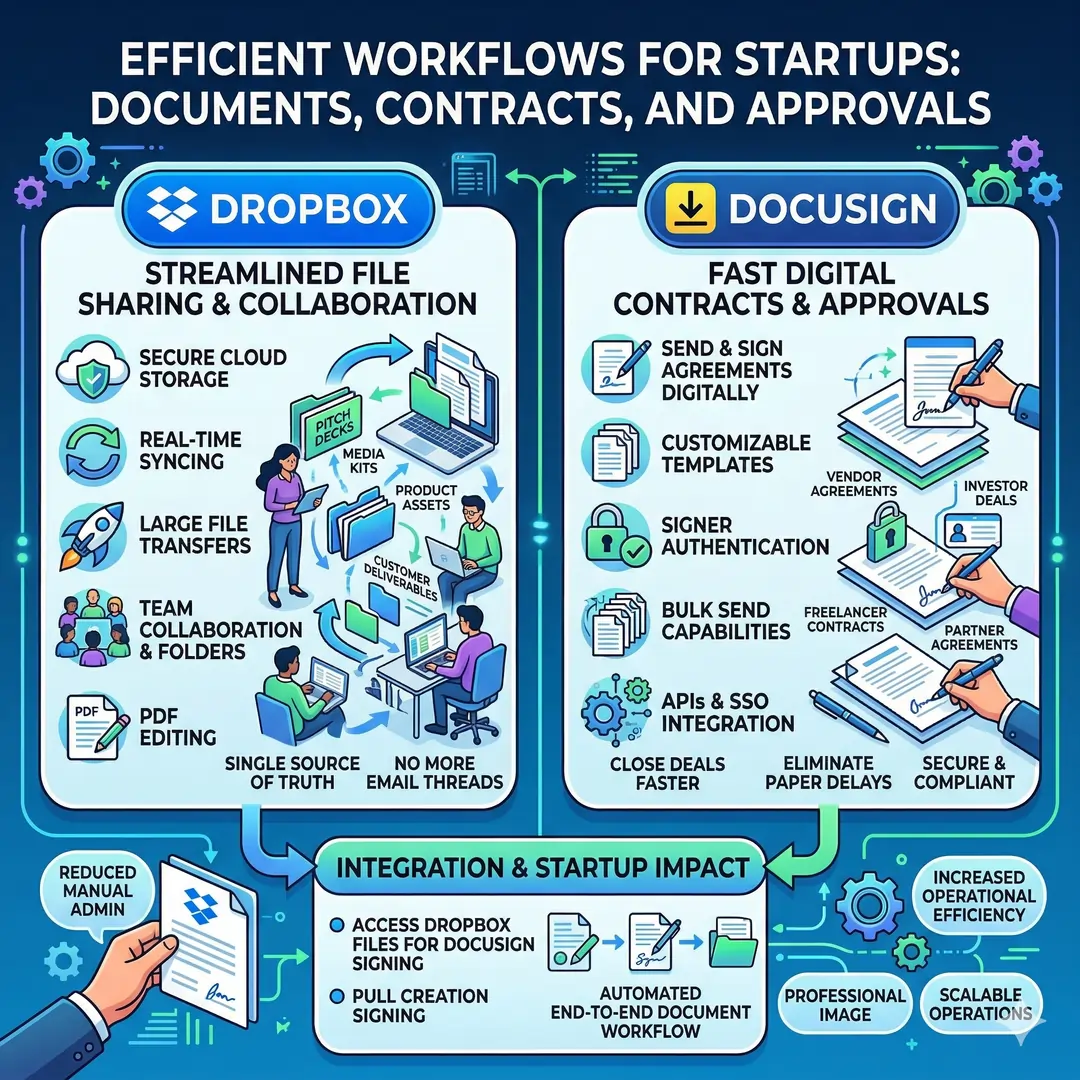
A startup team often lives inside files, decks, images, PDFs, and videos. Dropbox is built for secure sharing, cloud storage, collaboration, large file transfer, PDF editing, and file protection. Its product pages highlight real-time syncing, links for sharing, team folders, password protection, and the ability to transfer large files.
This makes Dropbox especially handy when a startup sends media kits, pitch decks, product assets, or customer deliverables. A designer, salesperson, and founder can all work from the same source of truth instead of sending the same file around in email threads.
DocuSign
Contracts are a normal part of startup life. Vendors, customers, freelancers, investors, and partners all need signatures sooner or later. DocuSign helps teams send, sign, and manage documents digitally. Its feature pages mention templates, bulk send, signer authentication, APIs, SSO, and embedded signing.
That is useful because paper signatures slow everything down. If a startup can send an agreement, collect a signature, and store the signed copy in one workflow, it can close deals faster and reduce manual admin work.
6. Security and access management
1Password
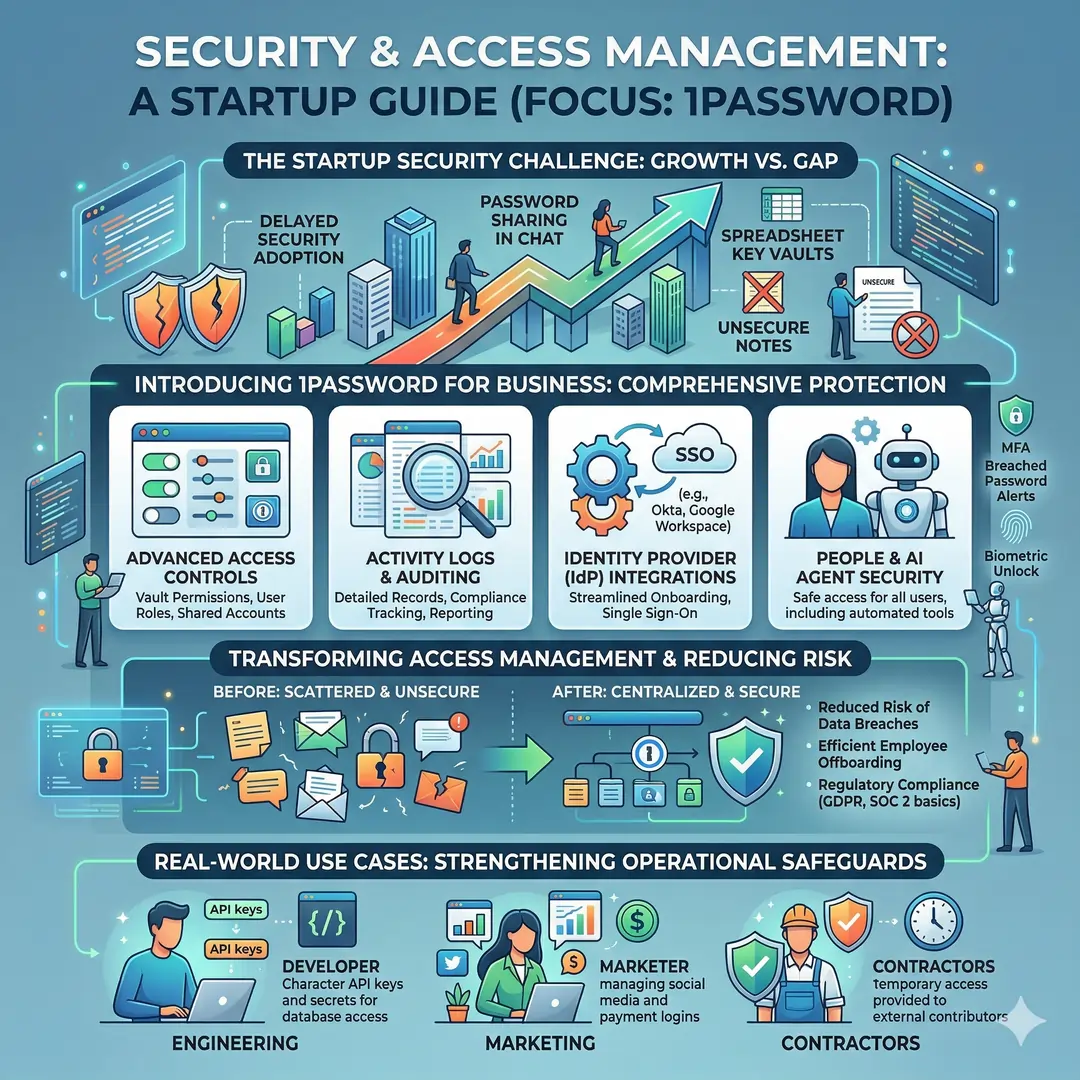
Many startups do not think seriously about security until they have already grown. 1Password is built to protect passwords, secrets, and app access, with advanced access controls for teams. Its business pages mention vault permissions, activity logs, identity provider integrations, and ways to secure access for people and AI agents.
This becomes important as soon as multiple people need access to shared accounts. Instead of sending passwords in chat or keeping them in notes, the team can manage access cleanly and reduce risk. For a startup that stores customer data, payment logins, or marketing accounts, that is a major operational safeguard.
Best startup tool stack by business stage
| Startup stage | Core needs | Recommended tools | Why this stack works |
|---|---|---|---|
| Pre-launch | Email, docs, planning, brand assets | Google Workspace, Notion, Canva | Gives a solo founder or tiny team a simple base for communication, planning, and presentation assets. |
| Early traction | Sales tracking, scheduling, task management | HubSpot CRM, Calendly, Trello or Asana | Helps capture leads, book meetings faster, and keep execution organized. |
| Growth stage | Collaboration, finance, marketing, contracts | Slack, QuickBooks, Mailchimp, DocuSign, Dropbox | Supports team coordination, cash flow visibility, marketing automation, signed agreements, and reliable file sharing. |
| Scale-up | Security, integration, process control | Microsoft 365 or Google Workspace, 1Password, Stripe, Asana | Adds stronger process control, payment infrastructure, and access management as complexity grows. |
How to choose the right tools without wasting money
The smartest startup tool strategy is not to buy the most famous software. It is to choose tools that solve a real pain point. A great starting question is simple. Which part of the business is slowing us down most right now? It might be communication, lead management, scheduling, finance, or file chaos. Pick the tool that removes that bottleneck first. The official product pages for these tools all emphasize different strengths, which is a reminder that each one serves a different job. (Slack)
It also helps to think about integration. A startup works better when tools talk to each other. For example, Calendly can connect to video tools and calendars, Slack can connect to apps and workflows, Asana can automate tasks, Mailchimp can power marketing journeys, and Stripe can support a range of payment models. Integration reduces duplicate work and keeps the stack from becoming a patchwork of disconnected apps.
Another good rule is to avoid choosing tools that are too heavy for the team’s current size. A tiny startup does not need a complicated enterprise system for every function. A lightweight stack is usually better because it is easier to learn, easier to maintain, and easier to actually use every day. That is part of why tools like Trello, Notion, and Google Workspace are so popular with early-stage teams. They lower the friction rather than adding it.
Common mistakes startups make with business tools
One common mistake is tool overload. Founders sometimes sign up for too many apps at once and end up with overlapping features, scattered information, and monthly bills that do not match the company’s stage. A startup can easily end up with two chat tools, two project tools, and multiple places where the same customer data lives. The result is confusion instead of clarity. A cleaner approach is to let one tool own each major job.
Another mistake is delaying finance and security tools. Many startups focus on growth and ignore accounting, access control, and document signing until problems start appearing. Tools like QuickBooks, 1Password, and DocuSign are useful early because they prevent messy cleanup later. By the time a company is moving fast, structure matters even more.
A third mistake is choosing tools that no one uses. A startup tool should feel helpful, not heavy. If a platform is too hard to learn, people will quietly work around it. That is why simple adoption matters. Slack for conversation, Asana or Trello for tasks, Notion for knowledge, and Canva for design can be excellent because they are practical and broadly understandable.
A practical starter stack for most startups
If a new startup wanted a simple, balanced stack, this would be a strong starting point:
Google Workspace for email, documents, storage, calendars, and meetings. Slack for internal communication. Asana or Trello for task management. HubSpot CRM for leads and sales follow-up. Canva for marketing visuals. Stripe for payments. QuickBooks for accounting. DocuSign for contracts. Dropbox for file sharing. 1Password for security. That combination covers most of the daily work a startup needs to do without becoming too complicated too soon.
For many startups, this stack is enough to go from idea to first customers, and from first customers to a real operating business. The key is not to collect software. The key is to build a workflow where every tool has a clear job, and every person knows where work belongs.
Conclusion
The best startup tools do not just make work easier. They create structure, speed, and confidence. Google Workspace and Microsoft 365 keep communication and documents organized. Slack keeps the team connected. Asana, Trello, and Notion bring order to projects and knowledge. HubSpot CRM, Calendly, Mailchimp, and Canva help with sales and growth. QuickBooks, Stripe, DocuSign, Dropbox, and 1Password support the financial, legal, operational, and security side of the business. Together, these tools form a practical foundation for startups that want to move fast without falling into chaos.
If a startup chooses tools with care, it saves time, reduces mistakes, and gives the team more room to focus on customers and growth. That is the real advantage of a smart tool stack.
Article References And Citations
- Google Workspace: https://workspace.google.com/intl/en_in/
- Microsoft 365: https://www.microsoft.com/en-us/microsoft-365/microsoft-365-business
- Slack Features: https://slack.com/intl/en-in/features
- Asana: https://asana.com/
- Trello: https://trello.com/tour
- Notion: https://www.notion.com/
- HubSpot CRM: https://www.hubspot.com/products/crm
- Calendly: https://calendly.com/
- Canva: https://www.canva.com/en_in/canva-business/
- Mailchimp: https://mailchimp.com/features/
- QuickBooks: https://quickbooks.intuit.com/global/accounting-software/
- Stripe: https://stripe.com/payments
- DocuSign: https://www.docusign.com/en-in/products/electronic-signature
- Dropbox: https://www.dropbox.com/features
- 1Password: https://1password.com/
Frequently Asked Questions (FAQs)
FAQ 1: What are the most important business tools a startup should use first?
The first tools a startup should choose are the ones that solve daily work problems quickly. In most cases, that means a communication tool, a document and storage suite, a project management tool, and a basic CRM. These four categories help a new business stay organized, reply faster, track work properly, and keep customer information in one place.
A startup does not need a huge software stack on day one. It needs a simple system that helps the team work without confusion. For example, a founder can use email and shared documents for internal coordination, a task board to track deadlines, and a CRM to follow up with leads. This creates structure early and prevents small problems from turning into bigger ones later.
FAQ 2: Why do startups need a project management tool so early?
A project management tool helps a startup turn ideas into action. When a business is small, people often remember tasks in their heads or write them in random notes. That works for a short time, but it becomes messy very fast. A proper tool gives every task a clear owner, deadline, and status, which makes progress easier to follow.
It also helps different team members stay aligned. A startup often moves between product work, marketing, sales, and support all at once. A good task management system keeps all of that in one place. It reduces missed deadlines, improves accountability, and saves time that would otherwise be lost in repeated follow-up messages.
FAQ 3: How does a CRM help a startup grow faster?
A CRM, or customer relationship management tool, helps a startup track leads, customers, deals, and follow-ups. Without a CRM, it is easy to lose track of who was contacted, what was discussed, and what needs to happen next. That can cost a startup real opportunities, especially when the team is small and every lead matters.
A CRM also helps founders understand their sales process better. They can see which leads are active, which deals are close to closing, and where people usually drop off. This makes the sales process more organized and more predictable. Over time, that kind of clarity helps a startup grow with less chaos and fewer missed chances.
FAQ 4: Is it better for a startup to use one all-in-one tool or separate tools for each function?
That depends on the stage of the startup, but many early businesses do best with a small set of focused tools rather than one giant system. A good all-in-one workspace can be helpful because it combines documents, messaging, meetings, and storage. At the same time, some jobs are handled better by specialist tools such as a CRM, accounting software, or a design platform.
The best choice is usually a balanced one. A startup can use one core workspace for communication and files, then add separate tools for sales, finance, design, and contracts. This keeps the setup simple while still giving the team the features they actually need. The goal is not to own the most software. The goal is to remove friction and keep the business moving.
FAQ 5: Why is team communication such a big deal for startups?
Team communication is one of the most important parts of startup success because small teams have limited time and resources. If messages are scattered across email, chat, notes, and phone calls, it becomes easy to lose track of decisions. A clear communication system keeps everyone on the same page and helps work move faster.
Good communication tools also support remote and hybrid work. Many startups have people working from different places and different time zones. With the right system, team members can share updates, ask questions, and review files without waiting for a long chain of replies. That makes the business more flexible and much easier to manage.
FAQ 6: What role do design tools play in a startup’s growth?
A design tool is useful because almost every startup needs visual content. This includes social media posts, pitch decks, product mockups, flyers, landing page graphics, and email banners. Even if the team does not have a full-time designer, it still needs professional-looking visuals that build trust and support the brand.
A tool like this saves time and helps keep the brand consistent. Instead of starting from scratch every time, a startup can use templates, brand colors, and reusable layouts. That matters because visual quality often shapes how customers see the company. A clean, clear design can make a startup look more reliable, more polished, and more ready for business.
FAQ 7: Why do startups need accounting software if they are still small?
A startup needs accounting software early because money moves quickly and mistakes can happen easily. At first, some founders try to manage expenses and invoices in spreadsheets, but that becomes hard to maintain as the business grows. Accounting software helps track income, expenses, bills, invoices, and cash flow in one place.
It also helps a startup make better decisions. When founders can clearly see where money is coming from and where it is going, they can plan more wisely. They can spot problems sooner, prepare for slow months, and avoid surprise financial stress. Good accounting habits early on often save a lot of trouble later.
FAQ 8: How do payment tools support a startup’s success?
A payment tool is essential because a business cannot grow without collecting money in a smooth and reliable way. A good payment platform helps a startup accept online payments, recurring payments, or one-time charges without building the system from scratch. This is important for product businesses, service businesses, and subscription models alike.
Payment tools also improve the customer experience. When paying is quick and simple, people are more likely to complete a purchase. A startup that makes checkout or billing confusing may lose customers even if the product is strong. That is why a reliable payment system is not just a technical tool. It is a direct part of the sales process.
FAQ 9: Why should startups care about security tools from the beginning?
Security tools matter from the beginning because startups often handle sensitive information right away. This may include passwords, customer data, internal documents, payment details, or partner contracts. If access is not managed properly, the business can face unnecessary risk. A password manager and secure file handling system help protect that information.
Security is also about control. As a startup grows, more people need access to more systems. Without proper access management, it becomes hard to know who can open what. A good security setup keeps things organized, reduces mistakes, and makes the team safer without slowing it down.
FAQ 10: How should a startup choose the right tools without overspending?
A startup should choose tools based on the actual problems it needs to solve, not on hype or popularity. The best way to begin is to identify the biggest bottleneck. It may be communication, lead tracking, scheduling, file sharing, or money management. Once that is clear, the business can choose one tool that solves that problem well.
It is also smart to start small and scale later. Many tools offer free or low-cost plans that are enough for early use. As the startup grows, the team can upgrade only when the extra features are truly needed. This keeps spending under control and prevents software clutter. A lean tool stack is often the best tool stack for a young company.
